15
TROUBLESHOOTING TIPS
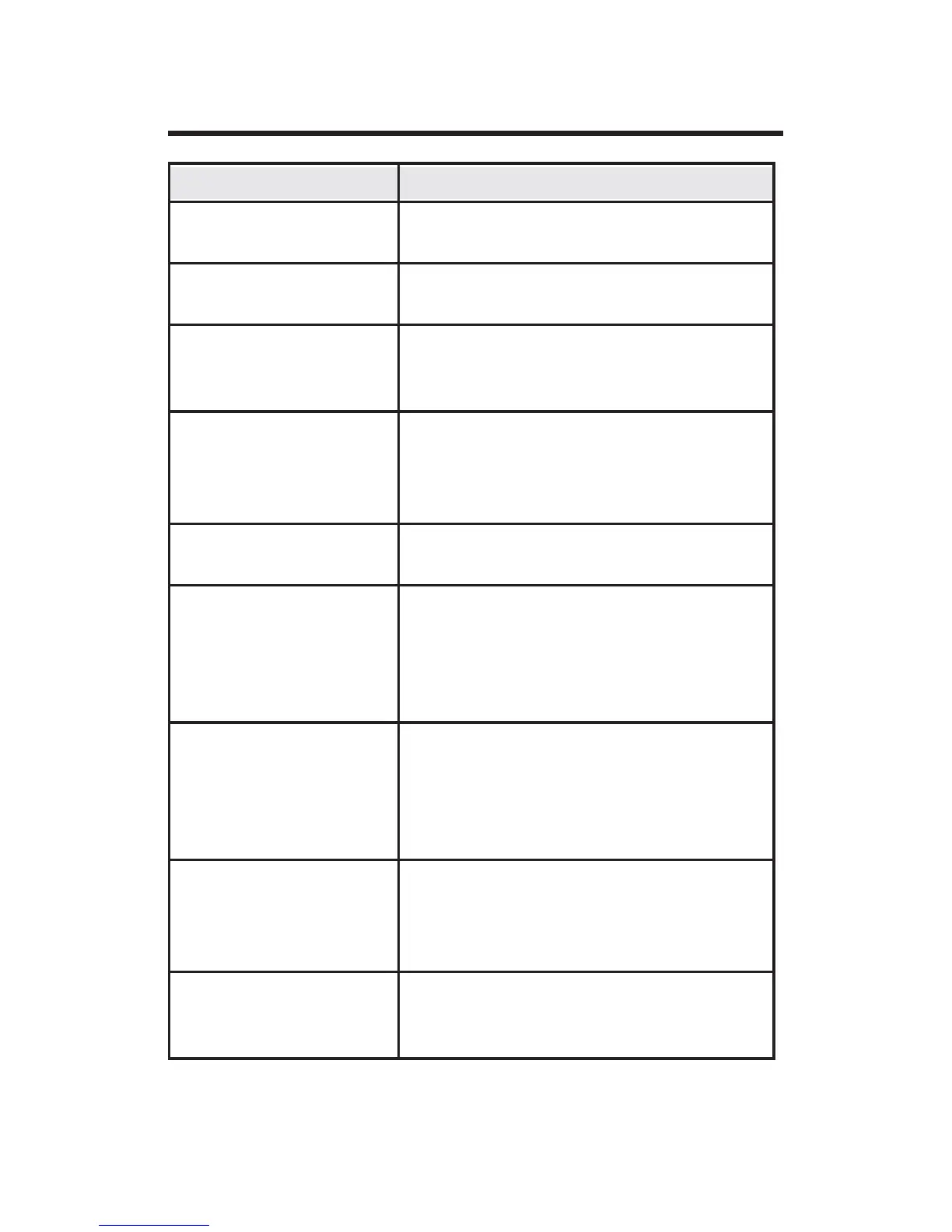
Problem Solution
No Display Check for 24 VAC; display is blank
when 24 VAC is not present
System fan does not
come on properly
Verify that wiring is correct.
All thermostat but-
tons are inoperative
Verify that 24 VAC is present; unit
will not operate when 24 VAC is not
present.
Thermostat turns on
and off too fre-
quently
Adjust temperature differential
VHH&RQ¿JXUDWLRQ0RGH6HWWLQJ
Temperature Differential, Stage 1 and
Stage 2 section).
Fan runs continu-
ously
Check Fan Auto/On switch. If set to
ON position, fan will run.
Room temperature
is not correct
Verify that wall hole is plugged with
SXWW\RULQVXODWLRQWRSUHYHQWDLUÀRZ
from the wall cavity. Adjust Tempera-
WXUH2IIVHWVHH&RQ¿JXUDWLRQ0RGH
- Room temperature offset section).
Compressor doesn’t
run or turn off im-
mediately when
changing function
or setting
There is a 3 minute time delay and
a 3 minute minimum run time for the
compressor when it turns on/off.
Fan doesn’t run or
turn off immedi-
ately when changing
function or setting
This is normal. On some models, the
fan may have a minimum run time/off
time delay.
Problem not listed
above
Press the Reset button once to reset
the thermostat and restore all factory
settings.


 To Next Page