EasyManua.ls Logo

Geemarc CL400 - Wall Mounting Instructions

Geemarc CL400
47 pages
Print Icon
To Next Page IconTo Next Page
To Previous Page IconTo Previous Page
Loading...
INSTALLATION
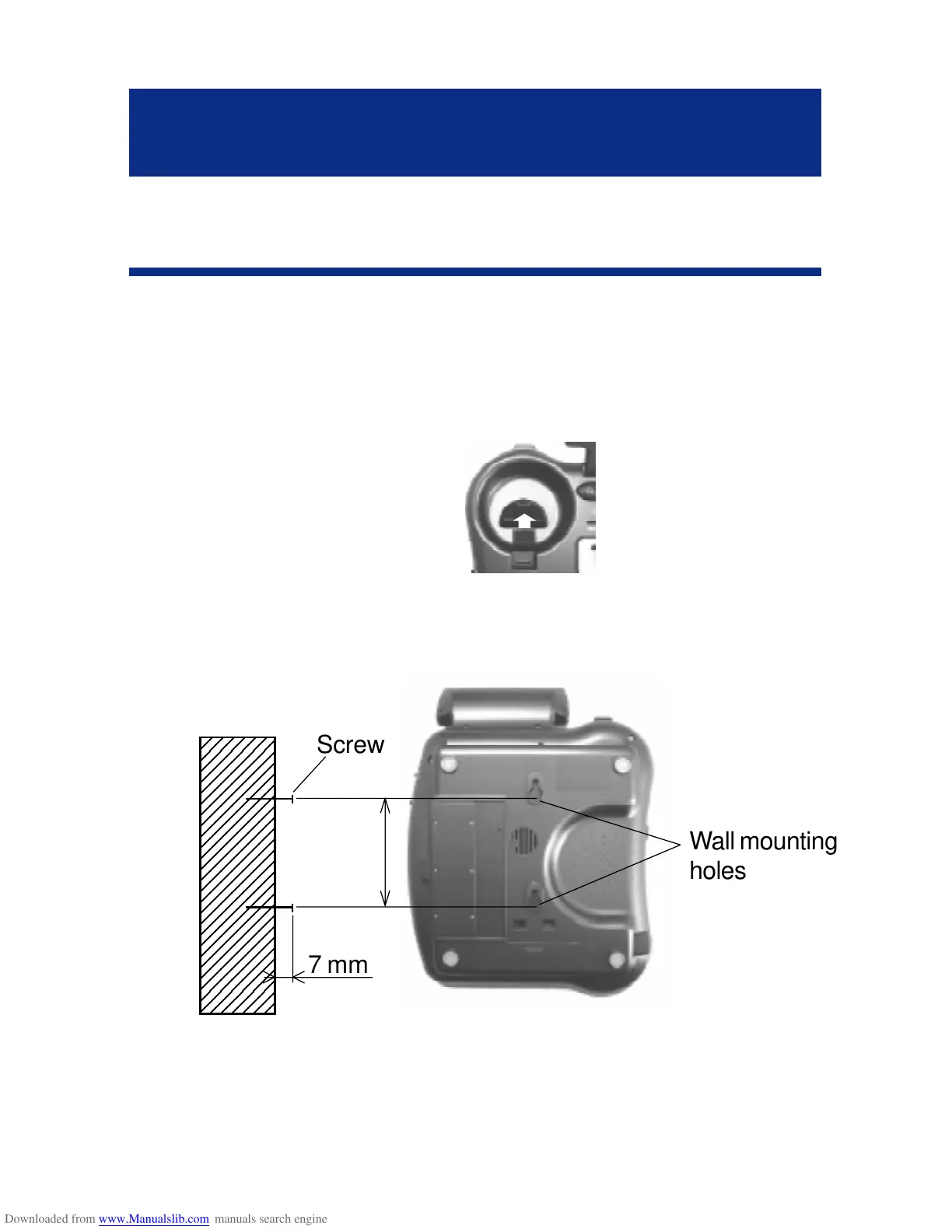
2 - WALL MOUNTING
To wall-mount your telephone,slide out the clip, turn
around and slide back into the wall mounting
position.This will ensure that the handset stays
firmly in position.
Make 2 holes in the wall 80mm apart (use the wall
mount template), insert the wall plugs and the wall
mounting screws.
The screws should protrude from the wall by 6-7
mm. Place the phone onto the screw-heads and
slide down to secure.
INSTALLATION
11
80 mm

12345678
1
234567
8
1
234567
8
1
234567
8
1
234567
8
1
234567
8
1
234567
8
1
234567
8
1
234567
8
1
234567
8
1
234567
8
1
234567
8
1
234567
8
1
234567
8
1
234567
8
1
234567
8
1
234567
8
1
234567
8
1
234567
8
1
234567
8
1
234567
8
1
234567
8
1
234567
8
1
234567
8
1
234567
8
1
234567
8
12345678
Wall mounting
holes
7 mm
Screw

Related product manuals