Chapter 3 - Setup 31
© 2017 Geist
GM1157
Flip the display 180 degrees. Both buttons must be pressed at the
same time.
Enable VLC* mode by pressing the center button three times within 2
seconds. Pressing the button while VLC mode is active will return the
unit to the standard Current display.
*See VLC section of manual for more information on this feature.
NOTE
Display Button functionality may vary based on unit configuration.
Monitored
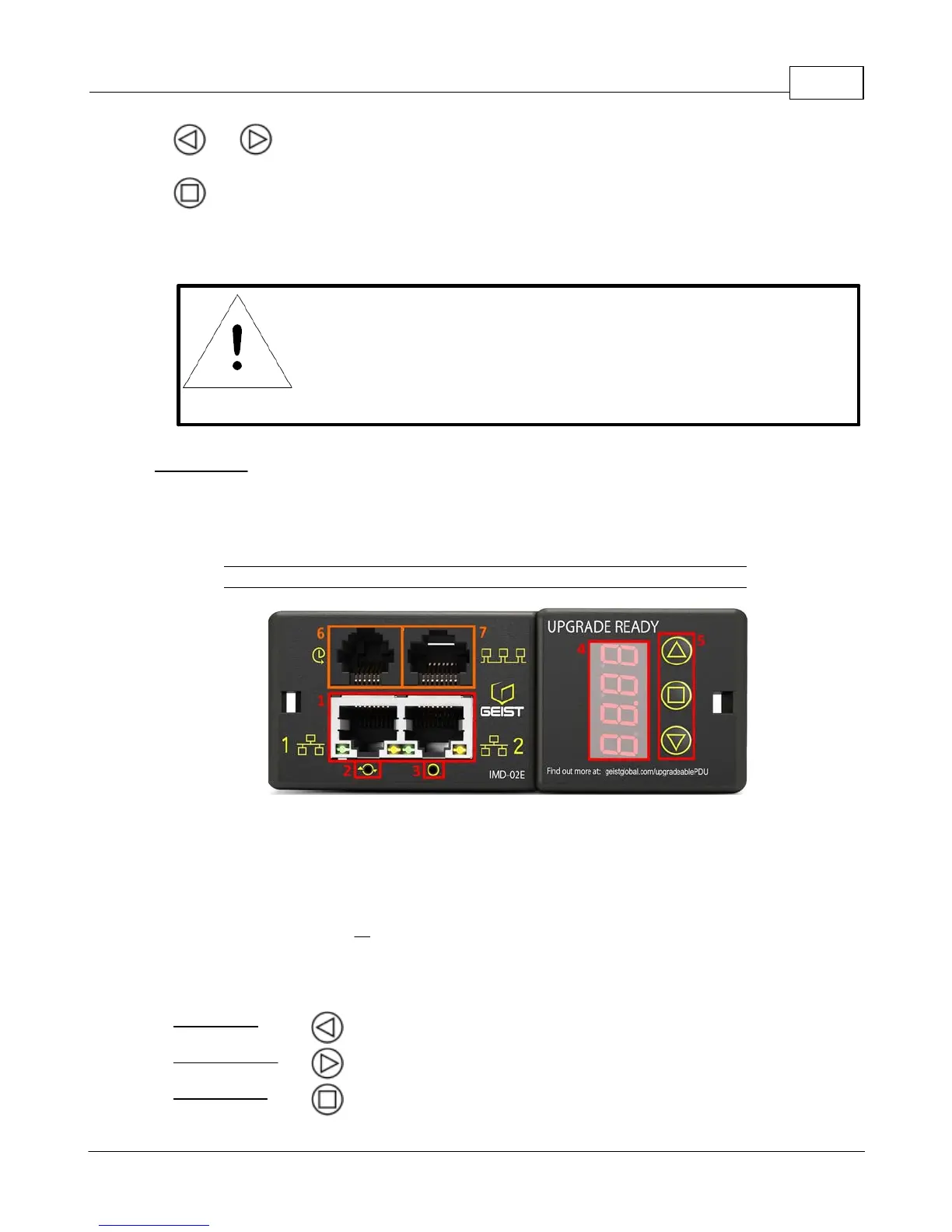
The Monitored Geist Upgradable PDU is an advanced option for data centers that need full remote
monitoring and alarms. It is built with the IMD-02E module, which provides dual Ethernet ports and a
local display. Highlighted in Red below:
Figure 3-2 IMD-02E Module
1. Dual Ethernet Ports: The Dual Ethernet ports act as a 2-port Ethernet switch, allowing for multiple
devices to be daisy-chained.
2. Hard-Reboot Button: Pressing the hard-reboot button reboots the IMD. This acts as a power-cycle
for the IMD, and does not change or remove any user information.
3. Network-Reset Button: Holding the network-reset button for 15 seconds during normal operation
will restore the default IP address and reset the user accounts. Holding the network-reset button
during power-up will reset all of the unit's settings back to factory-default values.
4. Local Display: The local display will display the phase, line, and circuit current values (in Amperes).
5. Display Buttons: There are three buttons near the IMD display; a back button, a forward button, and
a center button. The functions of these buttons are as follows:
Decrement to the previous channel.
Increment to the next channel.
Toggle between scrolling and static display modes. Holding this button
for 10 seconds will perform a network reset, restoring the default IP



 To Next Page