Upgradeable PDU Instruction Manual54
© 2017 Geist
GM1157
To add a new Alarm or Warning Event:
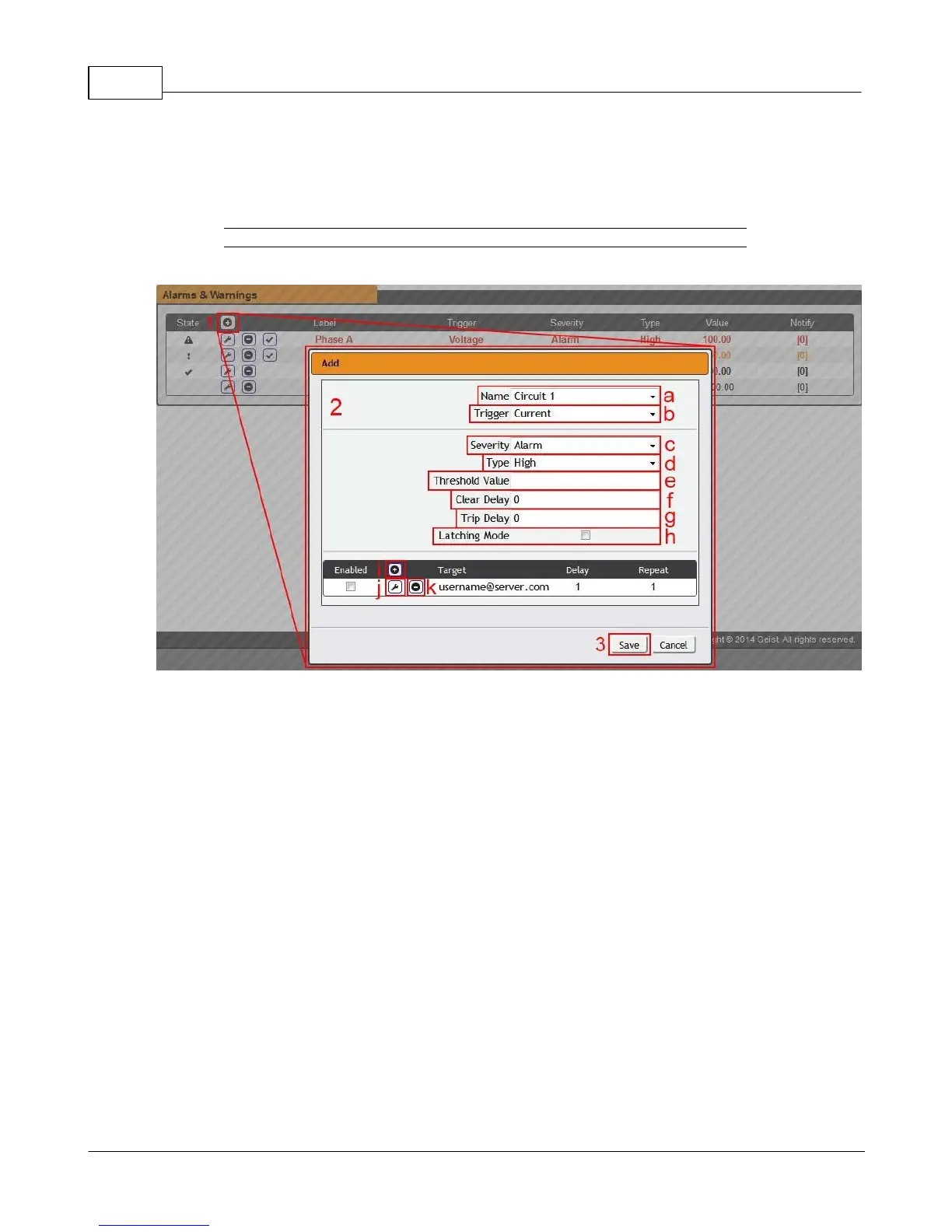
1. Click the Add/Modify Alarms & Warnings button:
Figure 3-20 Adding Alarms and Warnings
2. Set the desired conditions for this Event as follows:
a. Select the Name of the phase or circuit you wish to set an Event on.
b. Select the measurement (current, voltage, etc.) you want to Trigger the Event.
c. Set the Severity level ("Warning", or "Alarm") for this Event.
d. Select the threshold Type, "high" (trips if the measurement goes above the threshold) or
"low" (trips if the measurement goes below the threshold).
e. Type in the desired Threshold Value (any number between -999.0 ~ 999.0 is valid).
f. Type in the desired Clear Delay time in seconds. Any value other than "0" means once this
Event is tripped, the measurement must return to normal for this many seconds before the Event
will clear and reset. Clear Delay can be up to 14400 seconds (4 hours).
g. Type in the desired Trip Delay time in seconds. Any value other than "0" means that the
measurement must exceed the threshold for this many seconds before the Event will be tripped.
Trip Delay can be up to 14400 seconds (4 hours).
h. Latching Mode: If enabled, this Event and its associated Actions (see below) remain active until
the Event is acknowledged, even if the measurement subsequently returns to normal.



 To Next Page