Chapter 3 - Setup 49
© 2017 Geist
GM1157
Web Interface
The unit is accessible via a standard, unencrypted HTTP connection as well as an encrypted HTTPS
(SSL) connection. The following web pages are available:
Sensors Page
Overview
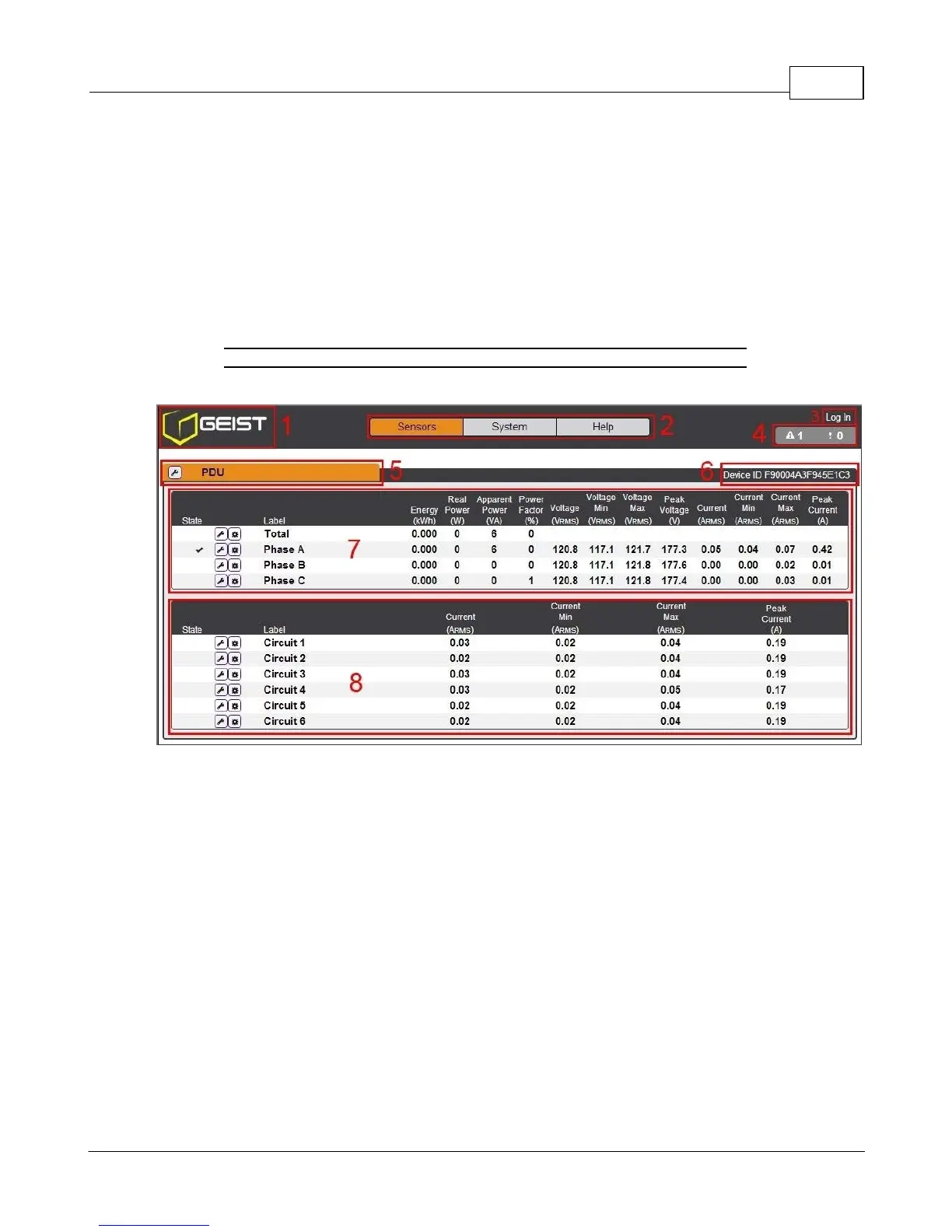
The front page, Sensors Overview, gives both current and historical views of the unit’s data. Real-time
readings are provided for all PDU data and individual circuits' data.
Figure 3-14 Sensors Page
1. Geist Logo
· Clicking on this logo from any page will reload the Sensors Overview page.
2. Sensors, System, and Help Tab
· Mouse over to show sub-menus:
· Sensors: available options are "Overview" (this page) and "Alarms & Warnings" (see next
section)
· System: available options are "Users", "Network", "Email", "SNMP", "Syslog", "Admin",
"Locale", "Restore Defaults", and "Firmware Update." Refer to the appropriate section
under "System".
· Help: available options are "Info" and "Support Site" Refer to the appropriate section under
"Help".
3. Log In / Log Out
· Click to log in or log out of the unit. Note that both username and password are case sensitive
and no spaces are allow. Prohibited characters for username only are: $&`:<>[ ] { }"+%@/ ; =?\^|
~',
4. Alarms and Warnings



 To Next Page