1111
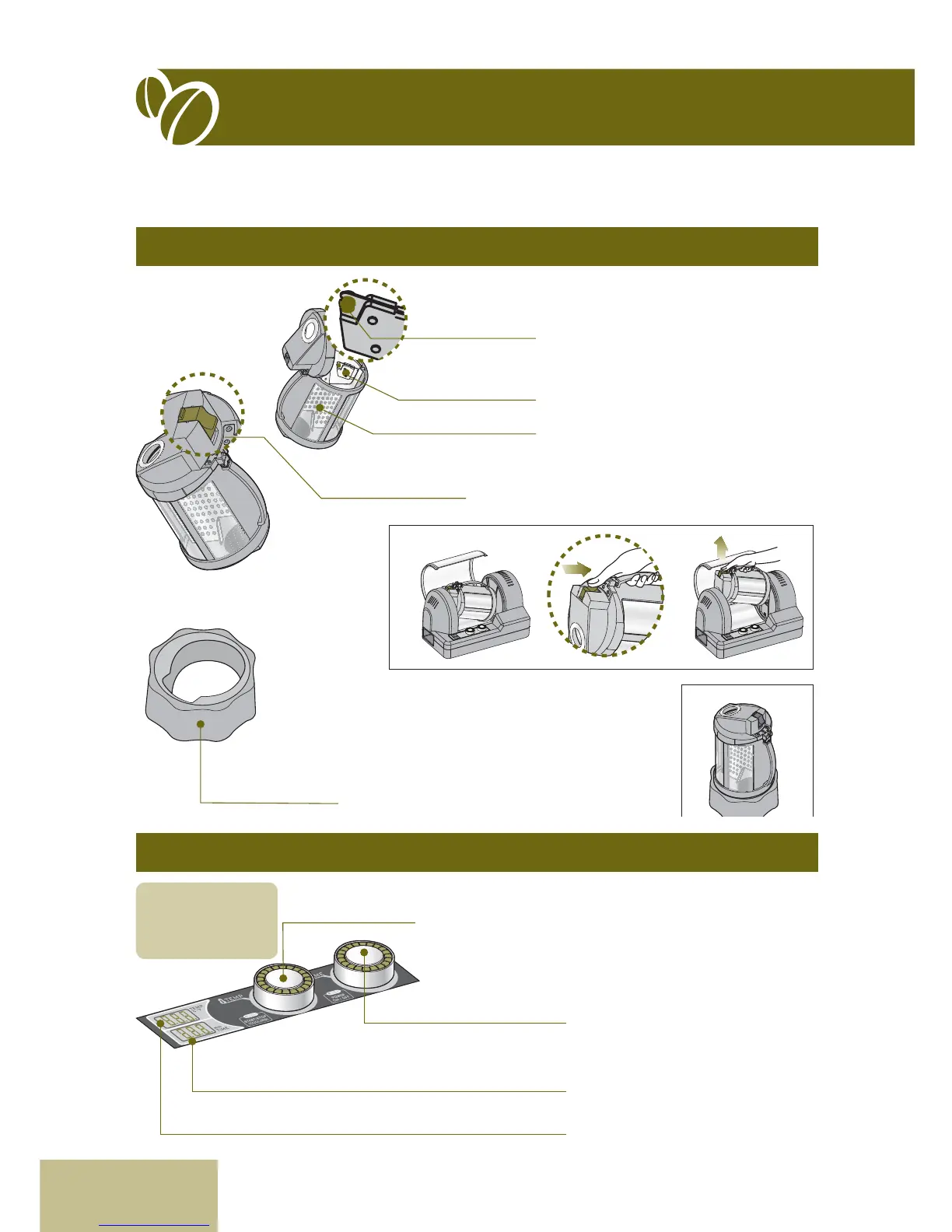
7. Parts Name & Functions
Chamber
Control Panel
Removing cha from the beans.
Reduce the shock of blade.
Dividing the chamber improves mixing
eciency for even roasting.
To detach the chamber from the roaster, push
the button to release the locking.
Supports the chamber in an upright position on
your counter to make lling and cleaning easier.
(1) Turn left the dial to decrease the roasting temperature; turn
right the dial to increase increases the temperature.
(2) Press down the dial manually to transfer to cooling cycle.
(3) Keep press down the dial for 3~5seconds for Emergency
stop..
(1) Tu rn lef t t he dial to decrease
decreases the roasting time, turn
right to increases roasting time.
(2) Press down the dial for power on or
o.
Displays the roasting/cooling time
Displays the roasting/cooling
temperature
Blade
Blade Rubber
Separator
Release Button
Temperature
(Start/Stop)
Timer (Power On/O)
Time Display
Temperature Display
Chamber Stand
For details about
operations, refer
to pages 14-15 in
this manual.


 To Next Page