1515
8. Operation
Cooling Start/Stop
4
1. Once the roasting time has elapsed, the Gene Café will automatically begin the cooling cycle.
The cooling cycle ends, and the roaster emits an audible signal when the roasting chamber
safely reaches 140º F/60º C.
2. Manual Roasting Stop: To stop the roasting process and begin cooling
the beans, regardless of remaining roasting time.
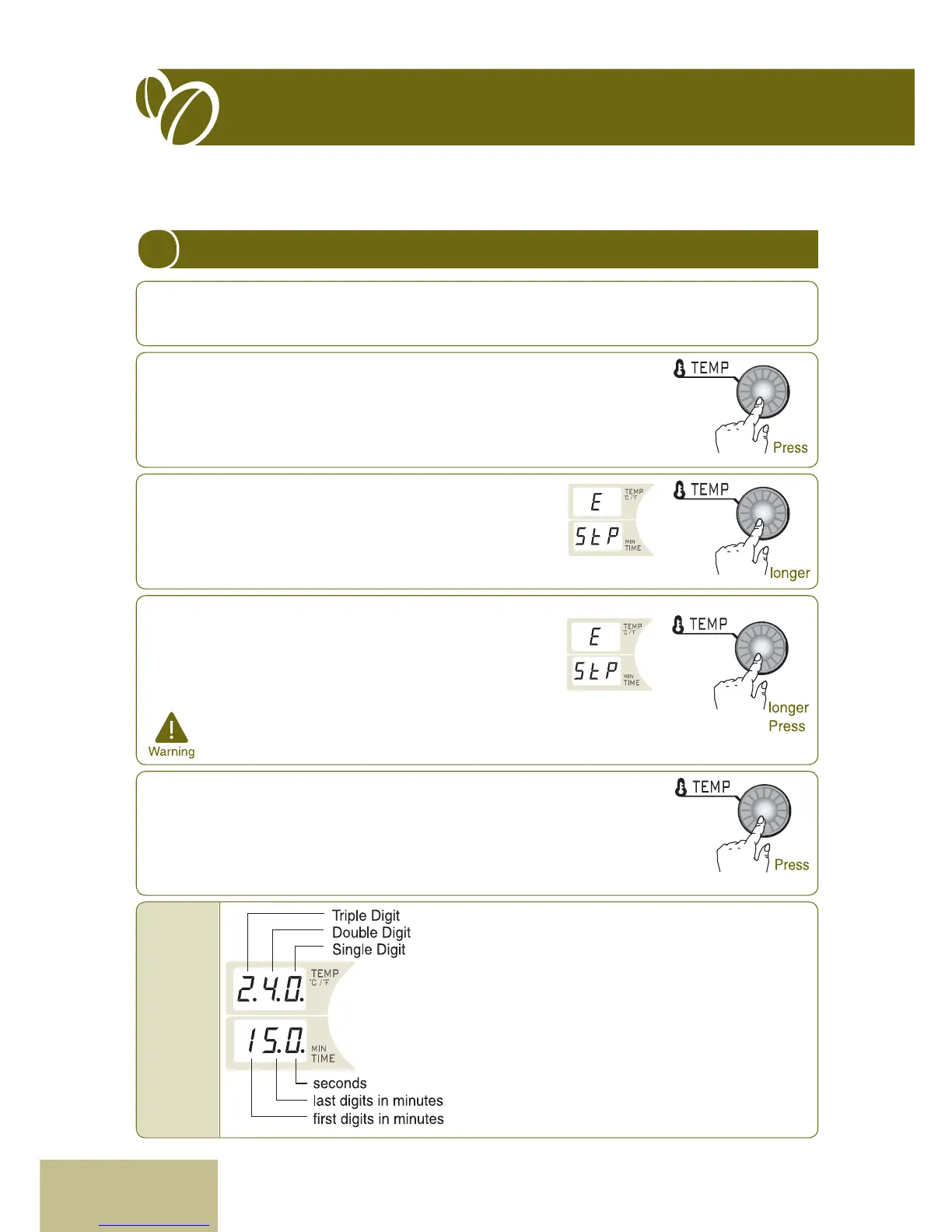
- Press TEMP (START/STOP) dial while the Gene Café is in the
roasting cycle.
- Gene Café will immediately start cooling the beans. The cooling cycle
will end when the roasting chamber safely reaches 140º F/60ºC.
3. Manual Cooling Stop: To interrupt the cooling cycle.
- Press TEMP (START/STOP) during cooling cycle.
- Gene Café will continue to cool the beans but will do so
only until the roasting chamber temperature reaches its
secondary safety level of 212ºF/100ºC. Time display will
display Stp.
4. Immediate/Emergency Stop
- Press TEMP (START/STOP) dial and hold down for at
least 2~5 seconds during the roasting operation.
Temperature display shows "E" and time display reads "Stp".
- Gene Café immediately stops operating. However, a
cooling fan will continue to run until the roasting chamber
reaches a safe temperature.
* Allow at least one hour for system to cool, before
roasting a second batch.
5. Continuous Roasting
- Roasting once Immediate stop Pressing TEMP(STOP) knob
Returning to the default setting(a cooling fan stops)
- After the temperature and timer are set again, it starts operation by
pressing TEMP(START) knob
* The above function is usually designed for restaurant, so it is rarely used
in home.
Temperature display alternately shows the current
roasting temperature for two seconds, and then
displays the set temperature for one second. This
cycle repeats for the duration of the process.
Time display shows the time remaining during the
roasting cycle, and the elapsed time, starting at
zero, for the cooling cycle.
Set the timer at interval of six seconds.
Information
displayed
during
roasting


 To Next Page