3
English
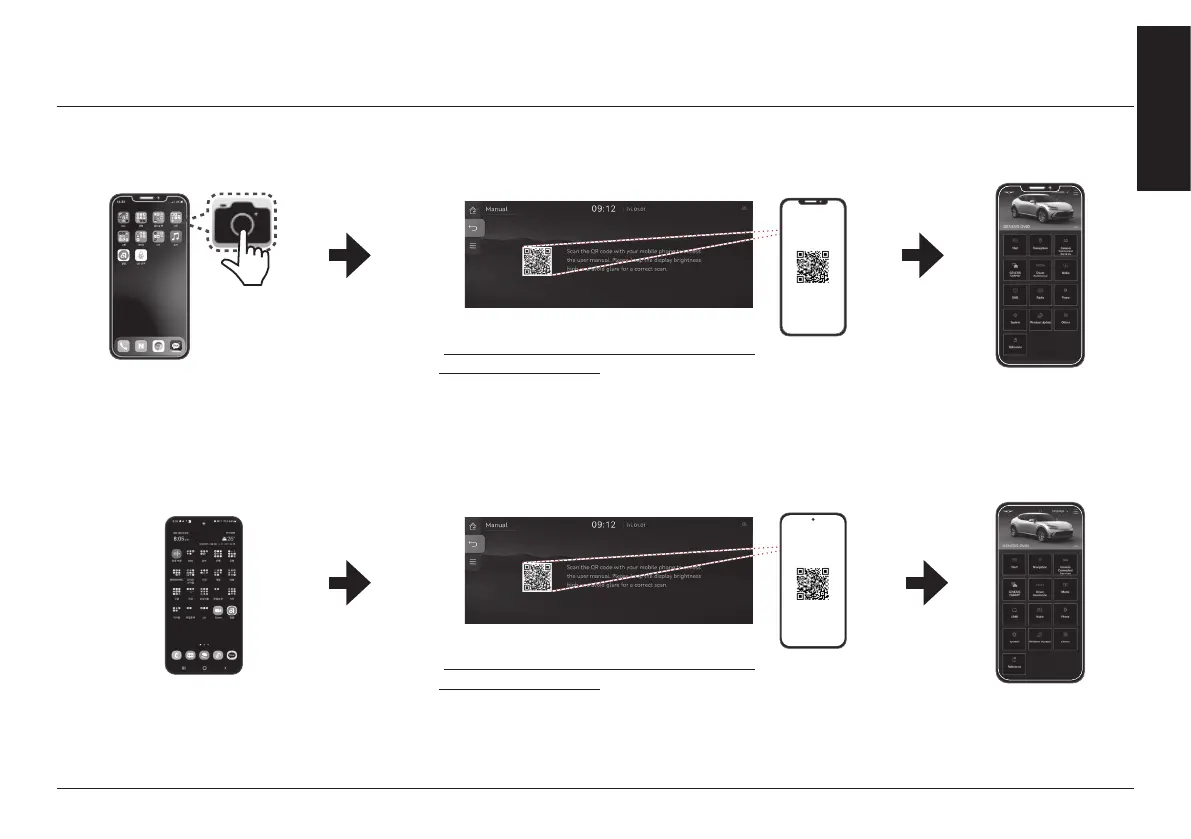
how To scan Qr code
how To scan Qr code
a
Open the camera on your
iPhone and point it at the
code.
b
Scanning QR code :
Press [Manual] > [Online manual (Navigation system)] on the
home screen. Scan the QR code, then tap the notication to
go to the web page.
c
Access the content.
a
Open the Play Store : After searching
QR code reader, install it. Open the QR
code reader on your android and point
it at the code.
b
Scanning QR code :
Press [Manual] > [Online manual (Navigation system)] on the
home screen. Scan the QR code, then tap URL in the code to
go to the web page.
c
Access the content.
K
iOS (iPhone)
K
Android (Galaxy etc.)
You can access directly following URL address.
(
http://webmanual.genesis.com/ccIC/AVNT/JW/
EUR/English/index.html)
You can access directly following URL address.
(
http://webmanual.genesis.com/ccIC/AVNT/JW/
EUR/English/index.html)



 To Next Page