11
English
basic conTrols
using conTroller and Touchpad
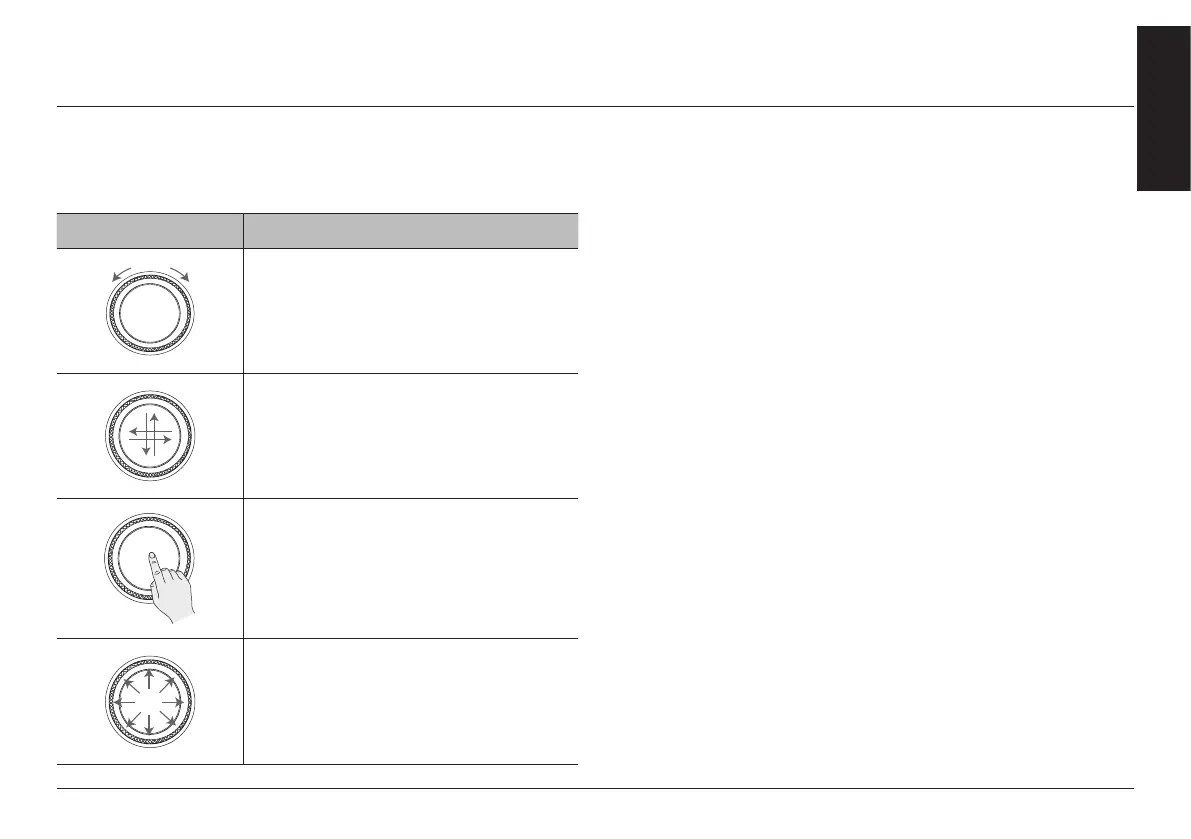
Rotate controller to left/right or use touchpad to switch or select the menu.
Controller Description
Turn the controller clockwise/counterclockwise
to move the list in the menu.
Operate zoom in/zoom out on the map screen.
Swipe up/down/left/right on touchpad to
switch the menu.
Press touchpad to select the menu.
Enter character through handwriting input on a
specic screen.
Push the controller up/down/left/right/
diagonal to move the menu and map location.
Push and hold the controller to scroll the
location on the map.
updaTe
For supplementation of system software, addition of new functions,
and renewal of map, update is needed.
You can update latest map and software by downloading the
Navigation Updater program from internet site (http://update.
genesis.com) and through USB.
For details on update, check from internet site and carry out.
1. On the general settings screen, press [Version information].
2. After inserting the USB with the update le, press [Update].
3. If you press [Background update], update is in progress. After
completion, turn off the engine and the system automatically
reboots.
,
noTe
↟ This product requires regular updates for software corrections, new
functions and map updates. Updating may require up to 1 hour
depending on the data size.
↟ Turning off the power or ejecting the USB during the update process
may result in update failure.



 To Next Page