6
name and funcTion of each componenT
head uniT
The image of this product may be different from the actual product.
name and funcTion of each componenT
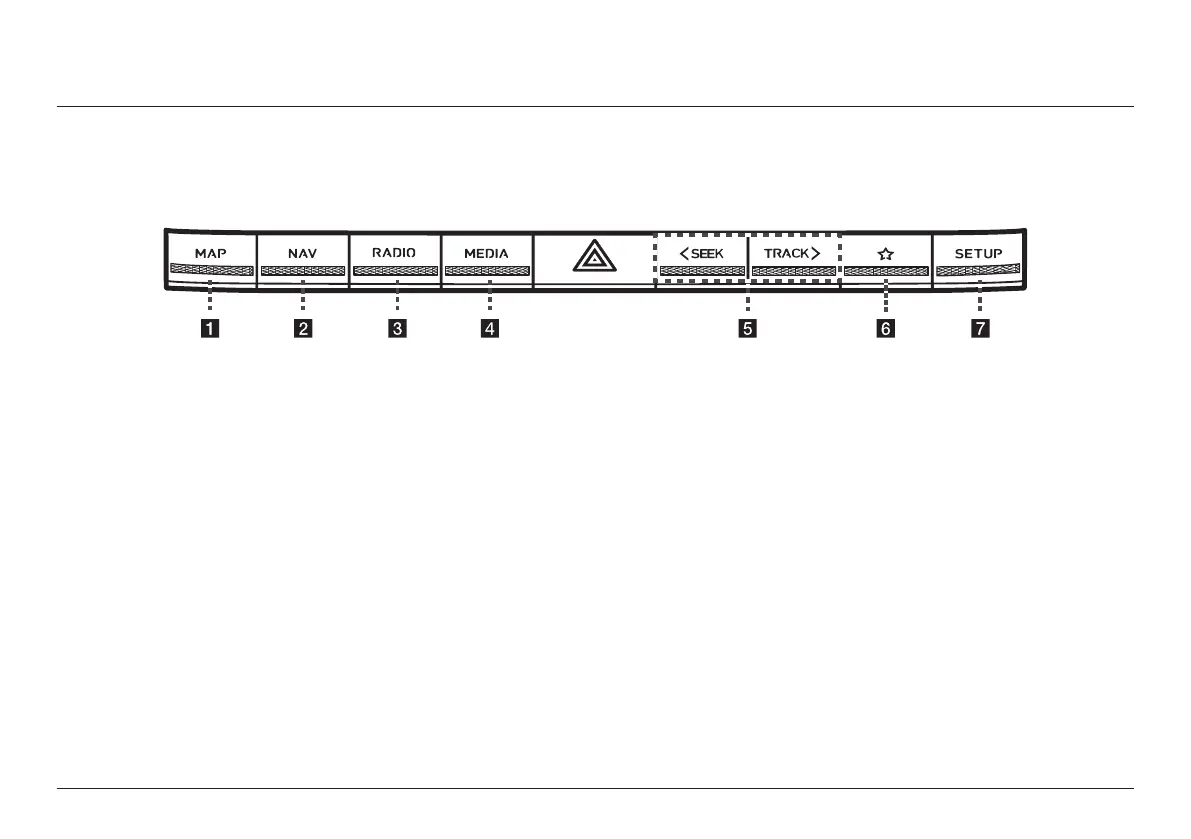
a MAP button
↟ Moves to the map screen showing
the current position of vehicle.
↟ When the destination is set, the
voice navigation starts on the map
screen.
b NAV button
↟ Moves to the navigation menu.
↟ Press and hold to move to the
destination search screen.
c RADIO button
↟ Activates radio mode.
↟ Each button press changes the mode
in sequence of DAB (If equipped)/FM
> AM > DAB (If equipped)/FM.
↟ Press and hold to move to the media
selection screen.
d MEDIA button
↟ Press this button to switch between
the media selection screen and
media play screen.
↟ Press and hold to move to the media
selection screen.
e A SEEK/TRACK D button
↟ When it is pressed shortly
- Radio: Plays the previous or next
channel.
- Media/Voice memo: Plays the previous
or next le.
↟ When it is pressed and held
- Radio: Changes the frequency until
the button is released, then plays the
frequency when released.
- Media/Voice memo: Rewinds or fast-
forwards the le.
f
K
(Custom) button
↟ User may select and use a desired
feature with this button.
↟ Press and hold to move to the
custom button settings screen.
g SETUP button
↟ Moves to the settings screen.
↟ Press and hold to move to the
general settings screen.



 To Next Page