8
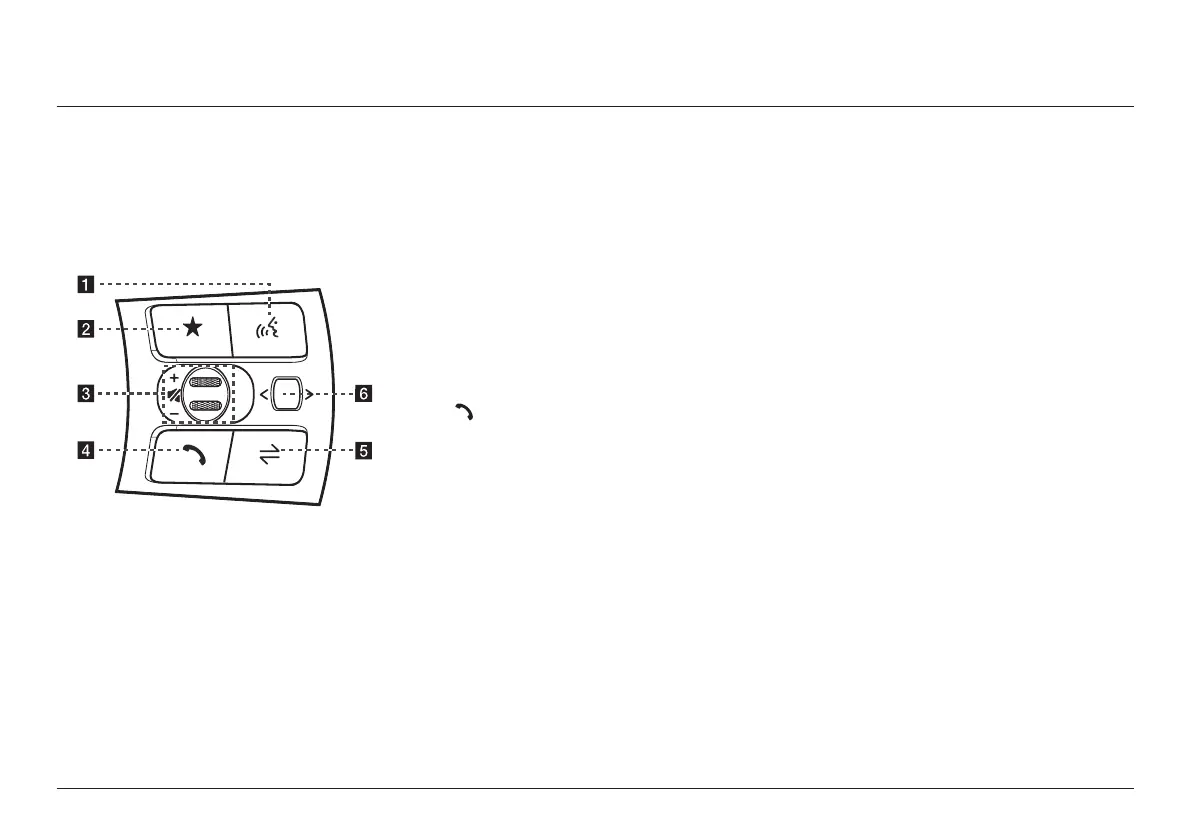
name and funcTion of each componenT
sTeering wheel remoTe
conTrol (righT)
The image of this product may be different from
the actual product.
a
i
(Voice recognition) button
↟ When it is pressed shortly
- Activates voice recognition mode.
↟ When it is pressed and held
- Activates voice recognition mode of the
connected phone projection device.
- Press and hold the button to cancel voice
recognition.
b
L
(Custom) button
↟ User may select and use a desired
feature with this button.
↟ Press and hold to move to the
custom button settings screen.
c
J
/
I
tumbler button
Slide the tumbler up/down to adjust the
volume.
f
(MUTE) button
Press the tumbler to turn mute on/off.
d (Bluetooth call) button
When it is pressed shortly
↟ Searches new Bluetooth phone or
connects the registered phone if
Bluetooth is not connected.
↟ If Bluetooth is connected,
- If selected in the call waiting screen,
displays call history screen.
- If selected in call history screen, makes
a call to last called number.
- If selected in phone entrance screen,
enters the last call number.
- If selected in phone reception alert
screen, answers the phone call.
- If selected in calling, ends the call.
When it is pressed and held
↟ When Bluetooth is connected, if
selected in Bluetooth hand free
waiting mode, redials.
↟ If selected in calling, ends the call.
e MODE button
↟ When it is pressed shortly
- Selects a mode from Bluetooth audio,
DAB (If equipped)/FM, AM, USB music,
USB video, phone projection or sounds
of nature.
↟ When it is pressed and held
- Moves to the mode button (steering
wheel) settings screen.



 To Next Page