7
English
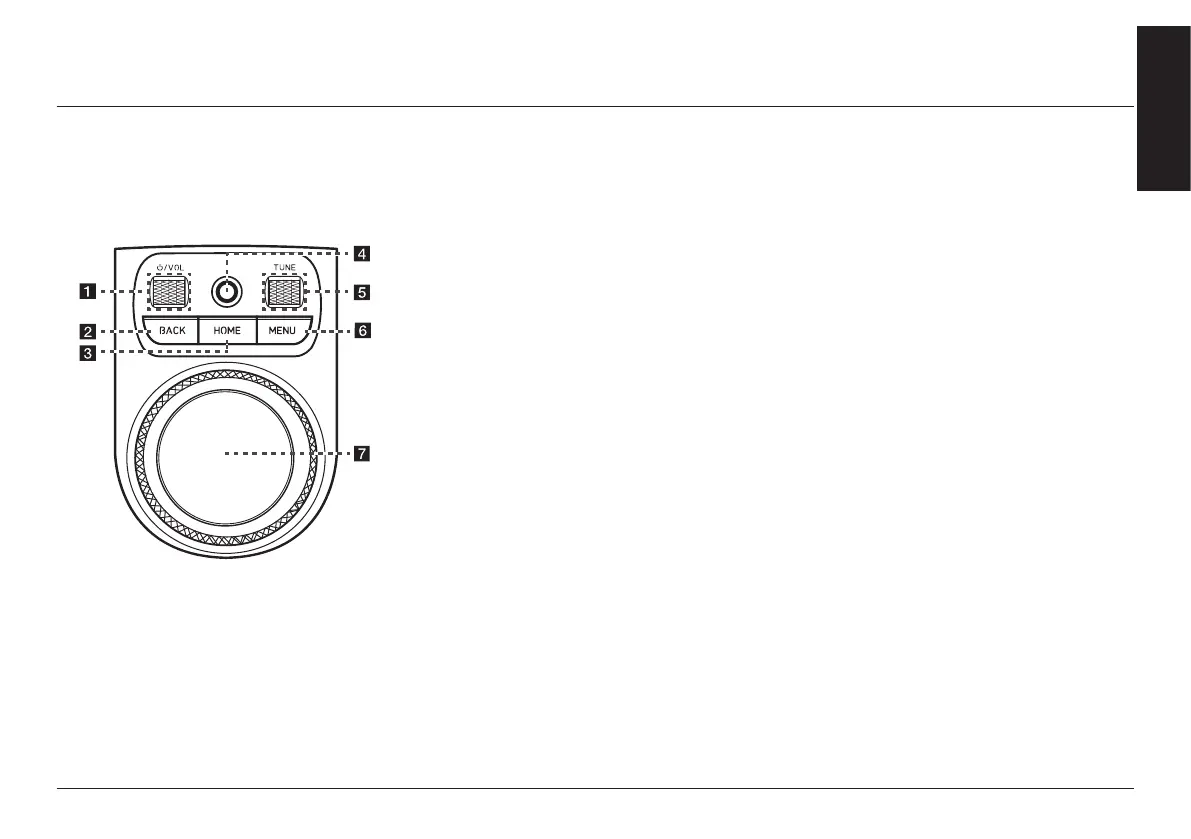
name and funcTion of each componenT
fronT seaT conTrol key
The image of this product may be different from
the actual product.
a
:
/VOL wheel button
↟ Press briey to turn media/radio on/
off.
↟ Press and hold to turn on or off the
display and the sound.
↟ Turn the wheel up/down to adjust
the volume.
b BACK button
↟ Press briey to move to the previous
screen.
↟ Press and hold to move to the home
screen.
c HOME button
↟ Press briey to move to the home
screen.
↟ Press and hold to move to the map
screen.
d Finger scan sensor
Use sensor to select the user prole or
convenience features, etc.
e TUNE button
↟ Radio (DAB (If equipped)/FM):
Turning the wheel up/down to
change the searched station.
↟ Radio (AM): Turning the wheel up/
down to increases/decreases the
frequency by one step.
↟ Media/Voice memo: Search for a
le by turning the wheel up/down.
And, when the name of desired le
is displayed, press the button to play
the le.
↟ Navigation: Turn up/down to change
the map scale on the map screen.
f MENU button
Displays a pop-up menu for each mode
when pressed briey.
g Controller
↟ Use controller to move and select the
menu as well as handwriting input.
↟ Use controller to change the map
scale on the map screen.



 To Next Page