29
±±
MIDI
Interface
IN
OUT
'USB Mini- B' Type Cable
1) Connect ‘USB MINI B’Type Cable
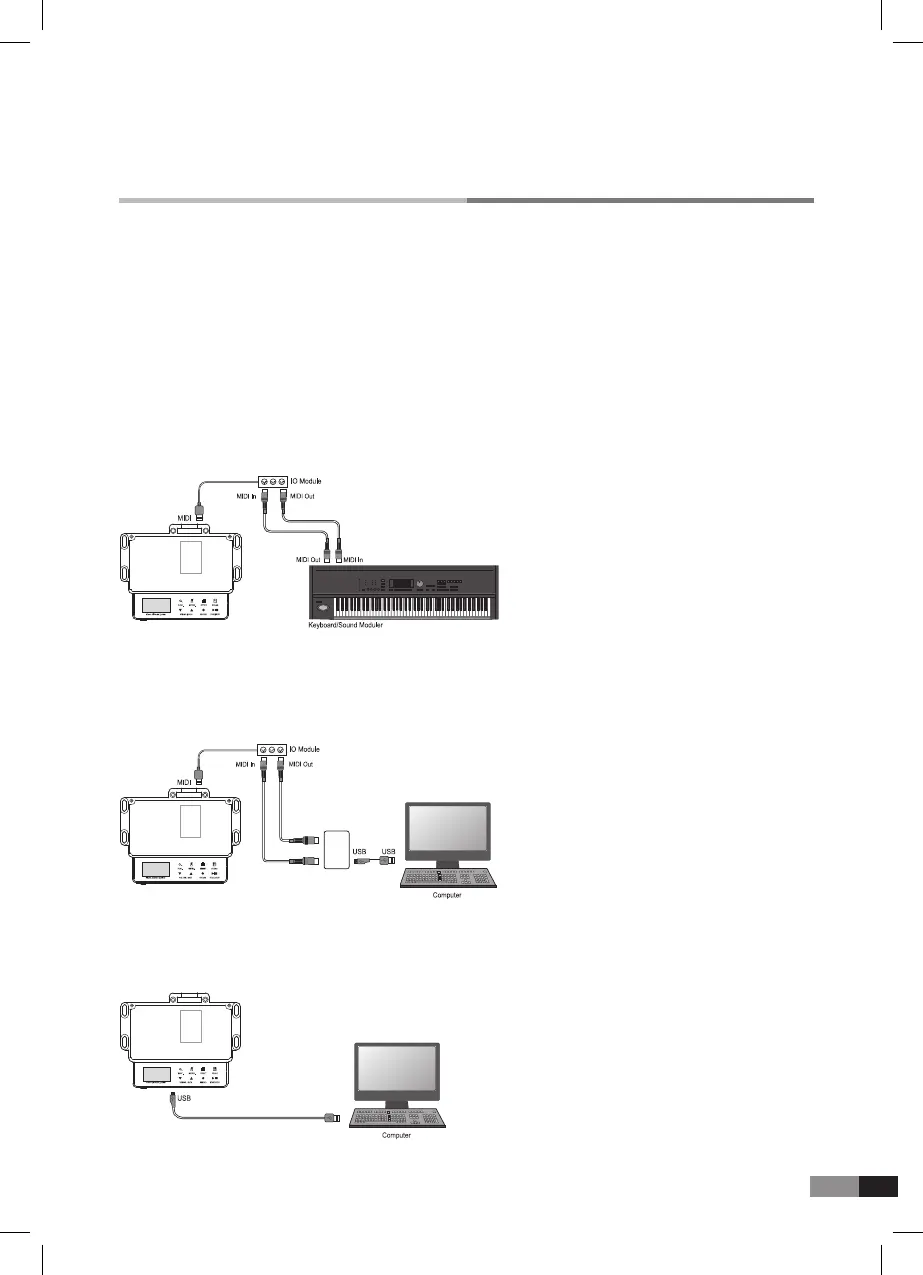
C. Connecting with external MIDI device
E. Connecting with computer with USB cable
1) Connert MIDI cable(5Pin-round-DIN cable)
1) Connert MIDI cable(5Pin-round-DIN cable)
*
MIDI I/O Module OUT -> Extra divice IN
*
MIDI I/O Module IN -> Extra divice OUT
*
MIDI I/O Module OUT -> Extra divice IN
*
MIDI I/O Module IN -> Extra divice OUT
Please refer to the MIDI Implementation Chart for the Control Command of connection
parameters with external MIDI device.
*
The sound of playing this product can be played back from the other MIDI device or saved in computer using
MIDI program.
*
GM, Patch, volume or sound can be different from each manufacturer, the composed music with the other sound
source can have different feeling.
*
This product outputs only ‘Note’ signal, so the patch of the external device should be set from the external device.
*
MIDI I/O Module, 5pin Round-DIN cable, MIDI Interface, ‘USB MINI B’ Type cable : option
D. Connecting with computer with extra MIDI device



 To Next Page