24
Education Mode for Practice
→
PRACTICE
* Sonatina
Kuau, Friedric..
[79] [4/4] [130]
→
PRACTICE
1 80 1
* Tempo : 130
L :
▶ R : ▶ A : ■
PRACTICE
1 80 1
* Tempo : 130
L :
▶ R : ▶ A : ■
→
PRACTICE
1 80 1
Tempo : 130
* L :
▶ R : ▶ A : ▶
PRACTICE
1 80 1
Tempo : 130
* L :
▶ R : ▶ A : ▶
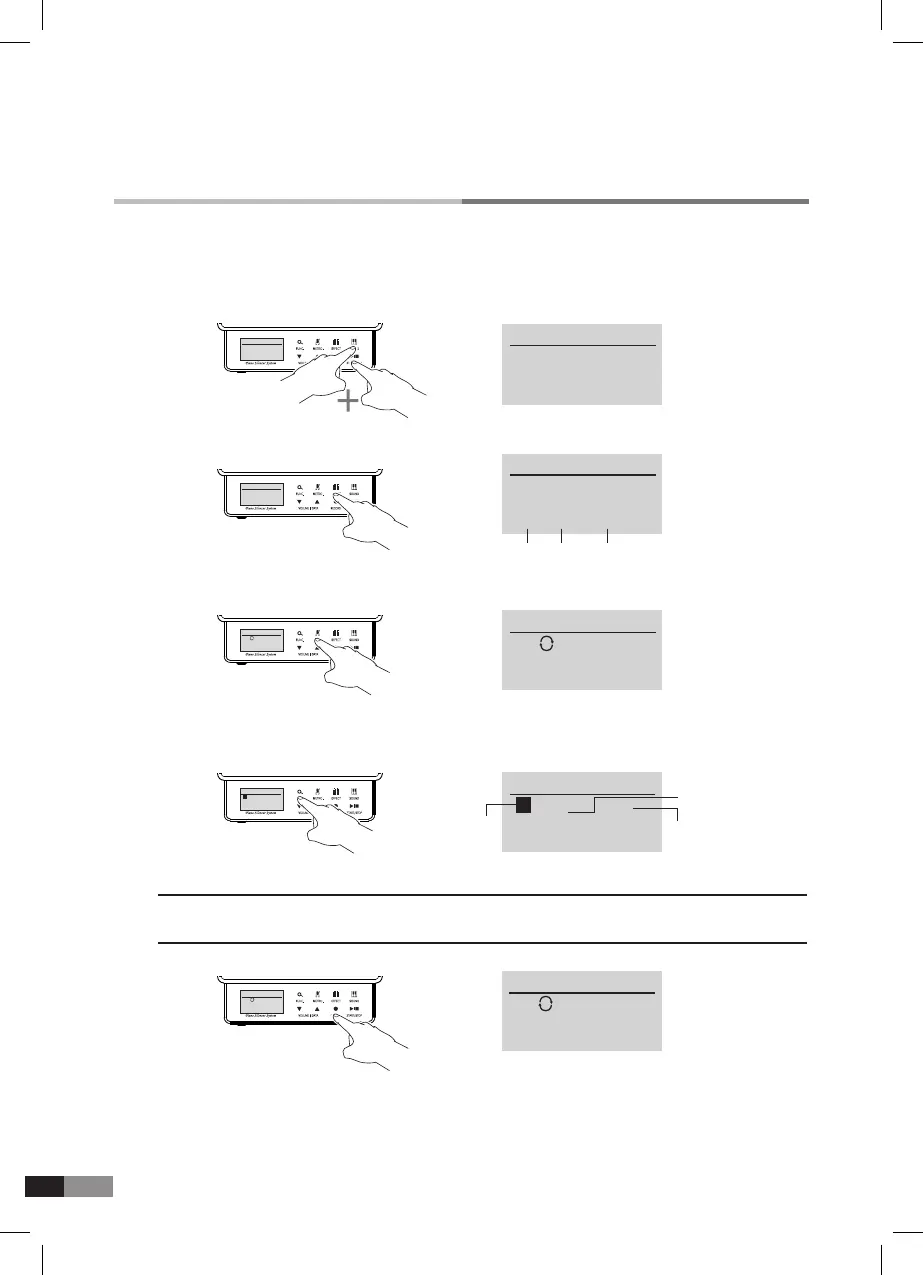
1) Press [SOUND]+[START/STOP] buttons together to get into the Education mode.
2) Press [ EFFECT] button to select a Book or Song.
*
Press [▼] or [▲] button to select.
3) Press [METRO.] button to change Tempo. (You can also change Tempo while playing)
*
Press [▼] or [▲] button to select.
4) Press [FUNC.] button to set the start measure and press [FUNC.] button again to set the stop mea-
sure. Then you can play the measures continuously.
*
Press [▼] or [▲] button to select the measure number.
5) Left, Right hand or Accompaniment can be On/Off individually with [RECORD] button.
*
▶: means (PLAY), ■: in the display means (STOP).
[L]: Left hand(Controlled by [
▼] button) [R]: Right hand (Controlled by [▲] button)
[A]: Accompaniment(Controlled by [RECORD] button)
GENIO PREMIUM
α
has built-in 106 Bayer songs, 30 Czerny songs, 80 Sonatina songs for left,
right hand or accompaniment. Please refer to the attached song lists. (Page 30)
6) Press [START/STOP] button to start or stop.
7) You can PAUSE/PLAY by pressing [METRO.] button. (you can adjust whole Tempo here)
• Press [METRO.] button again to play from you stopped.
• You can adjust demo song volume by pressing [EFFECT] button.
• Press [START/SROP] button to start from the beginning.
→
PRACTICE
* Sonatina
Kuau, Friedric..
[79] [4/4] [130]
Whole
Measures
Beat Tempo
PRACTICE
1 ← 80 1
Tempo : 130
L :
▶ R : ▶ A : ▶
→
PRACTICE
1 ← 80 1
Tempo : 130
L :
▶ R : ▶ A : ▶
Beginning
Measure
Present Measure
Ending Measure
PRACTICE
* Beyer Part .1
01 Song
[8] [4/4] [100]
PRACTICE
* Beyer Part .1
01 Song
[8] [4/4] [100]



 To Next Page