20
Effect
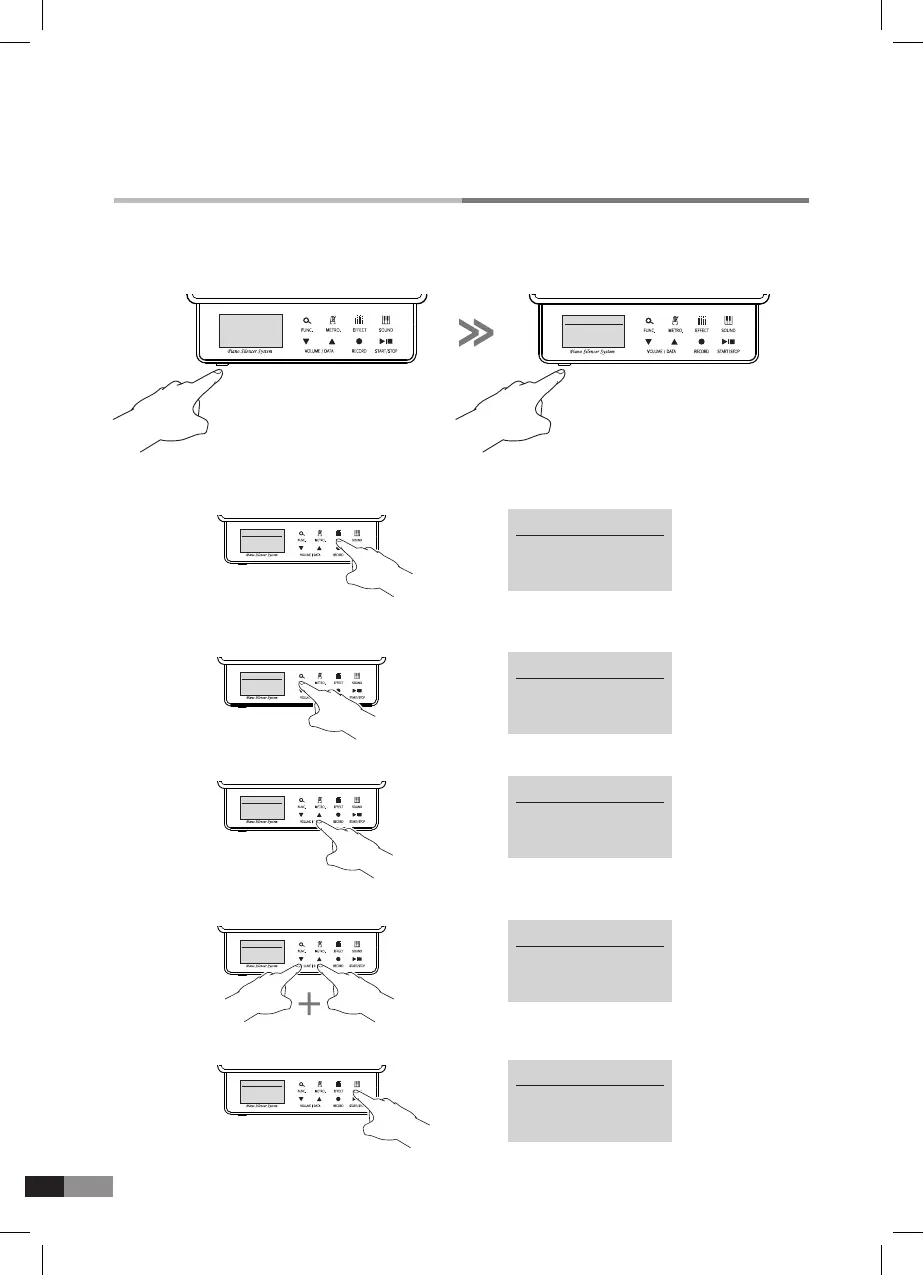
3) Press either [▼] or [▲] button to set with desired value.
4) Press both [
▼] and [▲] button together to set the Default (Ex. Transpose Semitone : 0)
5) Press [SOUND] button to nish the setting.
2) Press [FUNC.] button to select one parameter among.
*
Reverb, Chorus, Transpose, Pitch, Velocity curve
1) Press [EFFECT] button to move to effect setting mode. Then you can see ‘Reverb’ Letters on
the screen.
HOME
Preset Sound
P1 : Piano 1
→
Transpose
Semitone : 0
EFFECT
→
Reverb : 0
EFFECT
EFFECT
Reverb : 0
→
Transpose
Semitone : 0
EFFECT
EFFECT
Transpose
Semitone : 0
→
Transpose
Semitone : +2
EFFECT
EFFECT
Transpose
Semitone : +2
EFFECT
Transpose
Semitone : 0
→
Preset Sound
P1 : Piano 1
HOME
HOME
Preset Sound
P1 : Piano 1
The GENIO PREMIUM
α
can control the sound with various parameters.
*
Turn off and on the power to start from the default mode.



 To Next Page