EasyManua.ls Logo

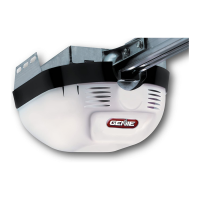
Genie H8000-07 - User Manual

Genie H8000-07
16 pages
Print Icon
To Next Page IconTo Next Page
Loading...
For 7’ 6” Doors. Extension Kit is available for 8’ Doors
Included Wall Console MUST be installed prior to Operation
of this Garage Door Opener.
Safe-T-Beam
®
Safety Reverse System MUST be Installed and
the Force Controls MUST be Properly set to close door.
This Equipment meets or exceeds all Federal, State and UL 325
Safety Requirements.
Will not operate “twice as fast” on one-piece doors.
SAVE THIS MANUAL FOR
FUTURE REFERENCE
Co m p l e t e w i t h iNtelliCoDe®
Re m o t e Co N t R o l a N D SeRieS ii
el e C t R o N i C S
Having Difficulty? Need Help?
Please call us: 1-800-35-GENIE (354-3643)
www.geniecompany.com
Please have Model information ready when calling.
Warranty Information . . . . . . . . . . . . . . . . . . . 2
Safety Information . . . . . . . . . . . . . . . . . . . . . . 3
Important Installation Instructions ....... 3
Safety Features . . . . . . . . . . . . . . . . . . . . . . . . . 3
Pre-installation Checklist . . . . . . . . . . . . . . 4-6
Control Adjustments ..................7-8
Accessories . . . . . . . . . . . . . . . . . . . . . . . . . . . 8-9
Maintenance. . . . . . . . . . . . . . . . . . . . . . . . . . . 10
Troubleshooting Guide . . . . . . . . . . . . 11-13
Wiring Diagram ....................... 14
Parts Lists / Exploded Views .........15-16
Accessory Order Form. . . . . . . . . . . . . . . . . . 17
ta b l e o f Co N t e N t S
3630436275
®
DC POWERED
SCREW DRIVE
OPENER
Operation and
Maintenance Manual

Questions and Answers

  • H
    howardbradfordAug 19, 2025
    What to do if my Genie H8000-07 Garage Door Opener doesn't run from the remote control?
    • T
      tonygonzalezAug 19, 2025
      If your Genie Garage Door Opener does not run from the remote control, first check the power source. Also, have a Genie Factory Authorized Dealer check that the ribbon cable between the controller board and motor drive board is properly connected to the connectors on the circuit boards.
  • E
    ecarrilloAug 21, 2025
    Why does my Genie H8000-07 start down, then stop and go back up?
    • K
      kara10Aug 22, 2025
      If your Genie Garage Door Opener door starts down, then stops and goes back up, consider the following: * If it's a new installation, check the door arm position. * Check the operation of the contact reverse function. * Inspect the Safe-T-Beam® System for beam obstruction or misalignment of lenses. * Check the Safe-T-Beam® System diagnostic code. * Check the close force adjustment. * Check the garage door for binding.
  • K
    kevinrichAug 25, 2025
    What to do if my Genie H8000-07 Garage Door Opener door starts down, then stops before closing completely?
    • C
      Cody PorterAug 25, 2025
      If your Genie Garage Door Opener door starts down, then stops before it is completely closed, check the close limit switch setting. Also, inspect for shorted wires and check the garage door for any binding.
  • K
    Karen HarrisAug 26, 2025
    Why does my Genie Garage Door Opener start to open, but stop before it is completely open?
    • U
      uwalkerAug 26, 2025
      If your Genie Garage Door Opener door starts up, but stops before it is completely open, ensure that the garage door and opener are in good repair, properly lubricated, and properly balanced. Also, check the open limit switch for a short circuit and for proper wiring, and check the open force adjustment.
  • J
    Jason ShafferAug 27, 2025
    How do I fix a Genie Garage Door Opener when the wall console does not work?
    • R
      Rachel TurnerAug 28, 2025
      If the wall console of your Genie Garage Door Opener does not work, check the wall console wiring for shorts, tight staples, or pinched wires. Also, check the wiring connections at the power head and wall console.
  • K
    Kyle AvilaAug 30, 2025
    What to do if Genie H8000-07 lights will not go out?
    • T
      Timothy HernandezAug 30, 2025
      If the lights on your Genie Garage Door Opener will not go out, disconnect the wires connected to the wall console. Until a replacement wall console can be obtained, disconnect the wall console and use only remote controls or a wireless keypad to operate the opener.
  • C
    Clinton PierceSep 1, 2025
    How to unlock a Genie H8000-07 wall console?
    • J
      Judith PierceSep 1, 2025
      If your Genie Garage Door Opener wall console is locked, the vacation locking switch on the wall control might be in “Lock” mode. Unlock the switch.
  • B
    bethmooreSep 3, 2025
    What to do if my Genie H8000-07 Garage Door Opener motor runs, but the door doesn't move?
    • R
      Robert CrossSep 3, 2025
      If your Genie Garage Door Opener motor runs, but the door does not move, ensure the magnetic carriage assembly is engaged to the rail drive screw. Check the force adjustment and ensure that all sections of the rail drive screw are turning when the motor runs.
  • H
    hortonsergioSep 5, 2025
    What to do if wiring to source is missing or bad for Genie H8000-07 Garage Door Opener?
    • C
      Christopher WhiteSep 6, 2025
      If the wiring to the source is missing or bad on your Genie Garage Door Opener, check the wiring. Also, remove power and reapply it.
  • J
    James TapiaSep 8, 2025
    How to troubleshoot Genie H8000-07 Garage Door Opener limit switches that are not working?
    • S
      stacey06Sep 8, 2025
      If the limit switches on your Genie Garage Door Opener are not working, check the limit switch wire connections to the terminals on the power head and check for shorted or pinched wires under the limit switch brackets.

Summary

THE GENIE COMPANY LIMITED WARRANTY

OVERVIEW OF POTENTIAL HAZARDS

IMPORTANT INSTALLATION INSTRUCTIONS

SAFETY FEATURES

Reversing Systems and Controls

Details on safety systems like reversing sensors and force adjustment controls.

PRE-INSTALLATION CHECKLIST

Power Head and Power Source Requirements

Safe-T-Beam Bracket Mounting Location

IMPORTANT SAFETY INSTRUCTIONS

MAINTENANCE AND ADJUSTMENTS

Adjusting Limit Switches and Force Controls

Steps to set door travel limits and operating force.

Setting Contact Reverse Function

PROGRAMMING THE REMOTE CONTROLS

Remote Control Programming and Management

Steps to program Genie remotes, erase memory, and manage codes.

MAINTENANCE

TROUBLESHOOTING GUIDE

Opener System Self-Diagnostic Troubleshooting

General Troubleshooting

WIRING DIAGRAM

Genie H8000-07 Specifications

General IconGeneral
TypeChain Drive
Frequency60 Hz
Drive SystemChain
Remote Controls Included1
Battery BackupNo
Smart Home CompatibilityAladdin Connect
Voltage120V
SecurityRolling code technology

Related product manuals