21
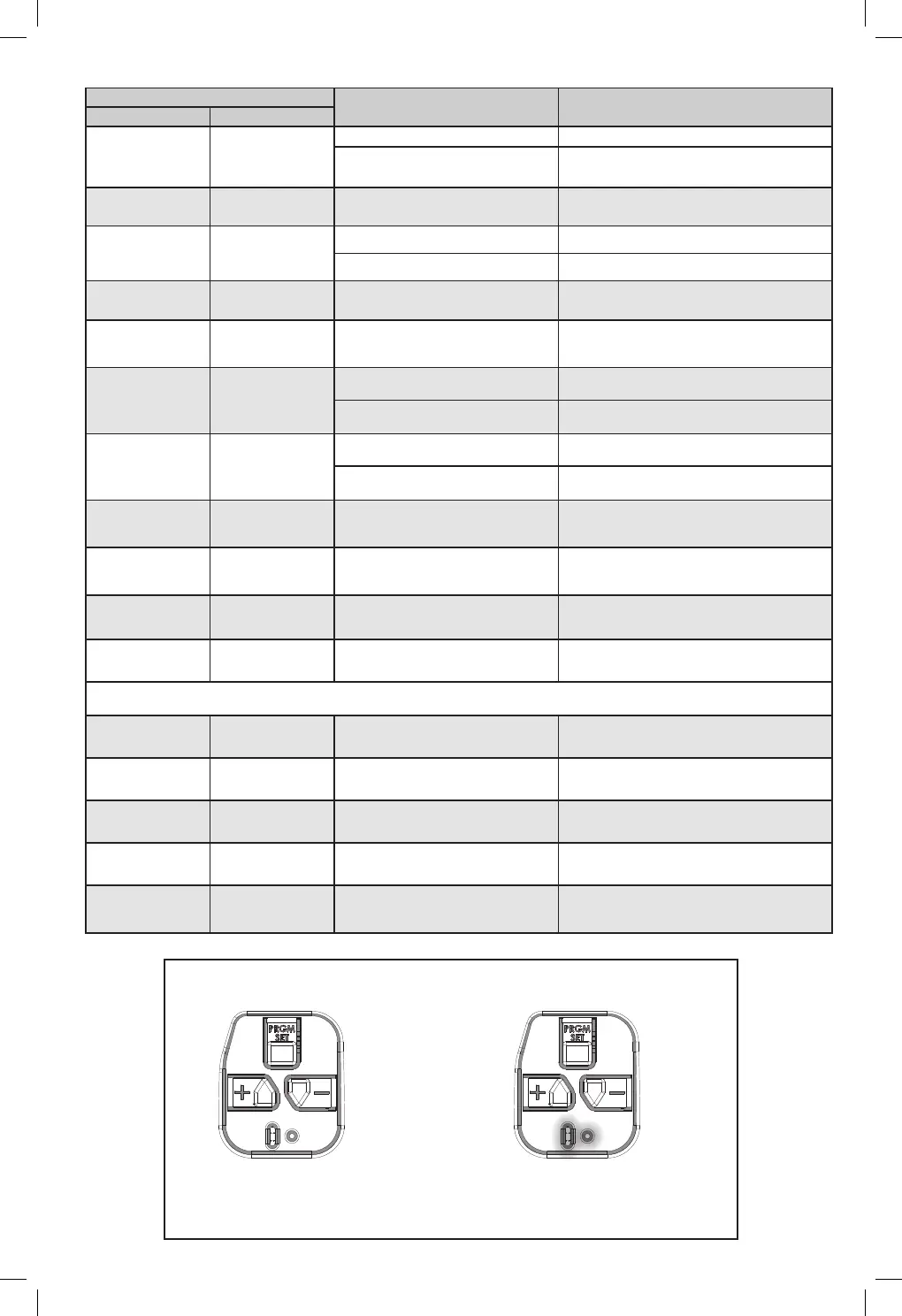
POWERHEAD LEDS
Powerhead LED
Possible Problem
Solution
Round LED Long LED
OFF OFF
Normal operation. None required.
No response from unit.
Check power supply.
Contact a trained door system professional.
ON/RED/
STEADY
ON/RED/
STEADY
Limits NOT set properly. Re-program limits, see pages 6-7.
ON/RED/
FLASHING
ON/RED/
FLASHING
Program error. Unplug unit, wait 5 seconds, plug in.
Component failure. Contact a trained door system technician.
ON/BLUE/
FLASHING
OFF Remote NOT programmed. Program remote, see page 9.
ON/PURPLE/
FLASHING
OFF Remote NOT programmed. Program remote, see page 9.
ON/RED/
FLASHING
OFF
Safe-T-Beam® physical obstruction. Remote obstruction, recheck unit.
Safe-T-Beam® signal interference.
Check alignment of Safe-T-Beam® pair and
nearest other Safe-T-Beam® pair, see page 18.
OFF
ON/RED/
FLASHING
Door contact in UP or DOWN travel. Remove obstruction.
Door component failure detected.
Check door spring, track, rollers, hinges and
xtures.
OFF
ON/RED/
STEADY
Thermal cutout.
DO NOT unplug unit.
Wait until LED clears before operating.
ON/PURPLE/
STEADY
ON/PURPLE/
STEADY
Component error. Contact a trained door system technician.
OFF
ON/BLUE/
FLASHING
Door will not open.
Check Sure-Lock™. Sure-Lock™ should be OFF for
normal operation (see page 6).
ON/PURPLE/
FLASHING
ON/PURPLE/
FLASHING
Radio receiver error.
Unplug the unit. Wait 5 seconds and plug the unit
back in. If problems persist, contact a trained door
system technician.
Battery Backup Troubleshooting LEDs
ON/GREEN
STEADY
ON/GREEN
STEADY
OK=Charged, Battery Backup
None Required
ON/GREEN
FLASHING
ON/GREEN
FLASHING
Discharging, Battery Backup
Power is out. Battery in use.
ON/YELLOW
FLASHING
ON/YELLOW
FLASHING
Charging, Battery Backup
None Required
ON/RED TO YELLOW
FLASHING
ON/RED TO YELLOW
FLASHING
Dead Battery, Battery Backup
Allow to charge 48 hours. If charging fails,
Replace Battery.
ON/WHITE STEADY ON/WHITE STEADY Battery Backup in Operation
No Fault. Courtesy light while in battery
backup mode. Light will turn o after 4
minutes.
LED DISPLAY UNDER NORMAL OPERATING CONDITIONS
NO LED DISPLAY BOTH LEDs = STEADY GREEN
Standard Models
Battery Back-up Models






 To Next Page