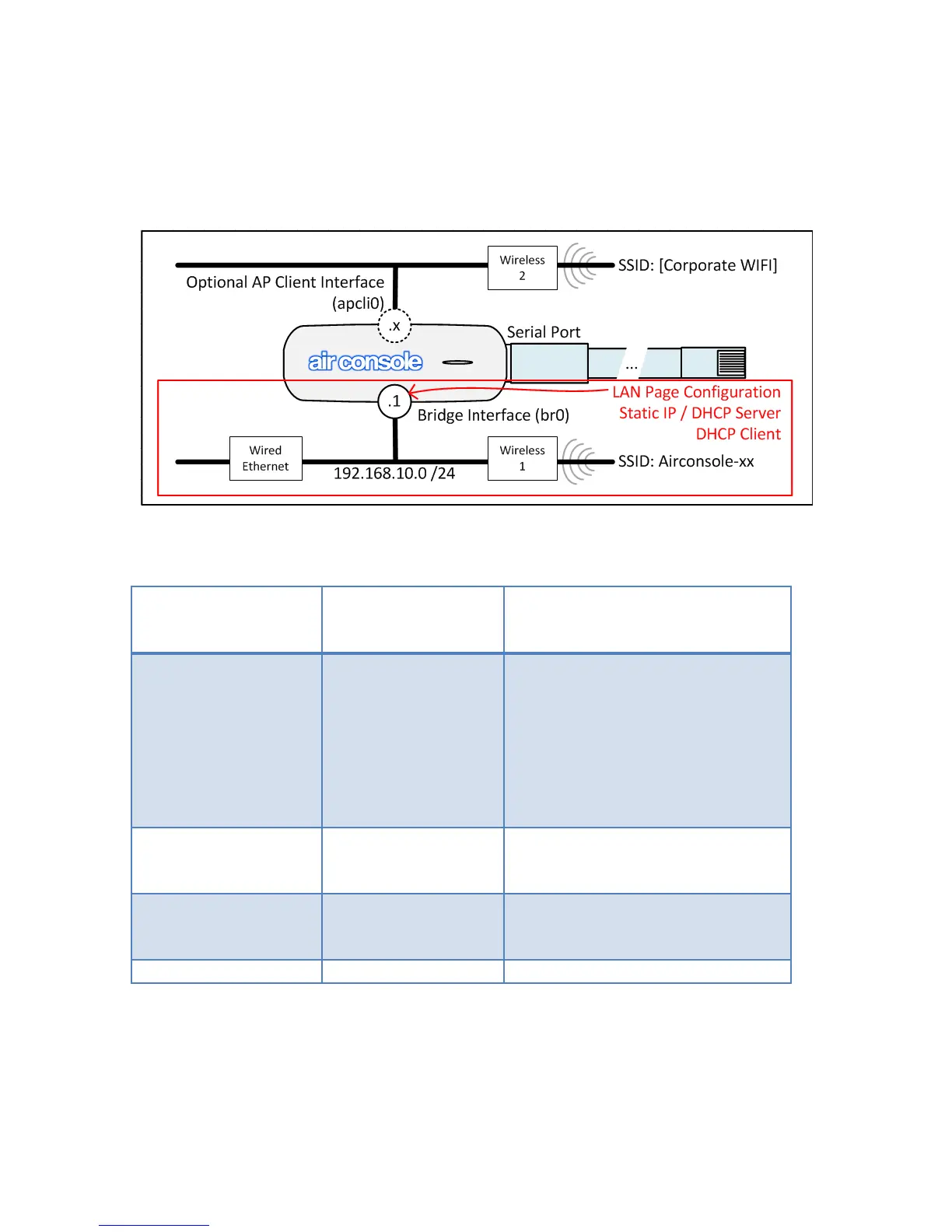
The LAN page allows for configuring how Airconsole behaves on the wired and wireless
network. Note as per the below drawing that this page configures the behavior of the the
wired Ethernet LAN port and the Airconsole-XX WIFI wireless interface which are
bridged together. It does NOT change the behavior of the Airconsole’s “AP Client”
interface which (if enabled) is discussed in the AP Client section further below.
There are a number of possible options for configuring the Bridge IP address and DHCP
Server service as per the below table
Airconsole’s
Bridge interface
Addressing
Airconsole act as
DHCP Server
Default Configuration. Use when
Airconsole operating outside
existing Wired network. Use with
caution when connected to
existing Wired network as
Airconsole DHCP server will
assign IP addresses to other
Wired LAN devices
Use when Airconsole should
participate in Wired LAN that
has no DHCP server
Use when Airconsole should
participate in existing Wired LAN
that has a DHCP server
Configuration Not Possible
Each mode is discussed in the sections below
4.2.1 Setup Page
The LAN Setup page sets the IP address of the Airconsole’s Bridge interface. The 2


 To Next Page