1
SD
CARD
SD Card Slot
2
USB
USB Slot
2.3
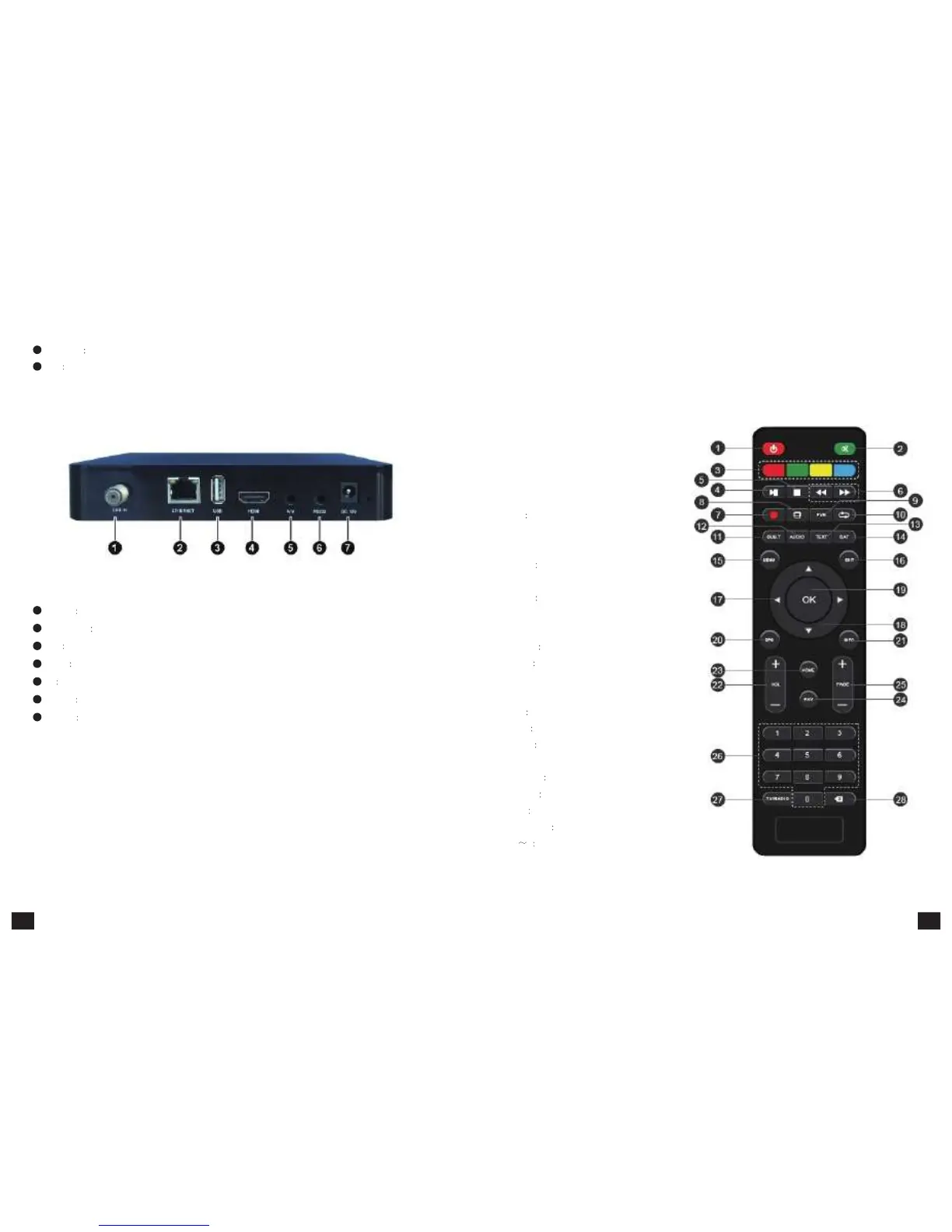
Rear
panel
1
LNB
IN
Signal Input
2
ETHERNET
Ethernet Slot
3
USB
USB Slot
4
HDMI
HDMI Output
5
AV
AV Output
6
RS
232
Serial Port
7
DC
12V
DC 12V Input
2.4
Remote
Control
1.Power/Standby key
2.Mute key
3.Their functions depend on certain application
4.Pause key
5.Stop key
6.Fast backward /Fast forward
7.Record key
8.V.RATIO: video aspect ratio settings
9.PVR Access to recorded content in USB
storage device
10.Recall key: Back to the last program
11.SUBT Switch/turn off subtitle
12.AUDIO: Audio settings
13.TEXT Teletext
14.SAT: Their functions depend on certain
application
15.MENU Menu shortcut key
16.EXIT Exit key
17.Left and right key
18.Up and down direction key
19.OK Confirm key
20.EPG Electronic program guide
21.INFO Display the information of current
program
22.VOL+/- Volume +/-
23.HOME HOME shortcut key
24.FAV Favourite program
25.PAGE +/- page up/ down
26.0 9 Numeric Key
27.TV/RATIO: switch between TV and Ratio
28.Delete key
5 6



 To Next Page