BIOS Setup - 54 -
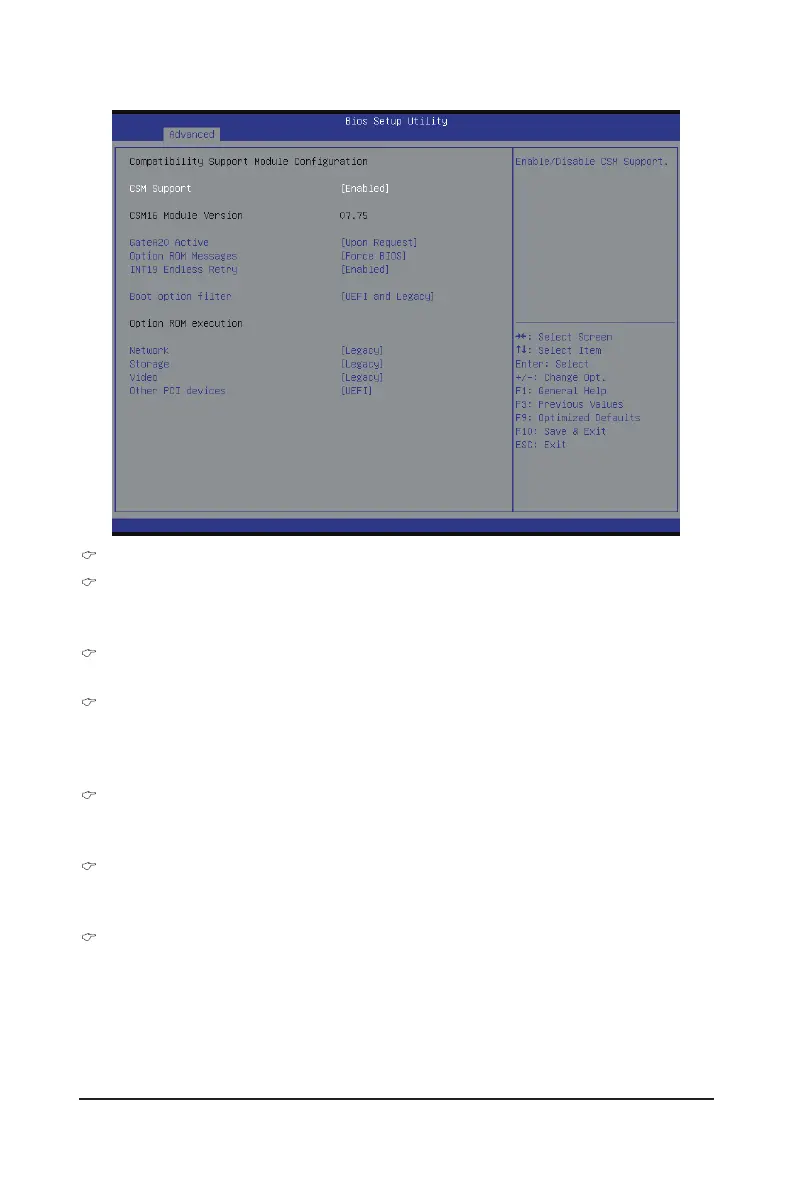
2-2-4 CSM Conguration
Compatibility Support Module Conguration
CSM Support
Enable/Disable Compatibility Support Module (CSM) support.
Options available: Enabled/Disabled. Default setting is Enabled.
CSM16 Module Version
Display CSM Module version information.
Gate20 Active
Upon Request: GA20 can be disabled using BIOS services.
Always: Do not allow disabling GA20; this option is useful when any RT code is executed above 1MB.
Options available: Upon Request/Always. Default setting is Upon Request.
Option ROM Messages
Option ROM Messages.
Options available: Force BIOS/Keep Current. Default setting is Force BIOS.
INT19 Endless Retry
Enabled: Allowed headless retry boot
Options available: Enabled/Disabled. Default setting is Enabled.
Boot option lter
Determines which devices system will boot to.
Options available: UEFI and Legacy/Legacy only/UEFI only. Default setting is UEFI and Legacy.


 To Next Page
 Loading...