Appendix- 89 -
Rebuilding an Array:
Rebuilding is the process of restoring data to a hard drive from other drives in the array. Rebuilding
applies only to fault-tolerant arrays such as RAID 1, RAID 0+1, or RAID 5 arrays. The procedures below
assume a new drive is added to replace a failed drive to rebuild a RAID 1 array.
Launch the NVIDIA Control Panel from All Programs in the Start Menu.
Step 1:
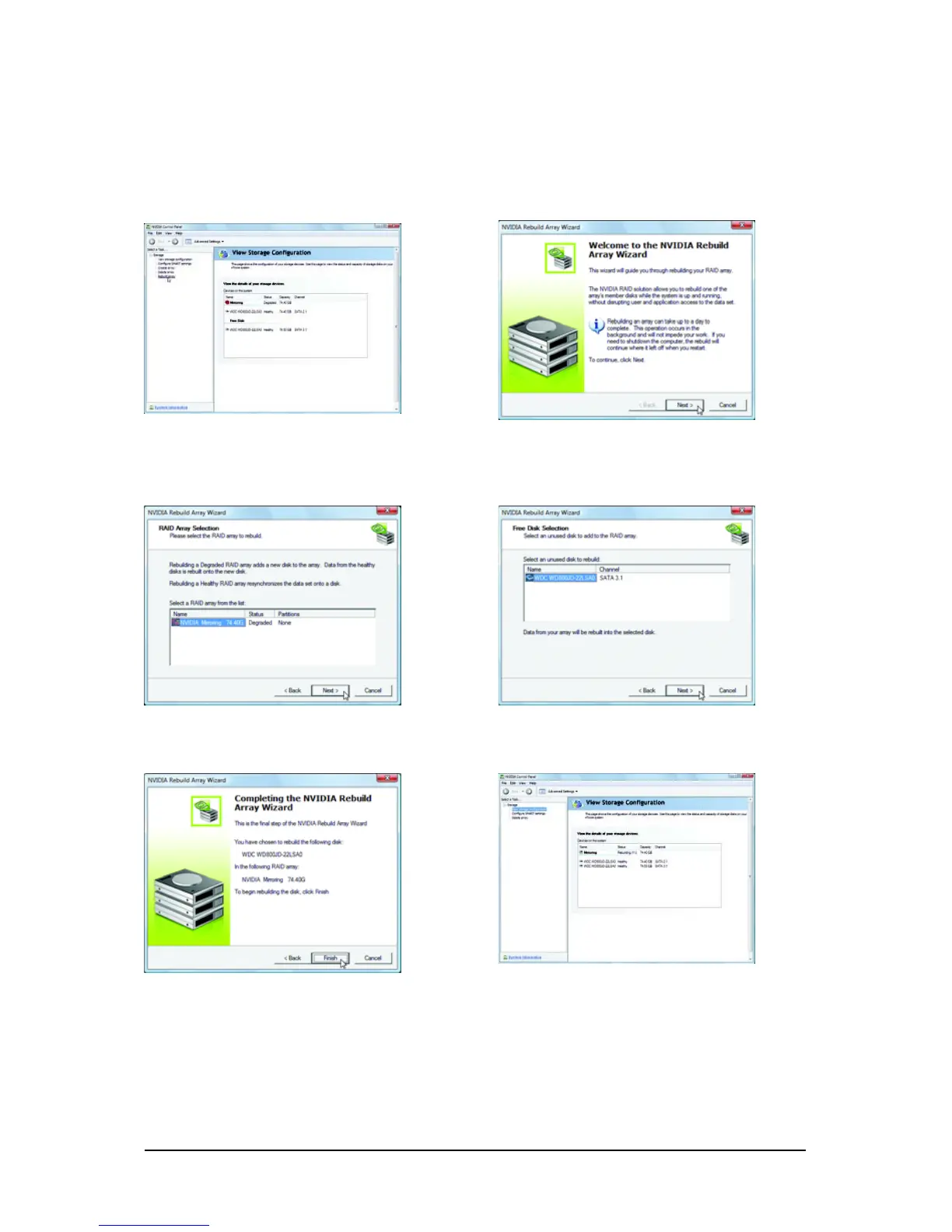
In NVIDIA Control Panel, click Rebuild array
under Storage in the Select a Task pane.
Step 2:
When the NVIDIA Rebuild Array Wizard appears,
click Next.
Step 3:
Select the array to rebuild and click Next.
Step 4:
Select a drive to add to the array and click Next.
Step 5:
Click Finish to start the rebuilding process.
Step 6:
The rebuilding progress is displayed in the View
Storage Configuration sub-menu.



 To Next Page