Template Module, Version 2.1, 11.08.2020 / Template Basiseinstellungen: Version 3.1 - 07.07.2020
Protection against unwanted calls
COMFORT 550 / 550A / LUG_Kombi IM-Nord en / A31008-M3001-R201-1-SM19 / applications_1.fm / 4/11/22
50
Black list
When the black list function is activated, calls from black list numbers are not indicated or are
only indicated in the display. These settings apply to all registered handsets.
The black list is enabled (denoted by in the menu) when Silent C
all or Block Call is selected
as the protection mode. It is enabled automatically with the first entry.
Setting the protection mode
Displaying/editing the black list
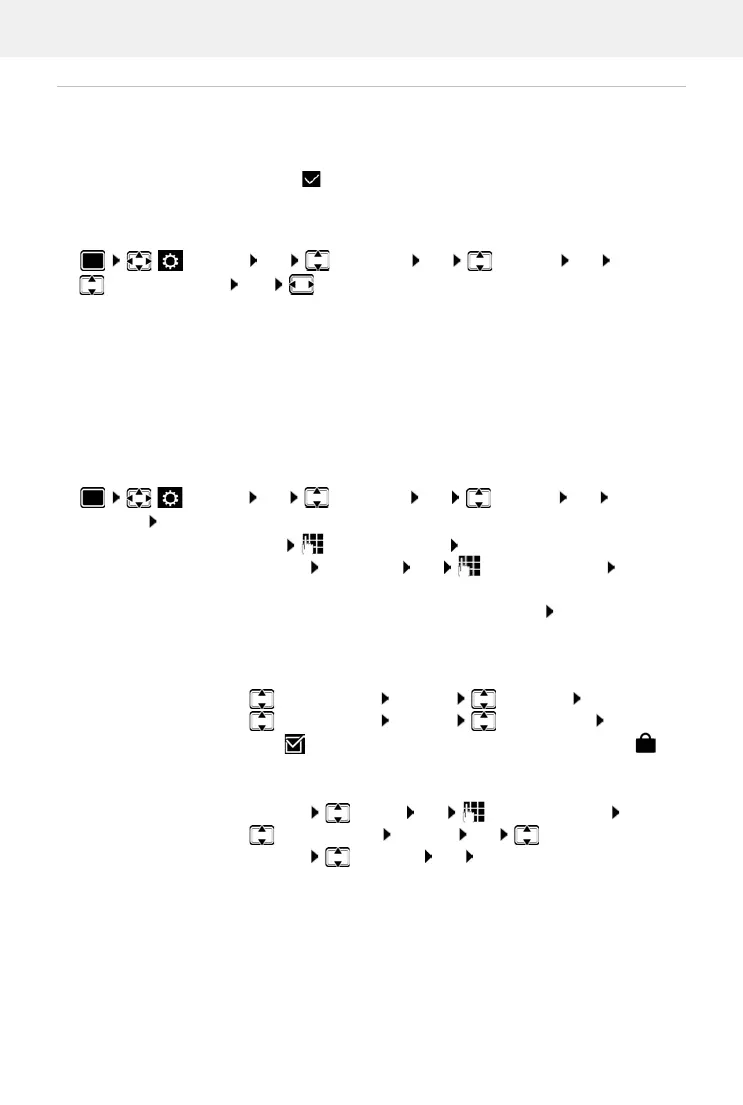
Settings OK Telep hony OK Blocklist OK
Protection Mode OK select desired protection
No Protection All calls are indicated, including from callers whose numbers are on
the black list.
Silent Call The telephone will not ring and the incoming call will only appear in
the display.
Block Call The telephone will not ring and the incoming call will not appear in
the display.
Save settings:
Save
Settings OK Telephony OK Blocklist OK Blocked
Numbers OK . . . the list of blocked numbers is displayed . . . possible options:
First entry:
New enter the number Save
Another entry:
Options New entry OK enter the number Save
Blocking a number range:
Only enter the starting digits of the number Confirm the Add
this number as a pattern? prompt with Yes
For dynamic black list, protect number before deletion:
Confirm the Lock this number? prompt with Ye s
Change entry:
select an entry Options Edit entry OK
Protect a number:
select an entry Options Lock number
Edit ( = enabled) . . . The number in the list is given the
symbol, it is also not deleted if the dynamic black list is enabled
Searching for a number:
Options Search OK enter the number Search
Delete entry:
Select an entry Options OK Delete entry
Delete list:
Options Delete all OK Ye s



 To Next Page