28
Template Go, Version 1, 01.07.2014 / ModuleVersion 1.0
Message lists
Gigaset CL660A / LUG IE-UK en / A31008-M2804-L101-1-7619 / call_list.fm / 3/2/18
Message lists
Notifications about missed calls, messages on the answer machine/network mailbox and missed
alarms are saved in the messages list.
As soon as a new me
ssage arrives, an advisory tone will sound. The
Message key also flashes (if activated
p. 29).
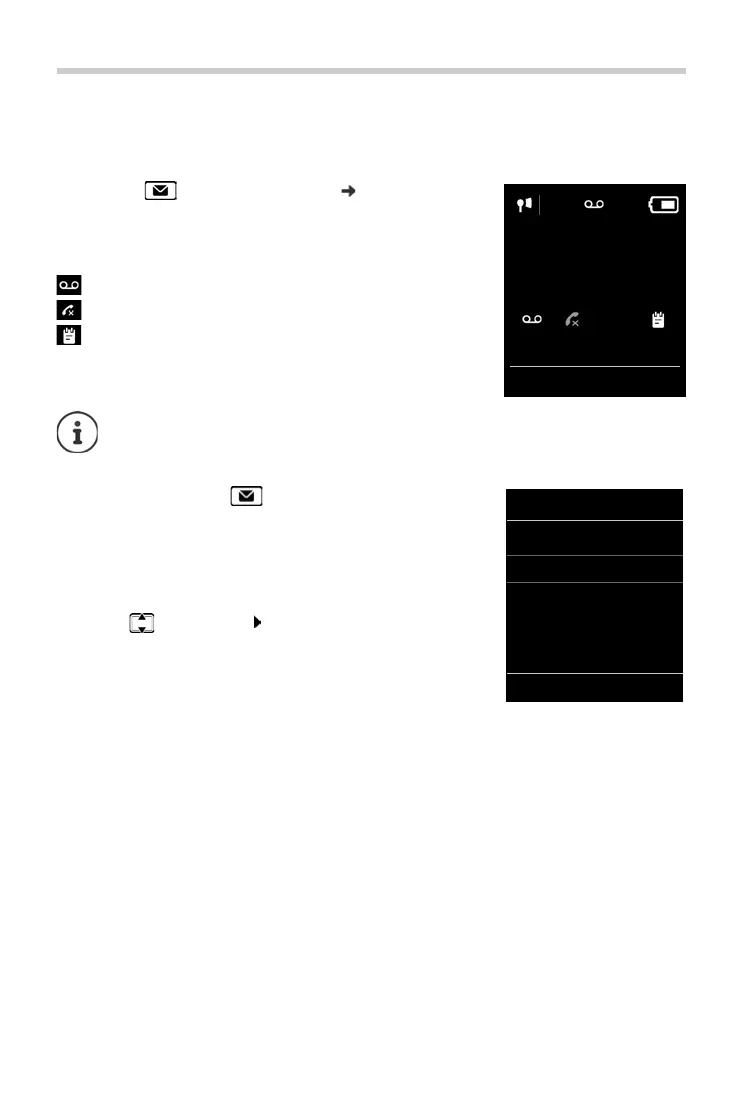
Icons for message types and the number of new messages are
shown on the i
dle display.
Notification for the following message types is available:
on the answer machine/network mailbox
in the missed calls list
in the missed alarms list
Display messages:
¤ Press the Message key . . . Messages lists that contain
messages are displayed, Mailbox: is always displayed
An entry is marked in bold: new messages are available. The
number of new messages is shown in brackets.
An entry is not marked in bold: no new messages. The number
of old messages is shown in brackets.
¤ . . . use to select a list OK . . . the calls or messages are
listed
Network mailbox: The network mailbox number is dialled.
The icon for the network mailbox is always displayed, provided the number is stored
in the telephone. The other lists are only displayed if they contain messages.
07:15
INT 1 14 Oct
02 10
08
Calls Calendar
Example
Messages & Calls
Missed Alarms: (2)
Missed Calls: (5)
Mailbox: (1)
Answer Mach.:
Back OK
Example



 To Next Page