9
Gigaset CL660A / LUG IE-UK en / A31008-M2804-L101-1-7619 / starting_200A.fm / 3/2/18
Template Go, Version 1, 01.07.2014 / ModuleVersion 1.0
Handset
Handset
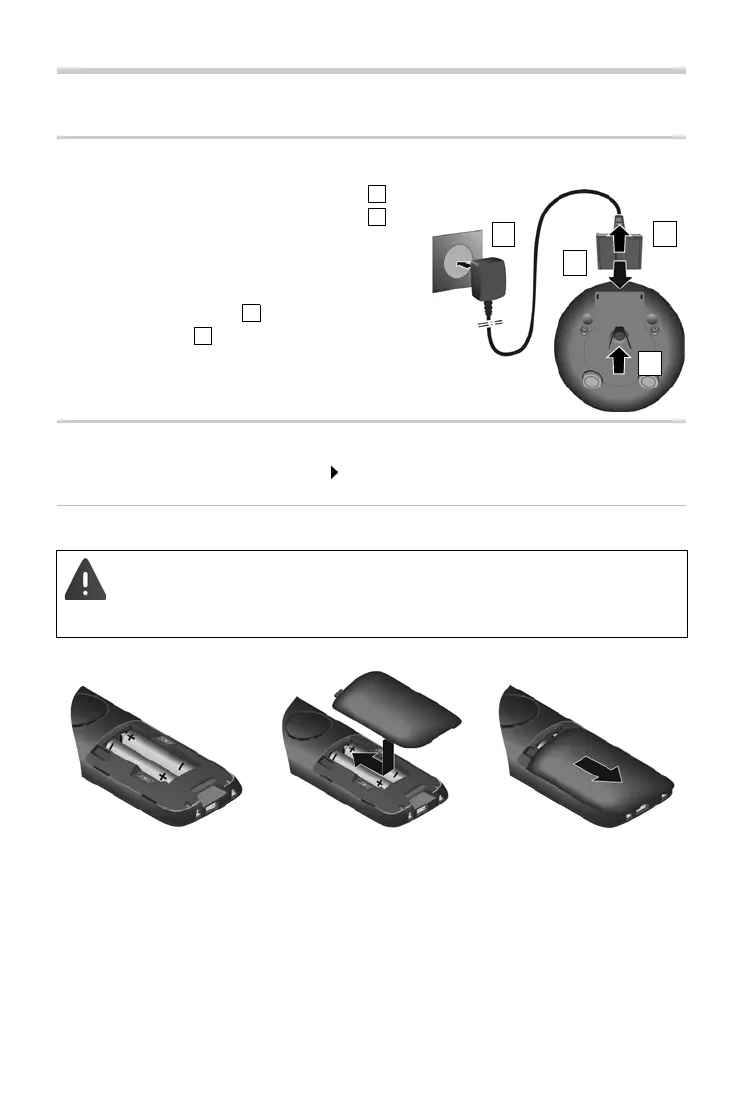
Connecting the charging cradle
¤ Connect the flat plug of the power adapter .
¤ Plug the mains unit into your power socket .
To remove the plug from the charging cradle again:
¤ Disconnect the power adapter from the mains
power supply.
¤ Press the release button .
¤ Pull out the plug .
Setting up the handset for use
The display is protected by a plastic film. Please remove the protective film!
Inserting the batteries
Only use rechargeable batteries, as this could otherwise result in significant health
risks and personal injury. For example, the outer casing of the batteries could be
destroyed or the batteries could explode. The device could also malfunction or be
damaged as a result of using batteries that are not of the recommended type.
¤ Insert the batteries
(for correct +/- direction,
see diagram).
¤ Fit the battery cover from
the top.
¤ Press the cover until it
clicks into place.
To re-open the battery cover:
¤ Insert a fingernail into the
notch at the top of the
cover and slide it
downwards.



 To Next Page