5
Gigaset CL660A / LUG IE-UK en / A31008-M2804-L101-1-7619 / overview_2_200A.fm / 3/2/18
Template Go, Version 1, 01.07.2014 / ModuleVersion 1.0
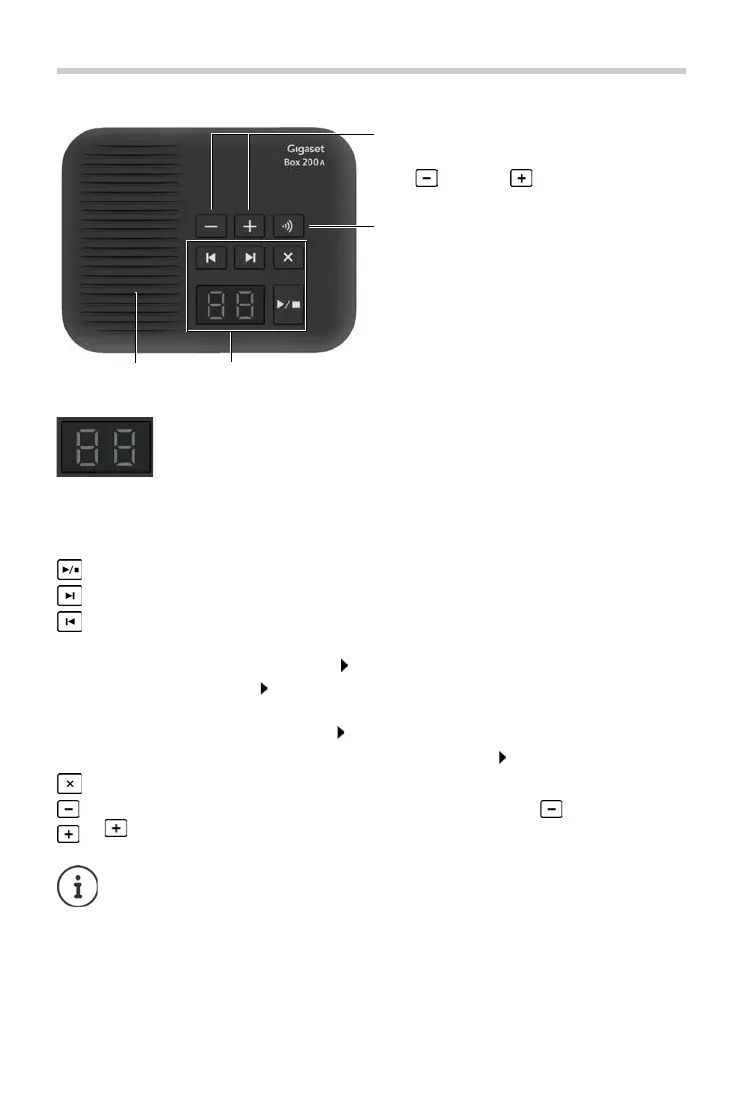
Base
Base
Lights up: The answer machine is activated. The number of saved
messages is displayed.
00 flashing: The answer machine is recording a message.
Flashing slowly: There are new messages. The number of new
messages is displayed.
99 flashing quickly: The answer machine is full.
On/Off/Playback/Stop key: Play back messages from answer machine or stop playback.
Forward key: Go to the next message.
Back key:
During message playback > 5 sec.
Go to the start of the message: Press and hold
Go back 5 seconds: Press briefly
During message playback > 5 sec.
Go to the start of the message: Press briefly
Skip to previous message during the time stamp playback: Press briefly
Delete key: Delete current message during playback.
Volume keys: Change speaker volume during message playback ( = quieter;
= louder).
If the answer machine is being operated from a handset or if it is recording a message
(00 flashing), it cannot be operated from the base at the same time.
Speaker
Registration/paging key
Locate handsets ("paging"):
¤ Press briefly
Register handsets:
¤ Press and hold
Display and keys for answer machine
Volume keys:
Adjust ringtone volume (for an incoming
call) = quieter; = louder



 To Next Page