22
2.2 Home Screen
Switch the oven on by pressing the "ON/OFF" key (ref.1 Fig.17), the
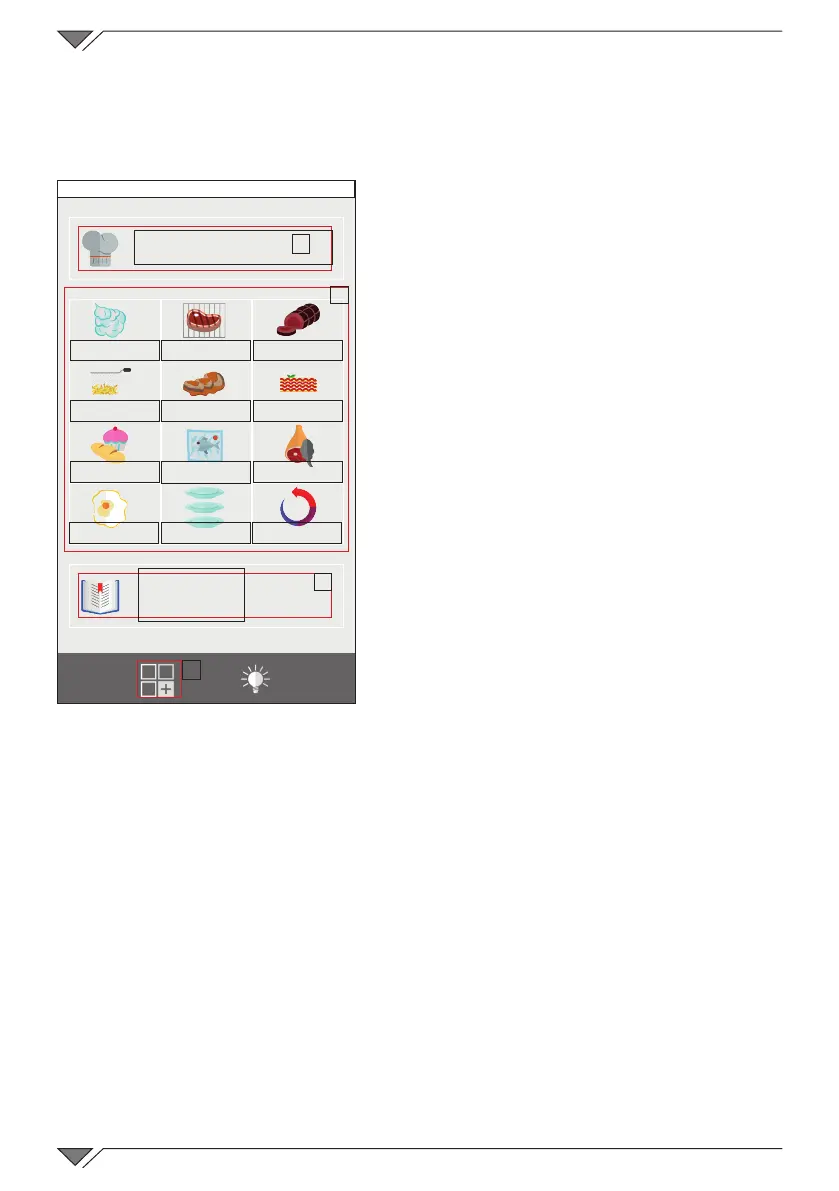
“HOME” page will appear on the display (Fig.17)�
It is possible to select whether to
perform “Manual Cooking” (ref� A) or
use one of the pre-set programs in the
“Cooking type” groups (ref� B) or in the
“Recipe book” (ref� C)�
By pressing button D, access is
given to the “Functions” menu where
it is possible to set washing, import
and export the cooking programs and
operate on the oven system settings�
(Some of these functions are reserved
exclusively to specialised technicians)�
The "Cooking type" groups (ref� B)
allow access to the programs regarding
the type of cooking to be performed,
such as grilling for example� Cooking
programs are found inside these groups
that refer to products of different
categories but which share the same
cooking type, as for example: grilled
lletsteakandgrilledsh.
Instead the “Recipe book” groups cooking programs divided by product
type, as for example: meat, vegetables, desserts, etc��
2.3 How to interact with the touch-screen
All of the operations can be selected by clicking on the desired item or
pictogram�
To modify a cooking parameter, e�g� the temperature, click on the
relativeeldandturntheknob.
Toconrmthemodication,clickontheparameteragainorpressthe
knob�
A
B
C
D
Friday, 30 October 2015 16:20
MANUAL
STEAMED GRILLED ROASTED
FRIED BRAISED AU GRATIN
BAKED
LOW TEMP�
SMOKED
EGGS
RACK CONTROL
REGENERATED
RECIPES



 To Next Page