7.3 Geo-fence
Geo-fence is for setting a rectangular area as permissible area or restricted
area. When TR-206 gets out of the permissible area or goes in to the restricted
area, TR-206 will send a report to notify the alarm condition.
Geo-fence function needs the information of GPS to check with the settings.
Please refer to chapter “5. GPS” for the setting.
TR-206 supports up to 64 sets of geo-fence areas. Each area could be
configured and re-configured For example, after you set 10 sets of geo-fence
areas. You could change the 7
th
geo-fence area setting independently.
Geo-fence area with type=0 is disabled. You could disable any one of the
previously set geo-fence area by setting it again and change the alert type to
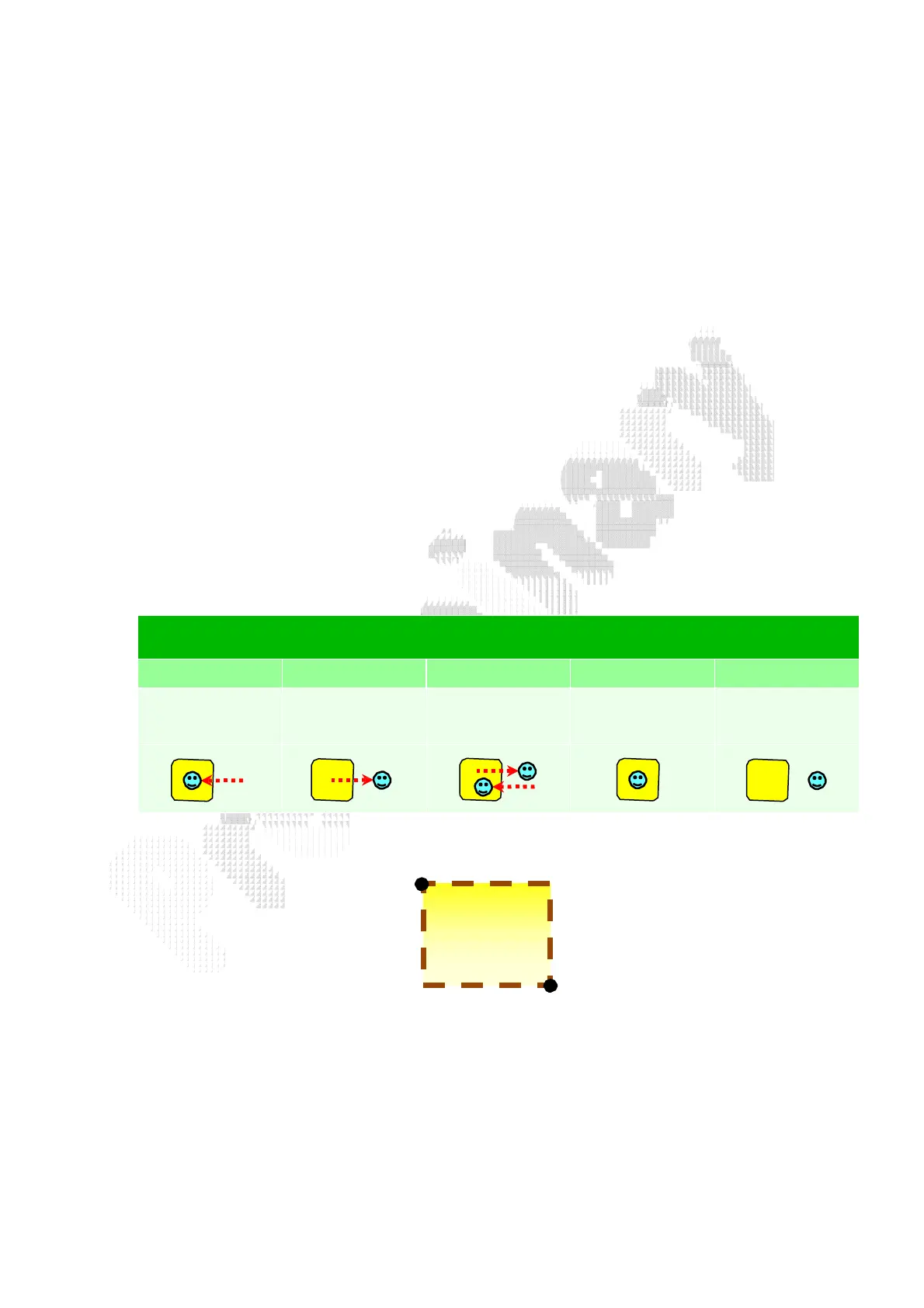
be 0. The alert types of geo-fence are illustrated below.
Alert type of Geo-fence
1
2 3 4 5
Get in area
Get out of
area
Cross over
the boundary
Stay in area
Stay out of
area
(upper_left_Lon,upper_left_Lat)
(right_bottom_Lon,right_bottom_Lat)
7.3.1 Setup Geo-fence
A Geo-fence area is defined by several parameters.
Area ID


 To Next Page