15ST100 User Manual v1 Confidential & Proprietary Information
8545-0194-01 v1.0
4. APPLICATION PROGRAMMING INTERFACE
The ST100 Board provides a Bluetooth Low Energy (BLE) GATT/Modem interface for controlling the operation of the device.
Commands are used to send information over the commercial IoT network, operate the GPS engine, and monitor the internal
operation of the device. The following types of commands are provided by the ST100 Interface:
• Simple ASCII Text commands for basic operation.
• Legacy binary commands, primarily emulating the interface of the STINGR product
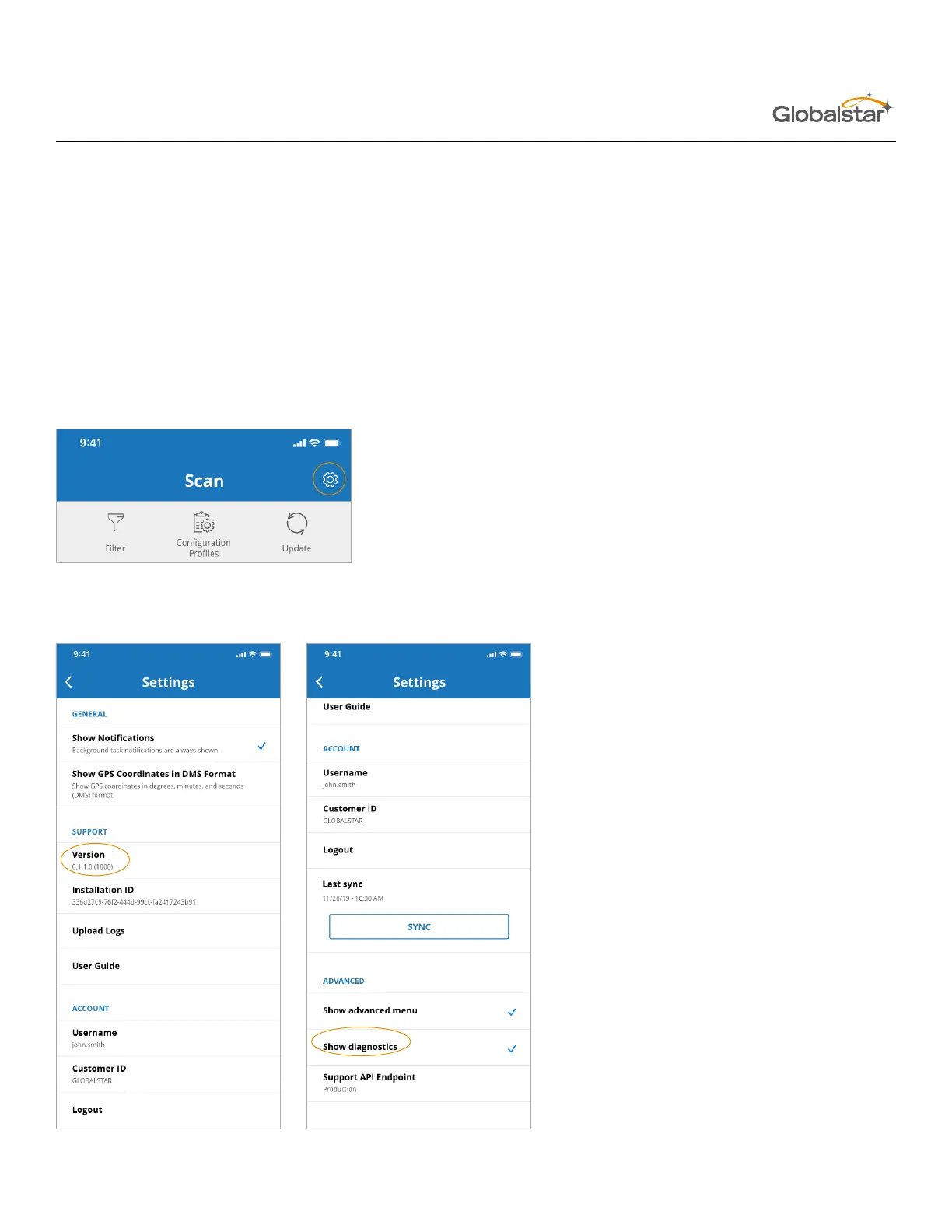
Commands can be entered using the Diagnostics screen in the Globalstar ST100 app.
Enabling Diagnostics Screen
1. Login to the app and click the Settings icon in the top right corner.
2. On the Settings screen tap “Version” 10 times.
3. Select “Show Diagnostics” on the “ADVANCED” menu.


 To Next Page