0020094585_01-08/10-Glow-worm
- 15 -
HOWTOUSEYOURCLIMAPRO
2
RF
- toafullweek(Monday-Sunday).
Onceadayhasbeenprogrammed,you
areautomaticallyreturnedtotheselection
screenofthedaytobeprogrammed.
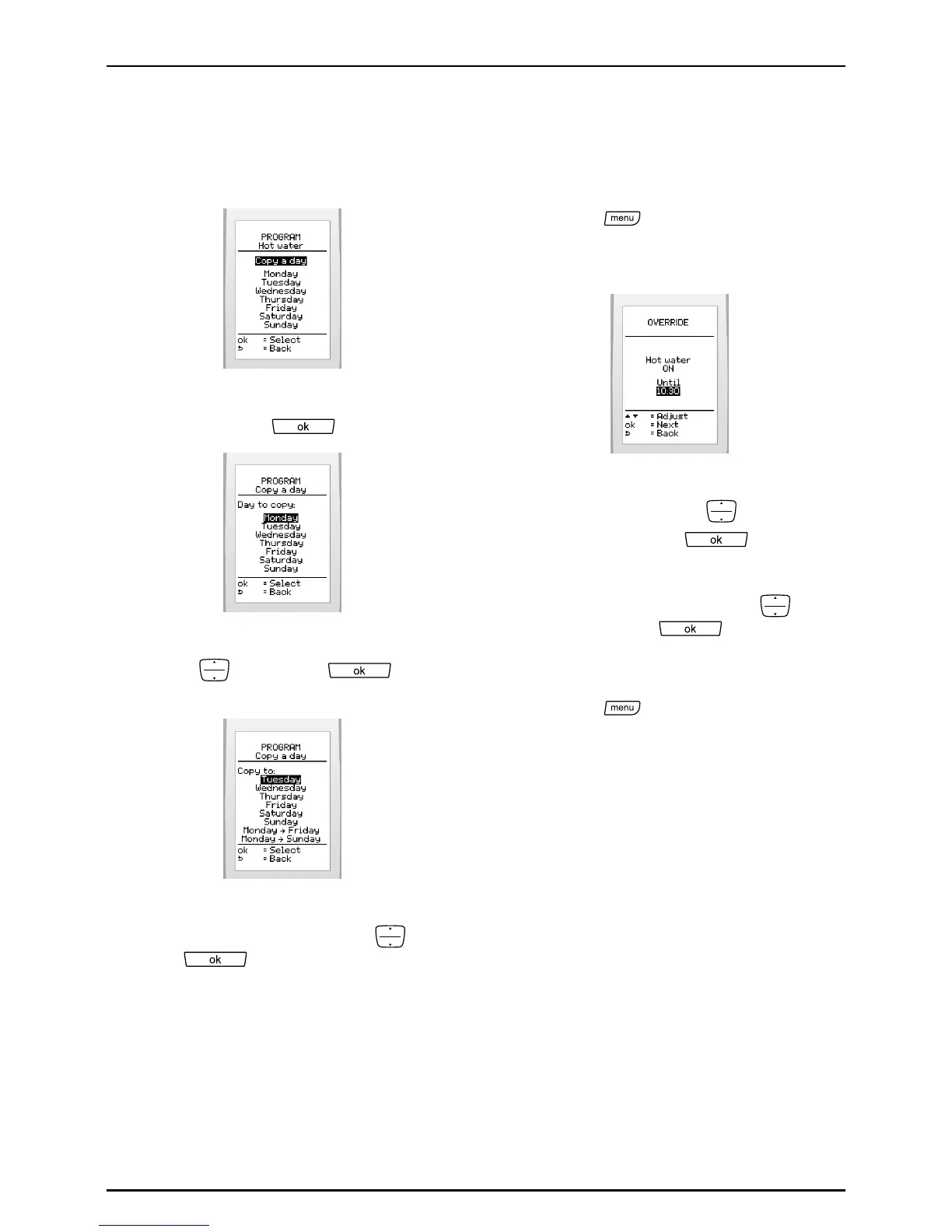
• Selectthefunction(copyaday)and
pressthebutton toconrm.
• Selectthedaytobecopiedwiththe
buttons
andpress to
conrm.
• Copytothedayorgroupofdaysof
yourchoicebyselectingwith
and
press toconrm.
6.8.5 To override the hot water
heating program
Thisfeatureallowsthetemporary
overridingofcurrentprograms.
• Pressthe
button,then,onthe
screen,select>hot water>override
temperature>set up.
• Activateordeactivatedomestichot
waterheatingwiththe
buttonsand
validatewithbutton
.
• Settheendtimeofthetemporary
modicationwiththebuttons
and
pressthebutton toconrm.
Tocancel:
• Pressthe
button,then,onthe
screen,select> hot water>override
off.
Itisalsopossibletocanceltheoverride
fromthemainscreen(seeoverridemenu).


 To Next Page