BACKUP LOAD PAN: THESE CIRCUITS WILL BE
POWERED BY BDI WHEN IN BACKUP MODE.
THIS BREAKER PAN BUS BAR IS RATED FOR 166 A CONTINUOUS @ 240
VAC.BREAKER PAN TO MID BUS BAR TORQUE: 72 in-lb. USE ONLY EATON BR
or BQC BREAKERS IN THIS PAN. TORQUE TERMINALS TO THE VALUES
SPECIFIED ON THE BREAKER.
2
4
6
8
10
12
Backed-up circuits
BDI L1
BDI L2
1
3
5
7
9
11
Backed-up circuits
EVSE PAN: THIS PAN IS ONLY SUITABLE FOR
CONNECTING EVSE CIRCUITS!
THIS BREAKER PAN BUS BAR IS RATED FOR 125A @ 240 VAC. USE ONLY
EATON TYPE 24INT125B. BREAKER PAN TO MID CASE TORQUE: 25 in-lb.
THIS EVSE MAX. CURRENT IS 80A. USE EATON TYPE BR BREAKERS UP TO 100A
RATING. TORQUE TERMINALS TO THE VALUES SPECIFIED ON THE BREAKER.
EVSE L1
EVSE L2
1
2
The maximum operating current of this system
may be controlled electronically. Refer to the
quick installation guide for more information.
Alternate power sources for this system are
controlled by a power control system (PCS).
The setting of PCS shall be considered the
power source output circuit current.
PCS controlled current setting:
80 A 100 A 120 A
140 A
160 A
Other:____ A
System NOT configured for PCS
WARNING! ATTENTION!
Parallel Energy Source Disconnect.
Power source output connection.
Do not relocate this overcurrent device.
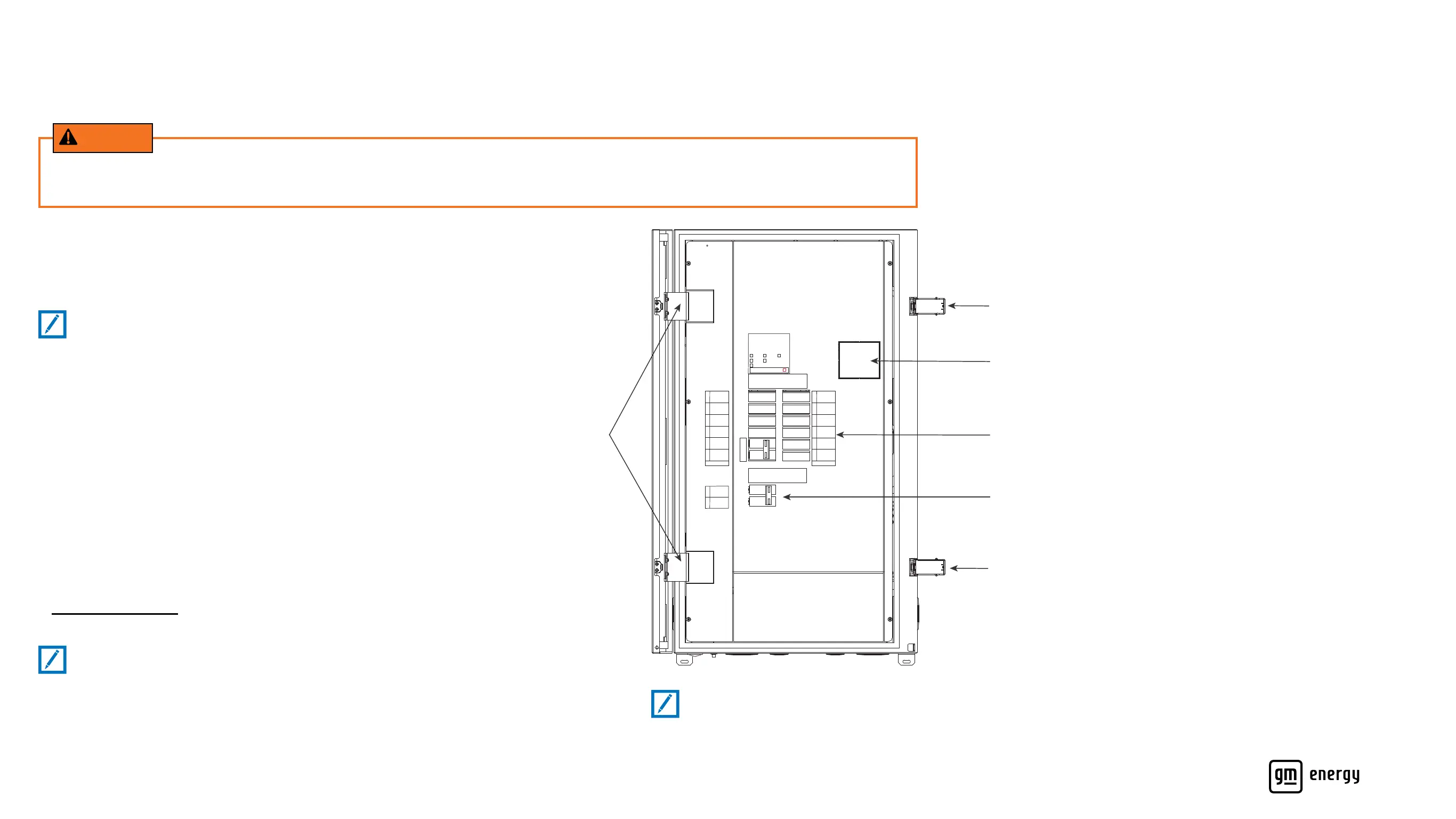
Optional Main Breaker Port
Door Hinges
Door Buckle
Branch Breaker Port
Optional EVSE Port
Door Buckle
On
Off
On
Off
On
Off
On
Off
100100
100100
7
GM Energy V2H Bundle User Manual
GETTING TO KNOW YOUR SYSTEM
GM Energy Home Hub
During a power outage, the GM Energy Home Hub safely disconnects your
home from the local power grid and enables backup power to ow from the
GM Energy Inverter throughout your home. The GM Energy Home Hub has
circuit breakers inside just like a main service panel.
You determine your experience
• The GM Energy Home Hub can be installed using a number of
congurations. When your system was installed, your installer should have
walked you through the modications that were made to your home’s
electrical system
• For more information on your system’s unique setup, view the inside
cover of the GM Energy Home Hub. For further information, contact your
installer or the GM Energy Support Center
• To optimize your experience, consider which appliances draw a lot
of power or are prone to power surges so that you can avoid disrupting
the discharging session
Find more information about how to check the GM Energy Home Hub
in Troubleshooting Tips.
Note:
Depending on your home’s unique installation, certain appliances
or circuits may not be powered during backup power mode.
Note:
Latches on the GM Energy Home Hub door have been tted with covers; users may remove covers if desired.
Note:
In some technical documents, the GM Energy Home Hub may be
referred to as an MID (Microgrid Interconnect Device).
The GM Energy Home equipment should not be used as a primary or backup power source for medical equipment or any other
products in which failure could lead to injury or loss of life.
WARNING



 To Next Page