28
29
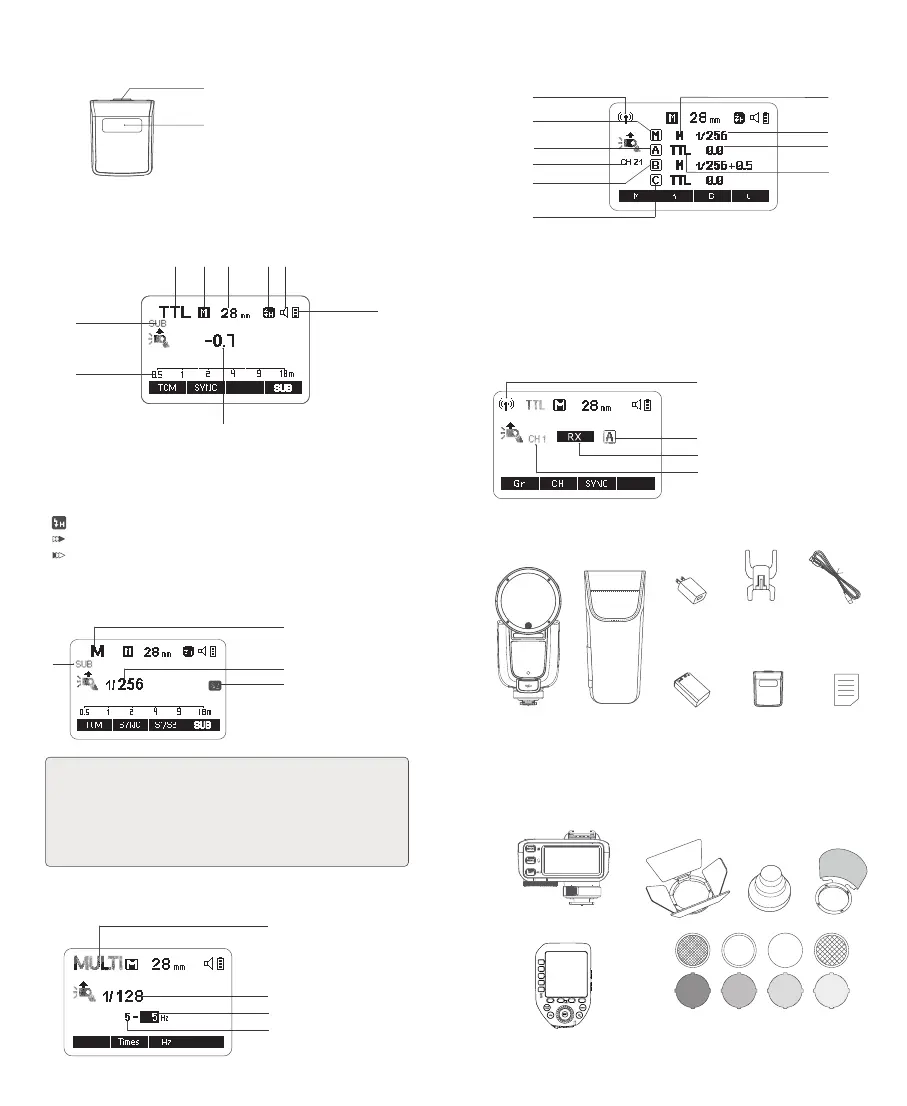
The product can be used in combination with the following accessories sold
separately, so as to achieve the best photography effects:
Receiver Unit (2.4G Wireless Receiving)
1. Radio Transmission Shooting
2. Receiver Unit Group
3. Receiver Unit (2.4G Wireless Receiving)
4. 2.4G Wireless Receiving Channel
①
④
③
②
Radio Transmission Shooting:
1. Radio Transmission Shooting
2. Transmitter Channel
3. Group M: Transmitter Unit Group M
4. Group A: Receiver Unit Group A
5. Group B: Receiver Unit Group B
6. Group C: Receiver Unit Group C
7. M: Manual Flash
8. Flash Output
9. Flash Exposure Compensation Amount
10.TTL: TTL Auto Flash
What's Inside
Separately Sold Accessories
Instruction
Manual×1
Storage Bag×1
TTL Wireless Flash Trigger X2T S
TTL Wireless Flash Trigger XProII S
Lithium
Battery×1
Accessory Kit for Round Flash Head AK-R1
Charger×1 USB-C Charging
Cable×1
Transmitter Unit (2.4G Wireless Transmitting)
Detachable Sub
Flash SU-1 x1
Mini Stand x1
①
⑦
⑧
⑨
②
③
⑤
⑥
④
Flash Body×1
⑩
Detachable Sub Flash SU-1
1. Flash Tube
2. Detaching Pusher
①
②
LCD Panel
TTL Auto Flash
1. TTL: TTLAuto Flash
2. A: Auto Zoom M: Manual Zoom
3. Zoom Display (Auto/28-105mm)
4.
: High-Speed Sync
:
Second-Curtain Sync
: First-Curtain Sync
5. Effective Flash Range/Shooting Distance (m/ft)
6. Flash Exposure Compensation Amount
7. Battery Level Indication
8. Beeper
9. Sub Flash SU-1 ON
Manual Flash
1. M: Manual Flash
2. Manual Flash Output
3. S1/S2 Optical Control
4. Sub Flash SU-1 ON
1. The display will only show the settings currently applied.
2. The functions displayed above function buttons 1 to 4, such as <SYNC and M/
A/B/C>, change according to settings’s status.
3. When a button or dial is operated, the LCD panel will be illuminated.
4.The <SUB> icon will display on the panel only after the sub flash is inserted into
the flash.
Note
:
③
①
④
②
SUBSUB
Multi Flash
1. MULTI: Stroboscopic Flash
2. Multi Flash Output
3. Flash Frequency
4. Number of Flashes
①
④
③
②
① ② ③ ④ ⑧
⑦
⑤
⑨
⑥


 To Next Page