46 47
Troubleshooting
The camera flash does not fi re.
If there is a problem, refer to this troubleshooting guide.
The camera flash is not attached securely to the camera.
Attach the camera’s mounting foot securely to the camera.
The electrical contacts of the camera flash and camera are dirty.
→
Clean the contacts.
The power turns off by itself.
After 90 seconds of idle operation, auto power off took effect if the flash is
set as a transmitter unit.
→
Press the shutter button halfway or press any flash button to wake up.
After 60 minutes (or 30 minutes) of idle operation, the flash enter sleep
mode if it is set as receiver unit.
→
Press any flash button to wake up.
Auto zoom does not work.
The camera flash is not attached securely to the camera.
→
Attach the camera flash’s mounting foot to the camera.
Photos have dark corners or only parts of the target subject are
illuminated.
The focal length of lens exceeds the flash coverage.
→
Check the flash coverage you set. This flash unit has the flash coverage
between 28 and 105mm, which fi ts medium-format cameras.
The flash exposure is underexposed or overexposed.
You used high-speed sync.
→
With high-speed sync, the effective flash range will be shorter. Make sure
the subject is within the effective flash range displayed.
You used manual flash mode.
→
Set the flash mode to TTL or modify the flash output.
Firmware Upgrade
1. This product supports fi rmware upgrade through the USB-C port, please
use USB-C cable (sold separately).
2. As the fi rmware upgrade needs the support of Godox G3 software, please
download and install the "Godox G3 fi rmware upgrade software" before
upgrading. Then, choose the related fi rmware fi le.
3. Please refer to the latest electronic version of the instruction manual.
Compatible Camera Models
This flash unit can be used on the following Sony camera models:
α77II, α99, α77, DSC-RX10, α6000, α7R, α6400, α7RII, α7RIII, α7M3, α9,
α7RIV, α7R5, α7MIV, ZV-E10, α58, ILCE6000L, α7R3, α 350
1. This table only lists the tested camera models, not all Sony cameras. For the
compatibility of other camera models, a self-test is recommended.
2. Rights to modify this table are retained.
Note:
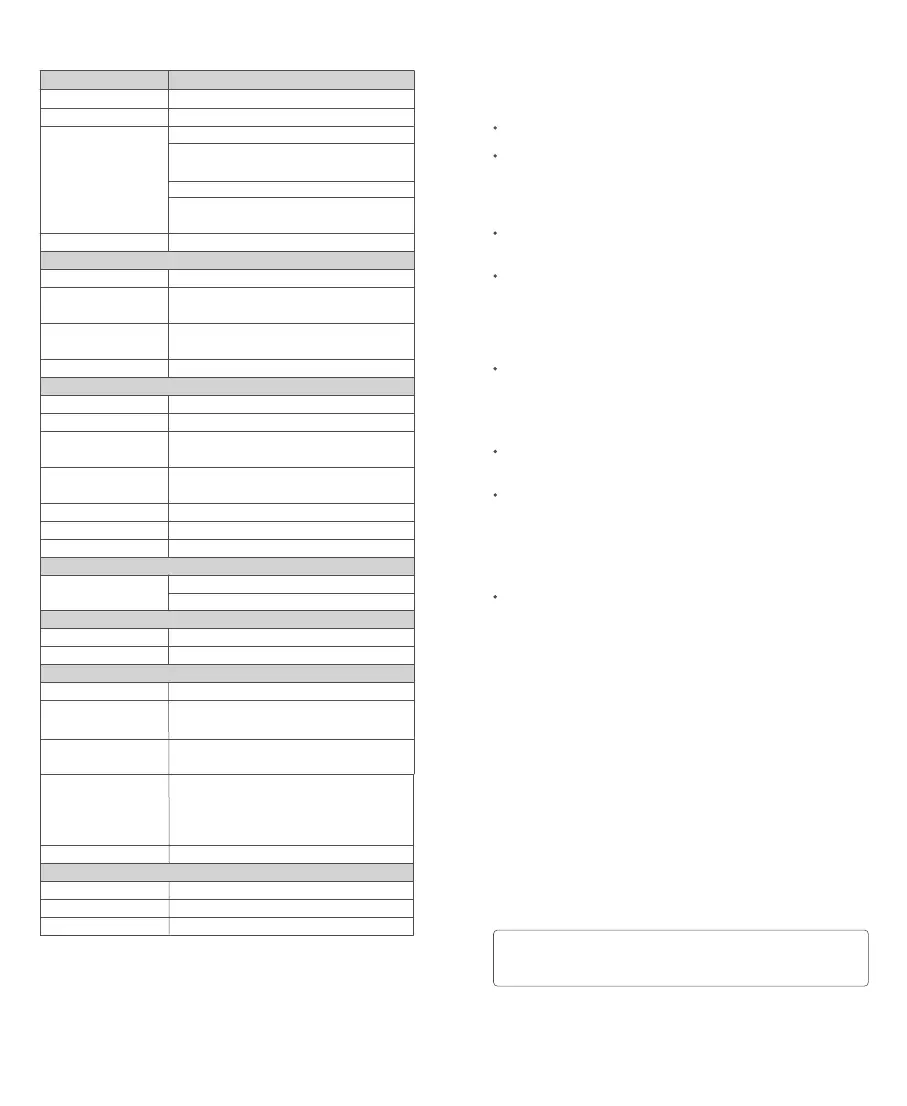
Technical Data
Model
Compatible Cameras
Power(1/1output)
Flash Coverage
Flash Duration
Exposure Control
Exposure Control System
Flash Exposure
Compensation (FEC)
Sync Mode
Multi Flash
Wireless Function
Transmitter Unit Groups
Controllable Receiver
Groups
Transmission Range
(approx.)
Channels
ID
Modeling Flash
Auto Focus Assist Beam
Effective Range (approx.)
LED Modeling Lamp
Power
Color Temperature
Power Supply
Built-in Lithium Battery
Recycle Time
Number of Flashes at 1/1
step
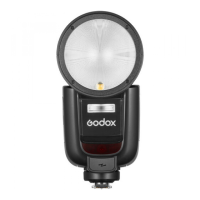
Wireless Flash (Radio 2.4G Transmission)
V1Pro S
Sony cameras ( TTL auto flash)
76Ws
28 to 105mm
• Auto zoom (flash coverage is set automatically to
match the lens focal length and image size)
• Manual zoom
• Swinging/tilting flash head (bounce flash): 0 to
330° horizontally and -7° to 120° vertically
1/300 to 1/20000 seconds
TTL auto flash and manual flash
Manual: ±3 steps with 1/3 increment each step
High-speed sync (up to 1/8000 seconds), fi rst-
curtain sync, and second-curtain sync
Provided (up to 90 times, 100Hz)
Transmitter, Receiver, Off
M, A, B, C
A, B, C, D, E (E group can be controlled by X series
flash trigger)
100m
32 (01~32)
OFF/01~99
Fired with camera’s depth-of-fi eld preview button
Center: 0.6~10m / 2.0~32.8 feet
Periphery: 0.6~5m / 2.0~16.4 feet
2w
3300K±200K
7.2V/2980mAh
Approx. 1.3 seconds. Green LED indicator will light
up when the flash is ready.
Approx. 500
Power off automatically after approx. 90s of idle
use when set as a transmitter unit.
Screen sleep automatically after approx. 60min (or
30min) of idle use when set as a receiver unit.
Hot shoe, 2.5mm sync cord
6.14‘’×2.99‘’×4.88‘’
466g
580g
Power Saving
Sync Triggering Mode
Dimension
W x H x D
Net Weight Without Battery
Net Weight With Battery
Specifi cations and data may subject to changes without notice.


 To Next Page