44 45
Number of flashes that will activate over-temperature protection:
Power Output Level
1/1
1/2 (+0.1~+0.9)
1/4(+0.1~+0.9)
1/8(+0.1~+0.9)
1/16(+0.1~+0.9)
1/32(+0.1~+0.9)
1/64(+0.1~+0.9)
1/128(+0.1~+0.9)
1/256(+0.1~+0.9)
Number of Flashes
100
150
300
300
1100
3500
3500
3500
3500
Note: Numbers of flashes of over-temperature protection are different in different zoom values
and different levels.
Number of flashes that will activate over-temperature protection in HSS
mode:
Power Output Level
1/1
1/2 (+0.1~+0.9)
1/4(+0.1~+0.9)
1/8(+0.1~+0.9)
1/16(+0.1~+0.9)
1/32(+0.1~+0.9)
1/64(+0.1~+0.9)
1/128(+0.1~+0.9)
1/256(+0.1~+0.9)
Number of Flashes
60
70
100
100
100
100
100
100
100
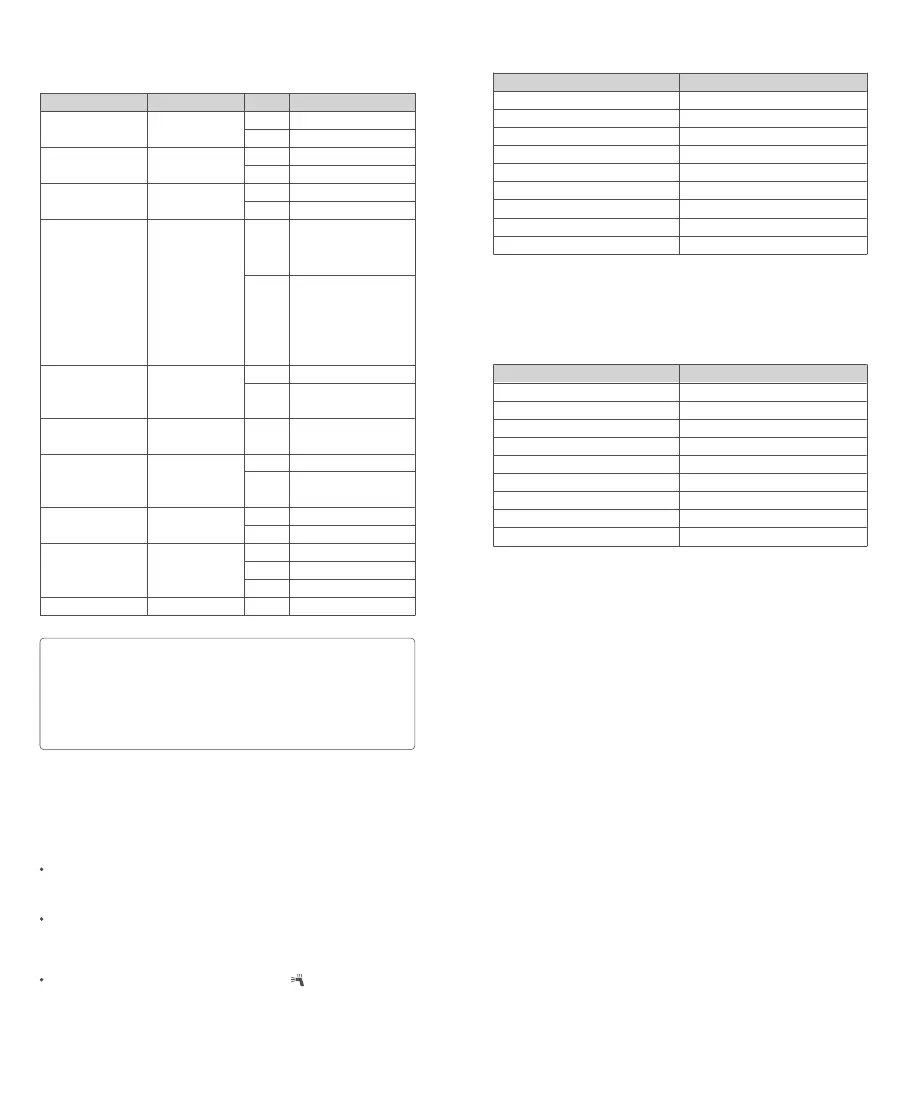
C.Fn: Setting Custom Functions
Custom Function Signs
m/ft
AF
STBY
RX STBY
SCAN
CH
ID
BEEP
LIGHT
LCD
Function
Distance indicator
AF-assist beam
Auto sleep setting
Receiver auto
power off timer
Scan the spare
channel
Wireless Channel
ID
Beeper
Backlighting time
LCD contrast ratio
Options
m
ft
ON
OFF
ON
OFF
60min
30min
OFF
START
01-32
OFF
01-99
ON
OFF
12sec
OFF
ON
-3~+3
Settings & Description
m
Feet
ON
OFF
ON
OFF
Power off automatically
after 60 minutes of idle
use when the flash is set
as a receiver unit.
Power off automatically
after 30 minutes of idle
use when the flash is set
as a receiver unit.
OFF
Start to scan the spare
channel
Choose channels from
01-32
OFF
Choose any fi gure from
01-99
ON
OFF
Off in 12 sec.
Always off
Always lighting
7 levels
Press the menu button to enter C.Fn settings.
1. The “Verx.x” in the top-right corner refers to the software version.
2. Turn the select dial to select the custom function No. and its parameters.
3. Press set button to select the custom function No. and confi rm its setting.
4. After you set the custom function and press <MENU> menu button, the camera
will be ready to shoot.
5. Press and hold the function button 1 <CLEAR> in the MENU interface until “OK” is
displayed on the panel, which means the parameters in C.Fn are reset.
Note
:
Protection Function
Over-Temperature Protection
To avoid overheating and deteriorating the flash head, do not fi re more
than 100 continuous flashes in fast succession at 1/1 full power. After 100
continuous flashes, allow a rest time of at least 10 minutes.
If you fi re more than 100 continuous flashes and then fi re more flashes
in short intervals, the inner over-temperature protection function may be
activated and make the recycle time over 10 seconds. If this occurs, allow a
rest time of about 10 minutes, and the flash unit will then return to normal.
When the over-temperature protection is started, <
>is shown on the LCD
display.


 To Next Page