12
| QUICK START
ON/OFF
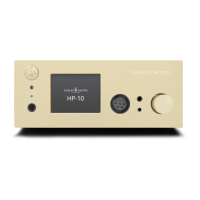
Connect the HP-10 to the power using the
supplied power cord.
The status LED turns red to indicate the
amplier is on standby.
SKC: switch the unit ON/OFF by pressing
and holding the knob for 3 seconds.
HOW TO SELECT FUNCTIONS
Touchscreen display: To select the function
and access the dedicated menu, click on it
once and then swipe left and right to browse
the menu. Click on the chosen function to
conrm it and return to the main screen.
Remote control: Use the IN + and IN
- buttons to navigate the main screen,
press once the centre button to activate a
function (that will turns yellow) and enter
the dedicated menu. Using the IN + and IN -
buttons to navigate the menu then press the
centre button once to confirm the function
and return to the main screen.
3 seconds push
Remote control: press the AMP mode
button and then the POWER button. To
switch OFF the unit, simply press the POWER
button.
Touchscreen display: tap and hold the
display for 3 seconds to turn ON/OFF the
unit.
Tap and hold
for 3 seconds
VOLUME CONTROL
SKC: Rotate the knob to the left and right to
adjust the volume at any time.
Touchscreen display: Tap the volume icon
once to activate/deactivate the MUTE
option.
Remote control: Use the VOL + and VOL -
buttons to adjust the volume.


 To Next Page