16
Studio is our innovative set of features that
pushes your headphones to the next level,
fully implemented in the analogue domain to
provide the best audio quality.
| Crossfeed mixes L/R channels to recreate a
sound stage, as if listening to loudspeakers.
| Harman Curve optimises the EQ for
listening with headphones.
| Superflat linearises the response for the
highs.
| DF adjusts the Damping factor perfectly
matching your headphones.
The STUDIO screen allows 4 different proles
to be set and stored:
| PROFILE 1
| PROFILE 2
| PROFILE 3
| OFF - No active options
| STUDIO
HOW TO SELECT FEATURES
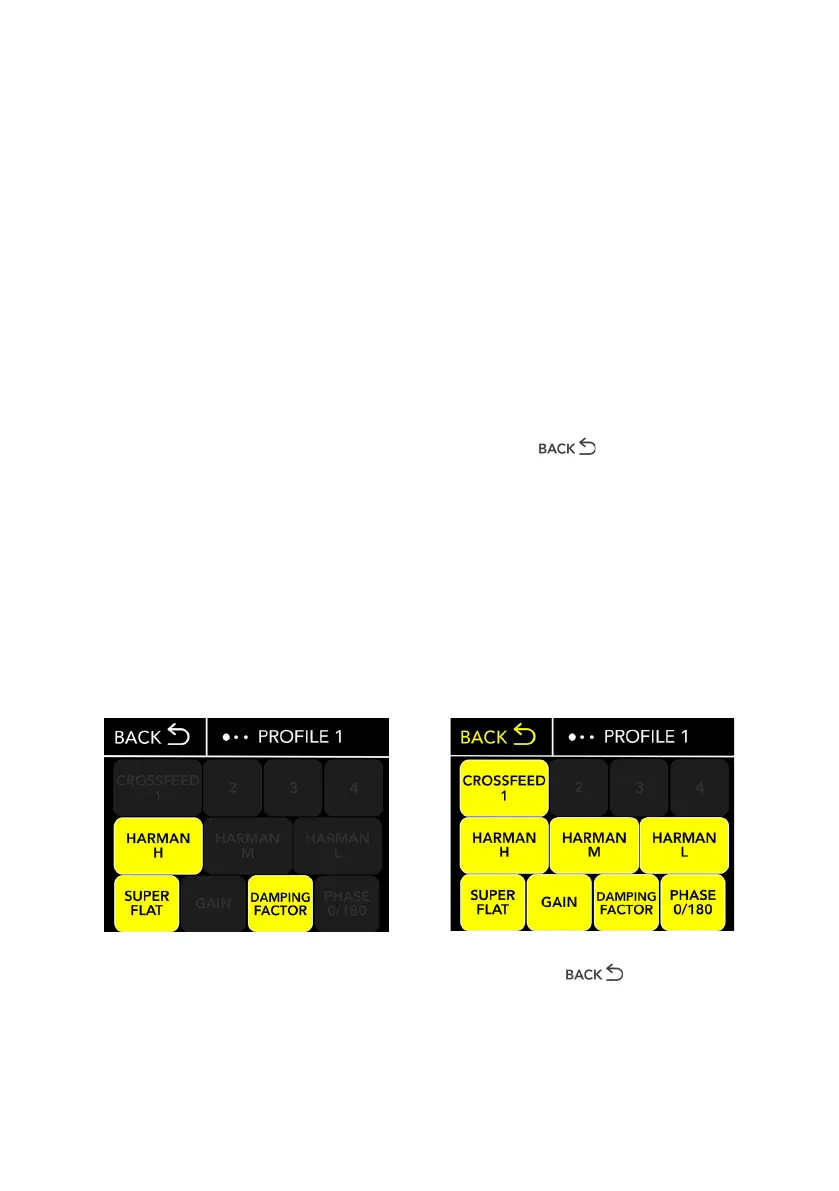
Touchscreen display: click once on the
prole you want to select to activate it.
Then simply click once on the items to
activate (the background item turns yellow)
and deactivate them.
Remote control: Use the IN + and IN -
buttons to navigate between proles.
The prole name turns yellow when selected
from the remote. Press the centre button to
active the chosen prole.
Finally click on (the text turns yellow)
to save and return to the main screen.
PLEASE NOTE: It is possible to activate
all functions at the same time with the
exception of Crossfeed, for which only one
of the four options must be chosen.
Select some or all functions
Press once to conrm


 To Next Page