EasyManua.ls Logo

Gold's Gym CWTL05607 - User Manual

Gold's Gym CWTL05607
36 pages
Print Icon
To Next Page IconTo Next Page
Loading...
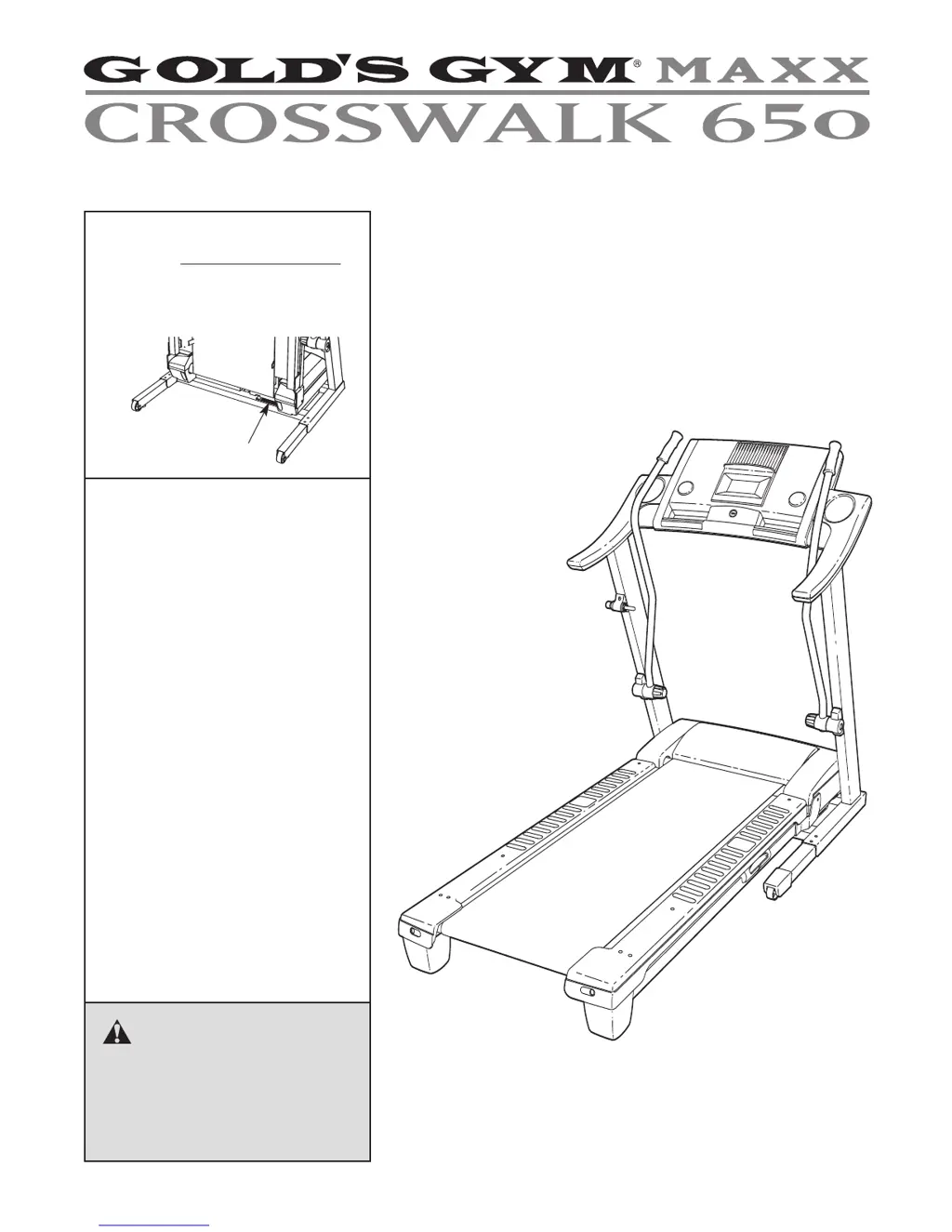
Serial Number Decal
Model No. CWTL05607.1
Serial No.
CAUTION
Read all precautions and instruc-
tions in this manual before using
this equipment. Save this manual
for future reference.
USER'S MANUAL
QUESTIONS?
As a manufacturer, we are commit-
ted to providing complete customer
satisfaction. If you have questions,
or if parts are missing, PLEASE DO
NOT CONTACT THE STORE;
please contact Customer Care.
IMPORTANT: You must note the
product model number and
serial number (see the drawing
above) before contacting us:
CALL TOLL-FREE:
1-877-776-4777
Mon.–Fri. 6 a.m.–6 p.m. MST
Sat. 8 a.m.–4 p.m. MST
ON THE WEB:
www.goldsgympowerflex.com
Write the serial number in the space
above for future reference.

Questions and Answers

  • C
    Carolyn DunnJul 29, 2025
    How to fix Gold's Gym CWTL05607 Treadmill if the power does not turn on?
    • L
      Lindsey JohnsonJul 29, 2025
      If your Gold's Gym Treadmill power isn't turning on, first ensure that the power cord is securely plugged into an outlet. Also, check the reset/off circuit breaker located on the treadmill frame near the power cord. If the switch protrudes, the circuit breaker has tripped. To reset it, wait five minutes, and then press the switch back in.
  • S
    Summer WilliamsAug 3, 2025
    What to do if Gold's Gym CWTL05607 Treadmill walking belt is off-center or slips?
    • C
      Catherine SullivanAug 3, 2025
      If the walking belt of your Gold's Gym Treadmill is off-center or slips when you walk on it, remove the key and unplug the power cord first. If the belt has shifted to the left, use a hex key to turn the left rear roller bolt clockwise 1/2 turn. If it has shifted to the right, turn the left bolt counterclockwise 1/2 turn. If the belt slips, turn both rear roller bolts clockwise 1/4 turn using the hex key.
  • N
    Natalie HansenAug 8, 2025
    How to troubleshoot Gold's Gym CWTL05607 if the display of the console does not function properly?
    • W
      walkerjasonAug 8, 2025
      If the console display of your Gold's Gym Treadmill isn't functioning correctly: 1. Remove the key from the console and unplug the power cord. 2. Carefully lower the Uprights. 3. Remove the two screws. 4. Locate the Reed Switch and the Magnet on the left side of the Pulley. Turn the Pulley until the Top Magnet is aligned with the Reed Switch. 5. Ensure that the gap between the Magnet and the Reed is slight, and then retighten the Screw.
  • D
    Dylan TranAug 13, 2025
    What to do if Gold's Gym Treadmill incline does not change correctly?
    • P
      Peter RichardAug 13, 2025
      If the incline of your Gold's Gym Treadmill does not change correctly, insert the key into the console, and press one of the Incline buttons. While the incline is changing, remove the key. After a few seconds, reinsert the key.
  • S
    Stephanie JohnsonAug 18, 2025
    How to fix Gold's Gym CWTL05607 upper body arms squeak?
    • J
      justinjamesAug 19, 2025
      If the upper body arms of your Gold's Gym Treadmill squeak during use, and specifically if the Left Upper Body Arm squeaks, turn the Resistance Knob counterclockwise and remove it. Apply a thin layer of white marine grease to the outer surface of the Resistance Cone. Then, reattach all parts. Repeat this procedure for the Right Upper Body Arm if necessary.
  • R
    Ryan DickersonAug 23, 2025
    How to turn off demo mode on Gold's Gym Treadmill?
    • C
      Chelsea WaltersAug 23, 2025
      To turn off the demo mode on your Gold's Gym Treadmill, if the console displays remain lit after removing the key, hold down the Stop button for a few seconds.

Summary

Important Precautions

Assembly Instructions

Initial Assembly Steps

Guides through initial assembly steps like attaching uprights and wires.

Operation and Adjustment

Power Cord Connection and Surge Protection

Details on connecting the power cord, surge suppressor requirements, and grounding.

Powering On and Manual Mode Operation

Guides on turning on the treadmill, using the safety clip, and operating in manual mode.

Cross Trainer Workouts

Distance Workouts

Preset Workouts

Folding and Moving the Treadmill

Folding the Treadmill for Storage

Step-by-step guide on how to fold the treadmill into its storage position.

Lowering the Treadmill for Use

Troubleshooting Common Problems

Power On and During-Use Issues

Solutions for problems like the treadmill not turning on or turning off during use.

Incline and Belt Speed Issues

Troubleshooting steps for incorrect incline changes and the walking belt slowing under load.

Belt Alignment and Slipping

Solutions for an off-center or slipping walking belt.

Exercise Guidelines and Intensity

Part List

Exploded Drawing A

Exploded Drawing B

Exploded Drawing C

Exploded Drawing D

Ordering Replacement Parts

Gold's Gym CWTL05607 Specifications

General IconGeneral
Maximum Speed10 mph
DisplayLCD
Incline Range0-10%
FoldingYes
Programs8
Speed Range0.5 - 10 mph

Related product manuals