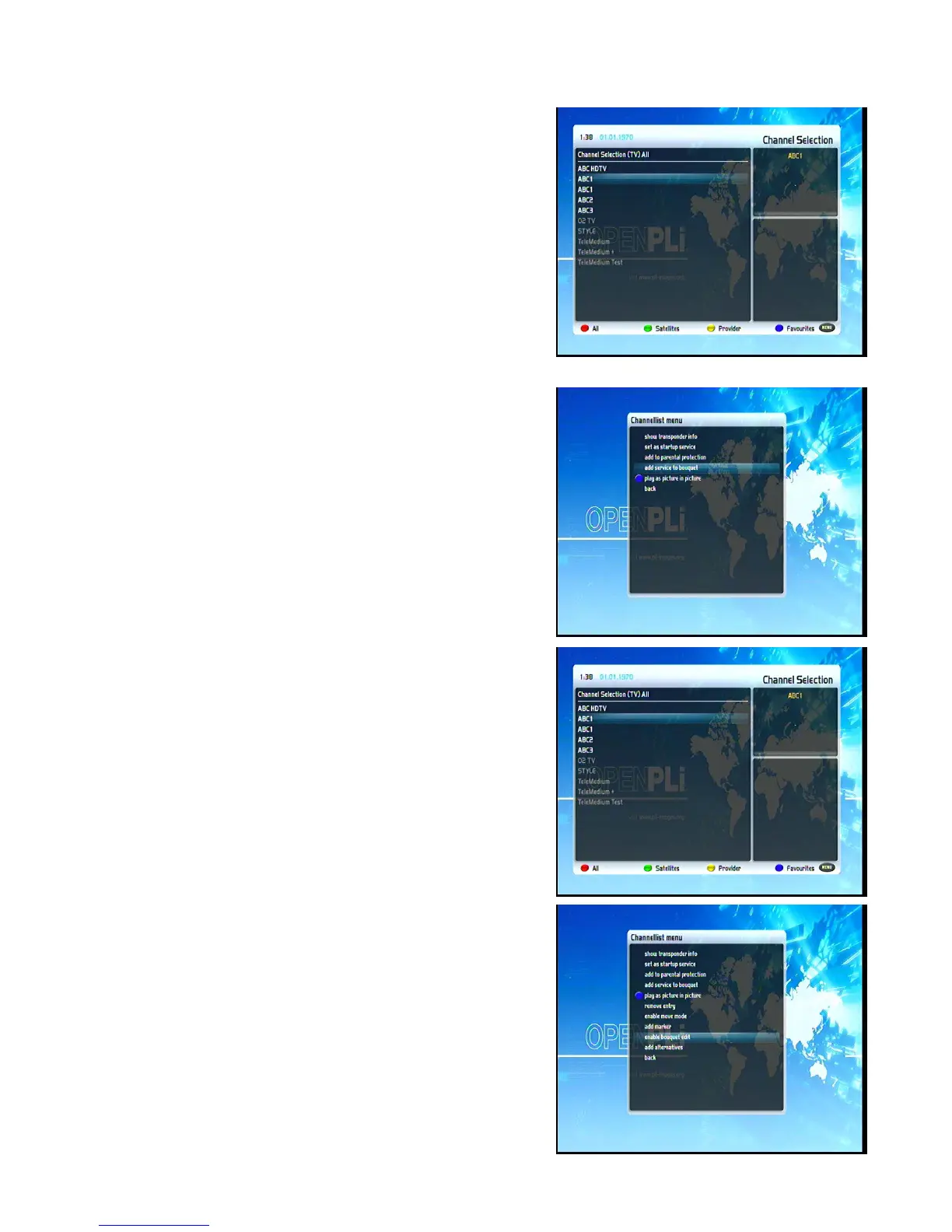
6.2 Add a service to favorites
If you want to add a service to your Favorites-view, you can
choose from services in the All-, Satellites- and Provider-views.
You can switch views by pressing the red, green, yellow and blue
Options-Buttons. At this point we only describe the process from
the All-Bouquet since it is the same for the others.
Press the Up/Down-Buttons on your remote control to activate
the service list.
Press the red Options-Button to change to the All view.
Use the Navigation-Buttons up/down to select the desired
service and press the MENU-Button to open the “Channel list
menu”.
Navigate to the option “add service to bouquet”.
If you are using more than one bouquet this option is named “add
service to bouquet” instead and you will get a list of your
bouquets afterwards. You can choose to which bouquet you
want to add the currently selected service.
If you are using only one bouquet which is the factory default, the
service will be added to you favorites list.
6.3 Adding multiple services to a bouquet
You can select multiple services from the All-view to be added to
the currently selected bouquet.
Press the Up/Down-Buttons on your remote control to activate
the service list.
Use the Bouquet +/- Buttons to switch to the desired bouquet. As
an alternative you can press the blue Options-Button and select
the desired bouquet.
After that select a service and switch to it by pressing the
OK-Button.
The “Channel list menu“will open up by pressing the
Menu-Button.
Navigate to the option “enable bouquet edit“. The All view will
Open up.
15


 To Next Page