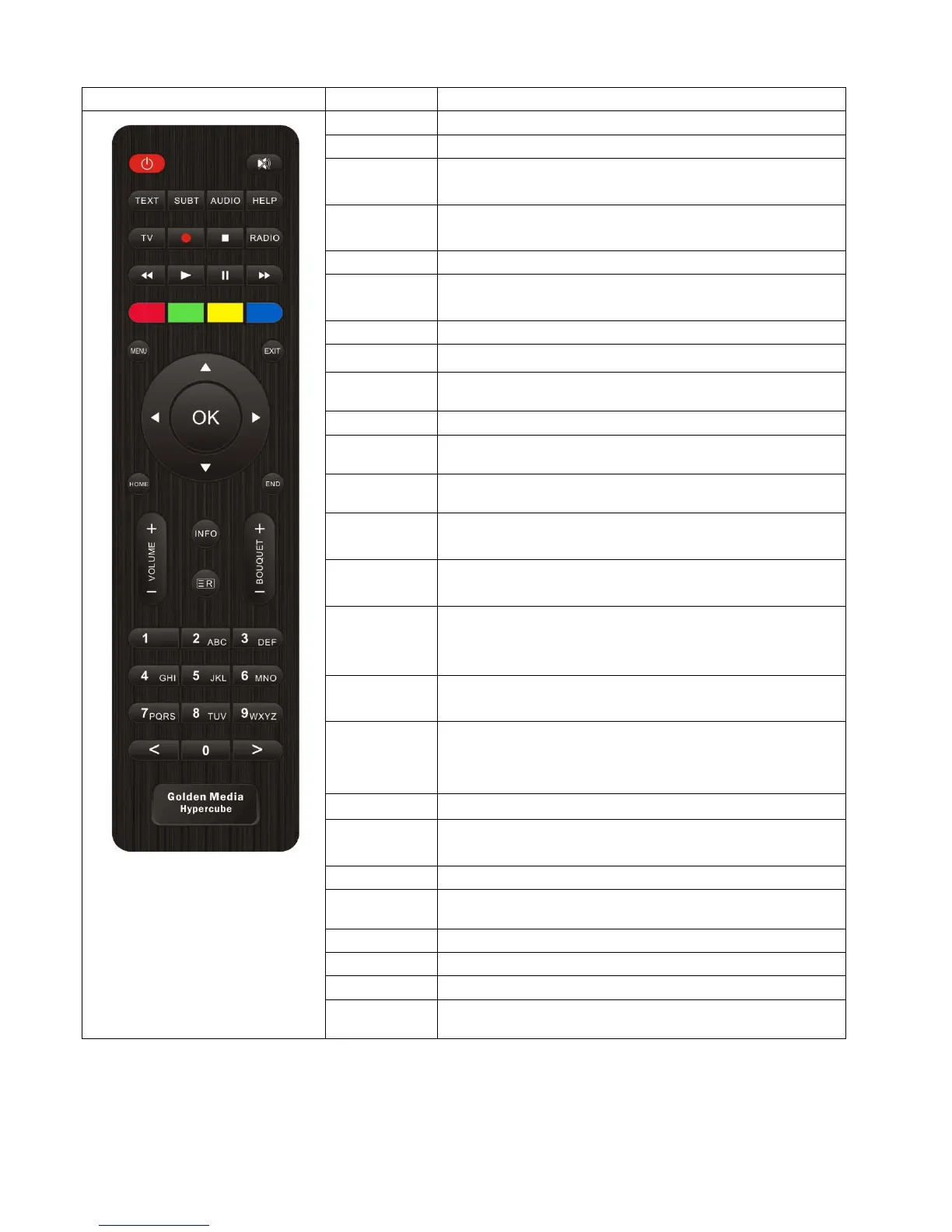
1.2 Remote Control
RCU Key Function
POWER Switch the STB ON and OFF.
MUTE Silence the audio temporarily.
TEXT Display the teletext information of the current channel, if the
channel provides teletext data.
SUBT Display the subtitle of the current channel, if the channel provides
subtitle.
AUDIO Display the audio track option to choose from (e.g. ACS, Stereo).
HELP Display major important operation methods of STB.
This provides users with a quick guide of using STB.
TV Display the TV Channel list.
Recording Display instantly the recording menu.
Stop Stop the playing of a recording and go to the live mode.
Radio Display the Radio channel list.
Play Play the selected file (e.g. recording) at normal speed.
Pause Pause the live program or recording play.
Fast Rewind Fast rewind at up to 128 times faster than at normal speed
(x2 / 4 / 8 / 16 / 32 / 64 / 128).
Fast Forward Fast forward at up to 128 times faster than at normal speed
(x2 / 4 / 8 / 16 / 32 / 64 / 128).
Color Keys
(Red,Green,Yell
ow,Blue)
Each key is assigned to a specific function which may be different in
each menu.
Numeric Keys Enter a channel number or numbers required to be input according
to menu options.
Navigation Keys Navigate up/down and left/right on the menu options.
Up/down keys are used to call up the channel list.
OK Confirm the selected menu option.
EXIT Exit the current menu option into the live mode, or switch
one step back of the menu.
HOME Instantly move to the top of the menu list.
END Instantly move to the bottom of the menu list.
Volume + / - Adjust the audio volume.
Bouquet +/- jump back and forth between the bouquets
INFO Display the information in different status.
Recording List Display the list of recordings stored on the HDD.
5


 To Next Page