3. First Time Installation (using Wizard)
The starting wizard helps you with the basic setup of your STB
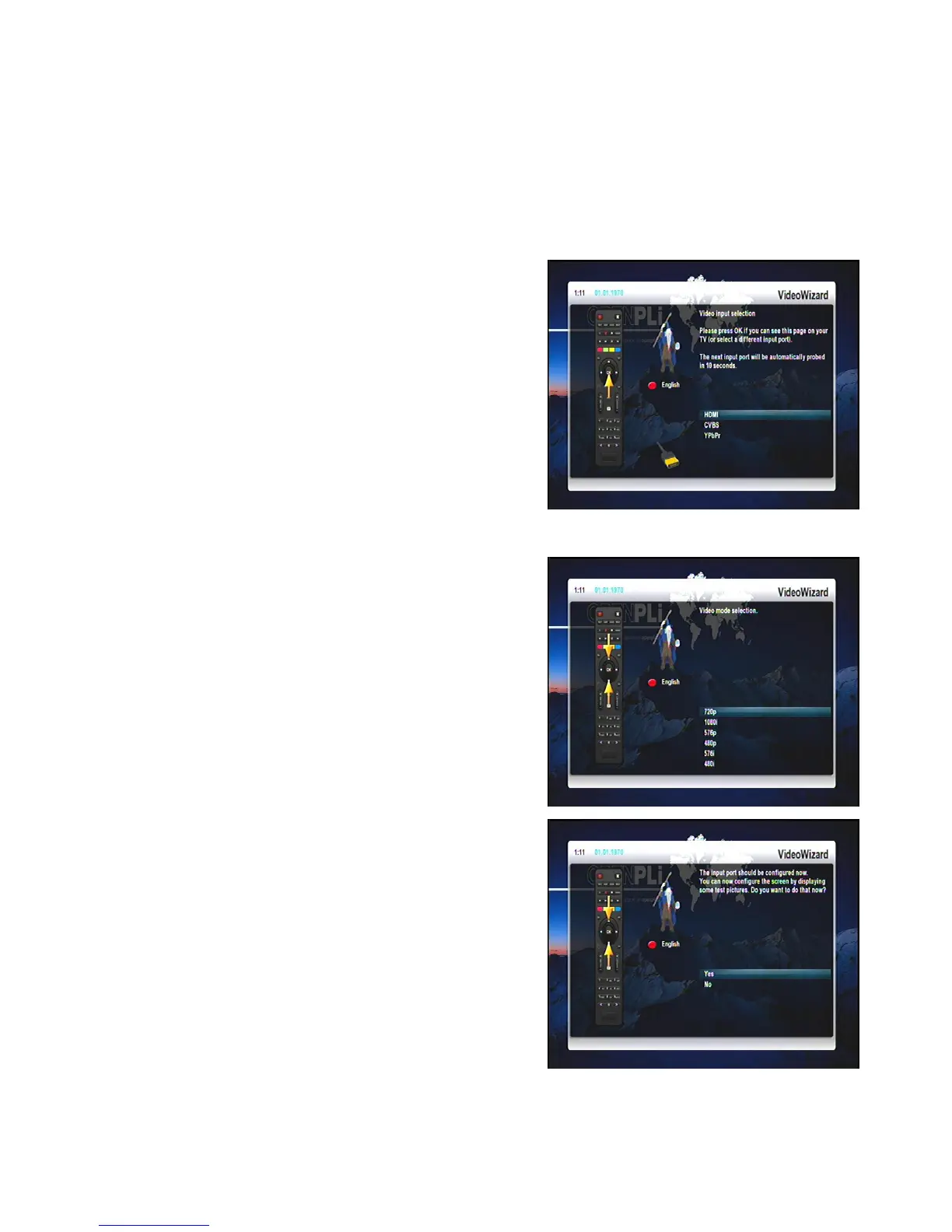
3.1 Video output selection
You will see different video output modes for roughly 10 seconds, after you have connected and switched on
your STB. Once you see a clear picture on your TV screen press the OK-Button to select it. If you prefer a
different output than the selected one you can use the Navigations-Buttons up/down and the OK-Button to
select it.
You can choose from the following video output options:
HDMI using a HDMI cable
CVBS using a component cable
YPbPr (YUV) using a component cable
Select your desired option with the Navigation-Buttons up and
down. Press the OK-Button to activate. You are taken to the
next step.
You can now select the video mode.
The possible options strongly depend on the video output mode
you have selected in the step before.
Select your desired option with the Navigation-Buttons up and
down. Press the OK-Button to activate.
You are taken to the next step.
Finally you can adjust the screen using some test screens.
Select your desired option with the Navigation-Buttons up and
down. Press the OK-Button to activate. The video outputs
should now be configured.
8


 To Next Page