Compass™ Service Manual
GP600-SM 10 RevA 02062006
II. TROUBLESHOOTING ELECTRONICS
AND THE SHARK® CONTROLLER
Note: The Dynamic® control module can be mounted on either side of the power chair
frame, in an upright position, using M5 screws. These should be tightened to a torque of
approximately 2 Newton meters (1816 lb.-in.).
NOTE: Batteries must have at least 18 VDC (combined) for the Shark system to operate. If
they do not, charge the batteries and perform a load test.
The following instructions provide details on diagnosing flash codes, in addition to the information provided in
the Shark manual:
Flash Code 1: Possible Stall Timeout or User Fault
Release the joystick to neutral and try operating the power chair again.
Flash Code 2: Battery Fault
Ensure that the battery cables are installed correctly per the owner’s manual. Check for source voltage.
Flash Code 2 Amber: Over- or Under-voltage Fault
Checking the Voltage
Check the battery voltage. If the batteries are producing between less than 13 VDC, charge them and
perform a load test.
Checking the Battery Charger
1. Unplug the joystick cable from the jumper harness.
2. Plug the charger into the joystick.
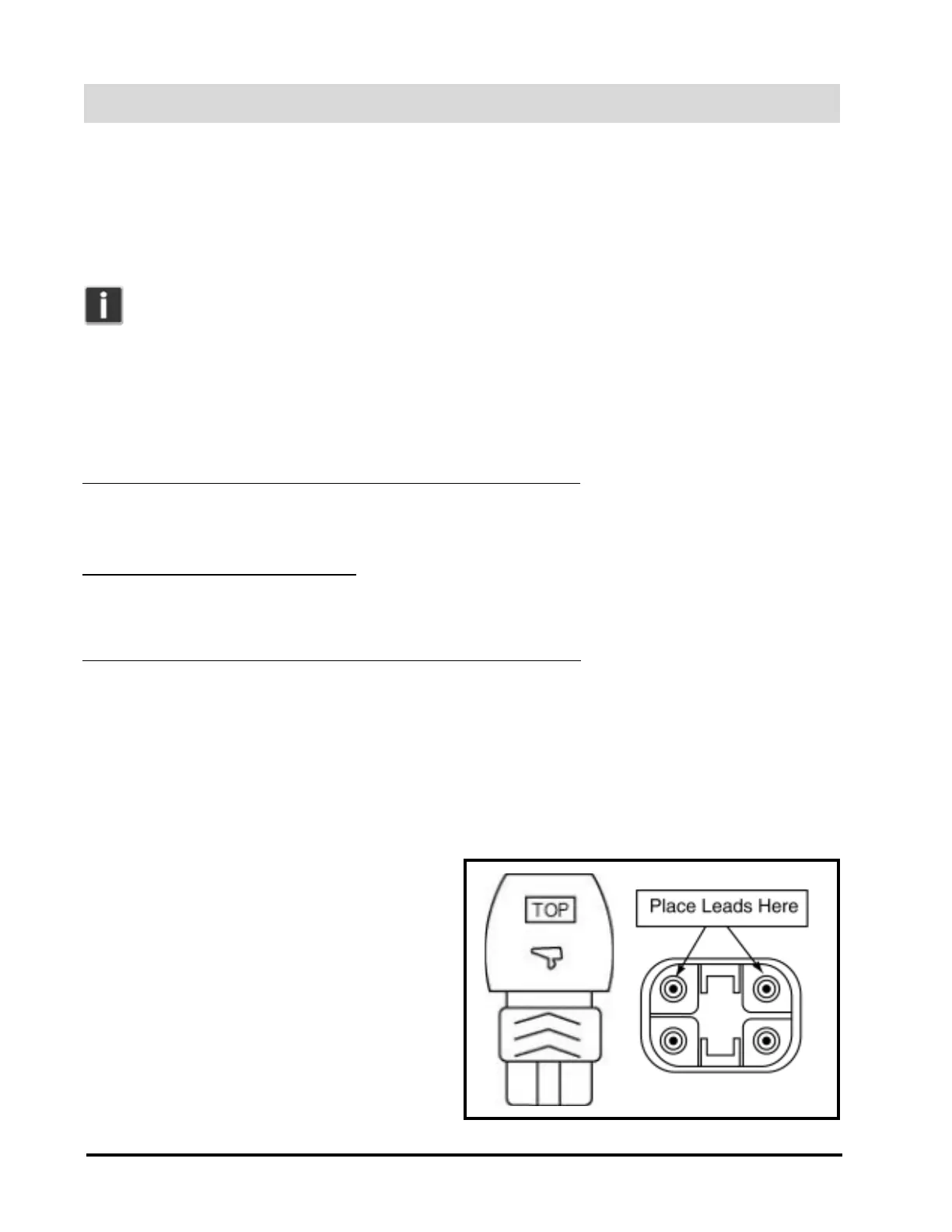
3. Take a voltage reading from the top two pins at
the end of the joystick cable; your reading
should be 27-29 VDC. See figure A.
Figure A. Top and End of Joystick Cable


 To Next Page