20
INTERCOM MENU
Continued from previous page.
Continued overleaf
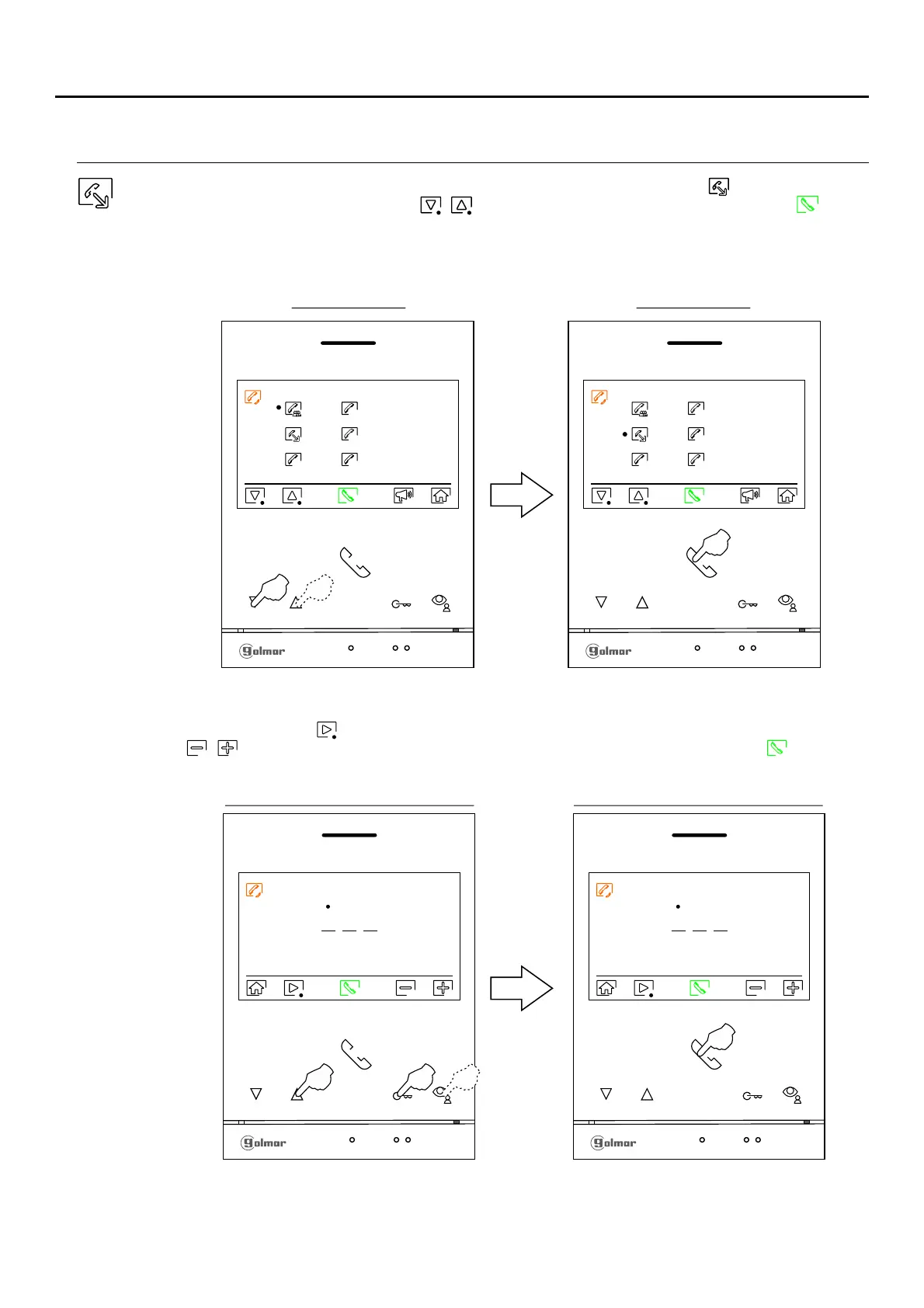
To make an external intercom call (to other apartments), go to the option with the icon by pressing the push
buttons located below the corresponding / icons, press the push button located below the icon to
access the menu for selecting the apartment code you wish to communicate with. For externalRemember:
intercommunication, the monitor(s) of the home making the call and the monitor(s) of the home receiving the call
must have the external intercommunication function activated (see page 16).
Apartment code selection screen
0 0 1
# #
M
S2
S1
S3
Intercom menu
M
S2
S1
S3
Intercom menu
Press the button below icon to select the apartment code field to be modified, then press the buttons below
icons / to modify with the apartment code to be called and press the button below icon to make the
call.
# #
Apartment code selection screen
0 0 3
# #
ART /G2+4 MONITORLITE
Note: New menu available with V.04 of ART 4 LITE G2+ and ART 4H LITE G2+ monitors, with V.05 of ART 4B
LITE G2+ monitor and with V.01 of the ART 4TH LITE G2+ monitor.












 To Next Page