6
MAIN MENU
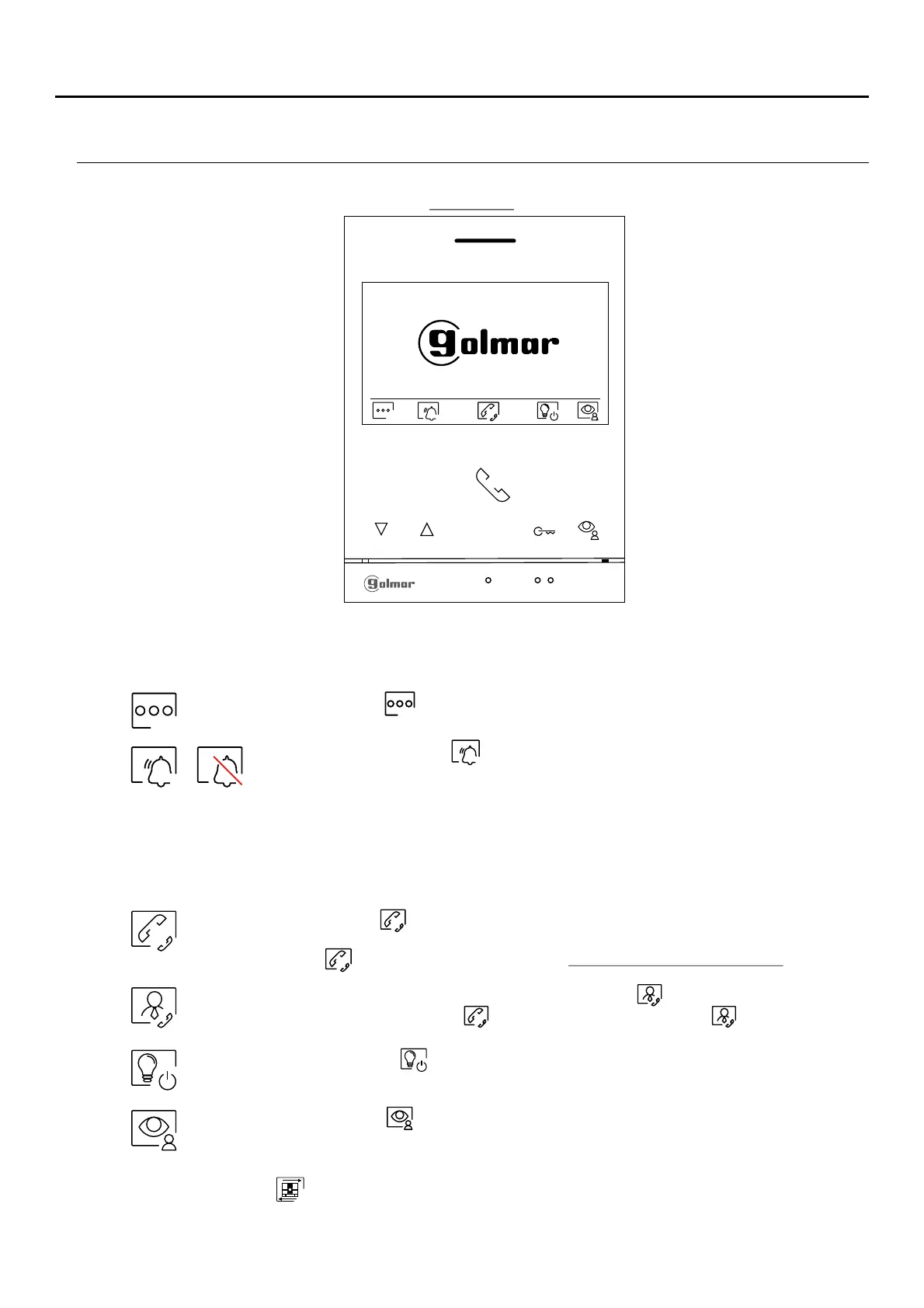
If the device is in standby (screen switched off), to access the main menu, press any of the buttons of the monitor.
Then press the button located just below the corresponding icon. The device will return to standby mode after 02
seconds without activity.
Press the button below icon to access the menu of the intercom between other monitors in the same
apartment or other apartments (see p ).age 18 to 21 If there is a guard monitor configured in theNote:
building, the icon to intercom menu will be placed in “Access settings menu screen”. See page 7.
Press the button below icon to display the image from the door panel. Note: This enablesmaster
the door panel camera to be changed, the audio on the corresponding door panel to be activated
and the door to be opened (see p. ).01 If the "display IP cameras" menu (programmable by the
installer) is activated on the monitor, a new menu screen will be displayed; press the button below
the icon to display the image from the master door panel.
Press the button below icon to make changes to the system settings (see pp. 7 to 9).
Press the button below icon to enable disable the 'Dofor 3 seconds and for 1 second to
not disturb' function: If the monitor is in 'Do not disturb' mode, the status LED will
illuminate (red) and the ringtone on the monitor will not sound when a call ( “HZ”see note
p g 5)a e is received.
With the "Do not disturb" mode deactivated, a one-second press accesses the menu,
allowing you to set a "Do not disturb" mode time period (see pages 15 to 16),
activate/deactivate the intercom between apartments (see page 16) and set an
"Automatic door opening" mode time (see pages 17 to 18).
Disabled Enabled
Press the button below icon to " " + &staircase light activation (SAR-G2 SAR-12/24 modules
required).
Note: New menu available with V.04 of ART 4 LITE G2+ and ART 4H LITE G2+ monitors, with V.05 of ART 4B
LITE G2+ monitor and with V.01 of the ART 4TH LITE G2+ monitor.
Main menu
ART /G2+4 MONITORLITE
If there is a monitor configured as "guard" in the building, the icon will appear on the apartment’s
main menu monitors (instead of icon ). Press the button below the icon to make a call to the
guard monitor, (see page 22).












 To Next Page