6
MAIN MENU
ART 7 /G2+ MONITORH
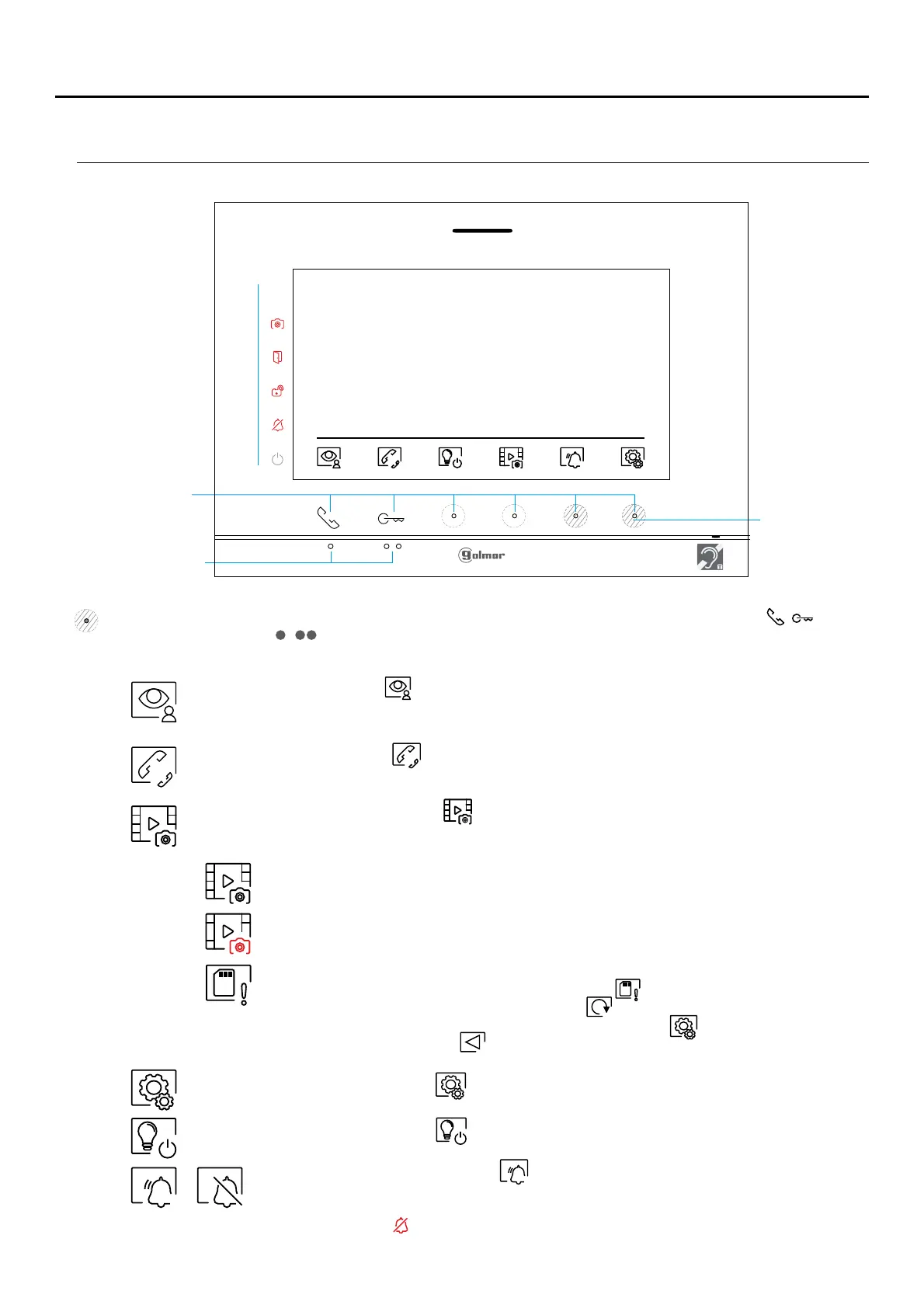
If the device is in standby (screen switched off), to access the main menu, press either of the 2 buttons (located/
above the raised dots for the visually impaired) on the monitor. Then press the hidden button located just/
below the corresponding icon. The device will return to standby mode after 0 seconds without activity.2 "
Press the button below icon to display the image from the door panels and cameras connected to
the system. Note: This enables the door panel camera to be changed, the audio on the
corresponding door panel to be activated and the door to be opened (see p. 1 ).2
Press the button below icon to access the menu of the intercom between other monitors in the
same apartment or other apartments (see pp. - ).15 17
Press the hidden button below icon to display the list of images recorded in the memory of the
device. If a MicroSD card is inserted in the monitor, images/videos will be recorded on the
MicroSD card (see pp. -2 ).18 0
Press the hidden button below icon to make changes to the system settings (see pp. -1 ).7 1
Indicates that the inserted Micro SD card must be formatted from the monitor. Access this
function by pressing the hidden button below icon to access the Micro SD card format
menu, then press the hidden button below icon to start formatting the Micro SD card. To
return to the main menu, press the hidden button below icon . To exit without formatting,
press the button below icon .
There are no images/videos pending viewing.
There are images/videos pending viewing.
Hidden button
pressing area
LED indicators
Raised dots for the
visually impaired
Press the hidden button below icon to enable disablefor 3 seconds and for 1 second to
the 'Do not disturb' function: If the monitor is in 'Do not disturb' mode, the ringtone on the
monitor does not sound when a call is received and the( not “HZ” n p g )see e i a e 5
notification icon will illuminate.
09:27
01 7 9-0 -201
Press the hidden button below icon to “stairs light” activation (SAR-G2+ & SAR-12/24 modules
required.












 To Next Page