Commander III
2-29
Test Menu:
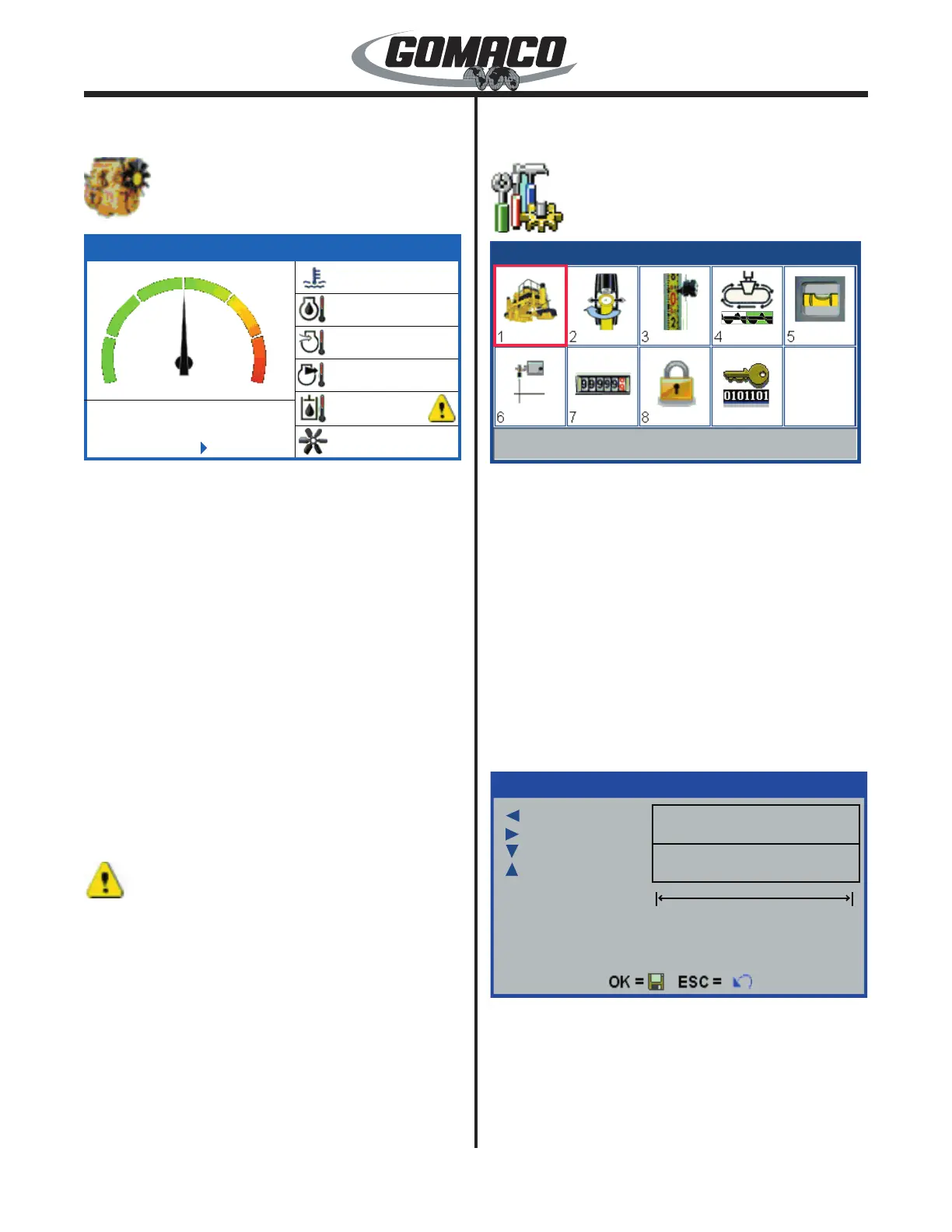
Engine Display
074
172G+
0
5
10
15
20
25
30
RPM X 100
Uren
14
=Eenheden
143ºF
N/A
131ºF
N/A
<122ºF
100%
172G+
Indicates the status of monitored systems on the
engine. The display will also appear when the throttle
switches are pressed to increase or decrease engine
rpm. Engine hours, coolant temperature, engine
oil temperature, intake combustion air temperature,
exhaust gas temperature, hydraulic oil temperature
and fan blade speed are monitored. Press the ►
navigation button to change units from Fahrenheit
to Celsius. Some engine parameters may not be
available (N/A) depending on engine conguration.
Some engines may be equipped with a variable speed
cooling fan for noise reduction. Coolant temperature,
intake combustion air temperature and hydraulic oil
temperature parameters will control the fan operating
speed. An arrow () symbol will appear when
one or more of the variable fan control parameters
require 100% speed for cooling. If one of the three
temperature senders is not connected or the fan is not
variable speed, the fan will operate at 100% speed.
248
An alert symbol may appear to the right of the
hydraulic temperature indicator. This symbol indicates
that the sender has been disconnected or is not
installed on the machine.
Main menu:
Setup menu
220-0013
111G+
Machine Setup
111G+
Sets parameters for the machine, sensitivity, steer
thresholds, steering feedback limits, sensor wand
positions (push/pull), sensor offsets, slope sensor,
elevation valve thresholds, auger/conveyor and
track valve thresholds, distance encoder calibration,
technician access and feature encryption status.
Press the navigation buttons to move the red selection
cursor to the desired sub-menu. The title of the
selected sub-menu will appear in the status bar at the
bottom of the screen. Press the OK button to enter a
sub-menu (or press a number button to bypass cursor
navigation and directly enter a sub-menu). Press
the escape button (ESC) to return to the main menu.
Below is a description of each of the setup displays:
104G+
= Backspace
= +/-
= 9
= 0
Current Value
New Value
1905
0
2684354550
104G+
When a number box appears on a screen, the value
can be changed by pressing the corresponding
numbered button. When the button is pressed,
a pop-up screen will appear to allow the value to
be changed. The top line will indicate the current
value setting. Use the number buttons to enter the
corresponding numbers 1-8. Use the down ( ▼) arrow



 To Next Page
 Loading...