Page 24
Installer Setup
Comfort Recovery (setup step 70)
Comfort Recovery turns on the heat before the Morning start time to bring the
room temperature to the Morning setpoint at the start of the Morning time period.
Please allow 4-8 days for Comfort Recovery time to adjust. When used with a
heat pump, electric strip heat will be disabled while Comfort Recovery is active.
Fault Type (setup step 73)
This step allows the FAULT terminal on the thermostat to be configured for three
different settings:
COMFORT ALERT - Fault alerts are controlled by the Comfort Alert accessory and
use the following codes:
NONE - Scrolling display shows ‘FAULT’ when a fault signal is active.
1 - Long Run Time
2 - System Pressure Trip
3 - Short Cycling
4 - Locked Rotor
5 - Open Circuit
For installation instructions of
the Comfort Alert accessory,
please refer to the Comfort Alert
Installation Manual.
6 - Open Start Circuit
7 - Open Run Circuit
8 - Welded Contactor
9 - Low Voltage
Dry Contact Use (Setup Step 72)
PAN - If PAN is selected when the dry contact is active, the thermostat will lockout the
compressor terminal(s) and “SERVICE DRAIN PAN” will appear on the display.
VACATION - If VACATION is selected when the dry contact is active, the thermostat
will be forced into Vacation Mode.
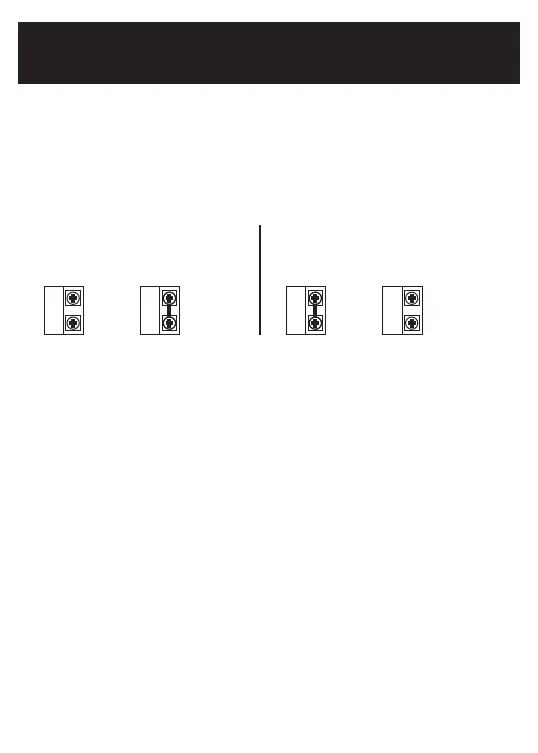
Dry Contact Operation(setup step 71 - 72)
Dry Contact Polarity (Setup Step 71)
Open (Normally Open) - The dry contact
is open until the connected device closes
the circuit.
Closed (Normally Closed) - The dry
contact is closed until the connected
device opens the circuit.
Dry
Contact
‘Idle’ ‘Active’
Dry
Contact
Dry
Contact
Dry
Contact
‘Idle’ ‘Active’
Dry
Contact
Dry
Contact
Press Fan To Clear All Messages (setup step 76)
This feature allows the user to clear all current error messages from the display.


 To Next Page