-
M
-
M
E
D
C
B
A
E
D
C
B
A
J
I
H
G
F
J
IHG
F
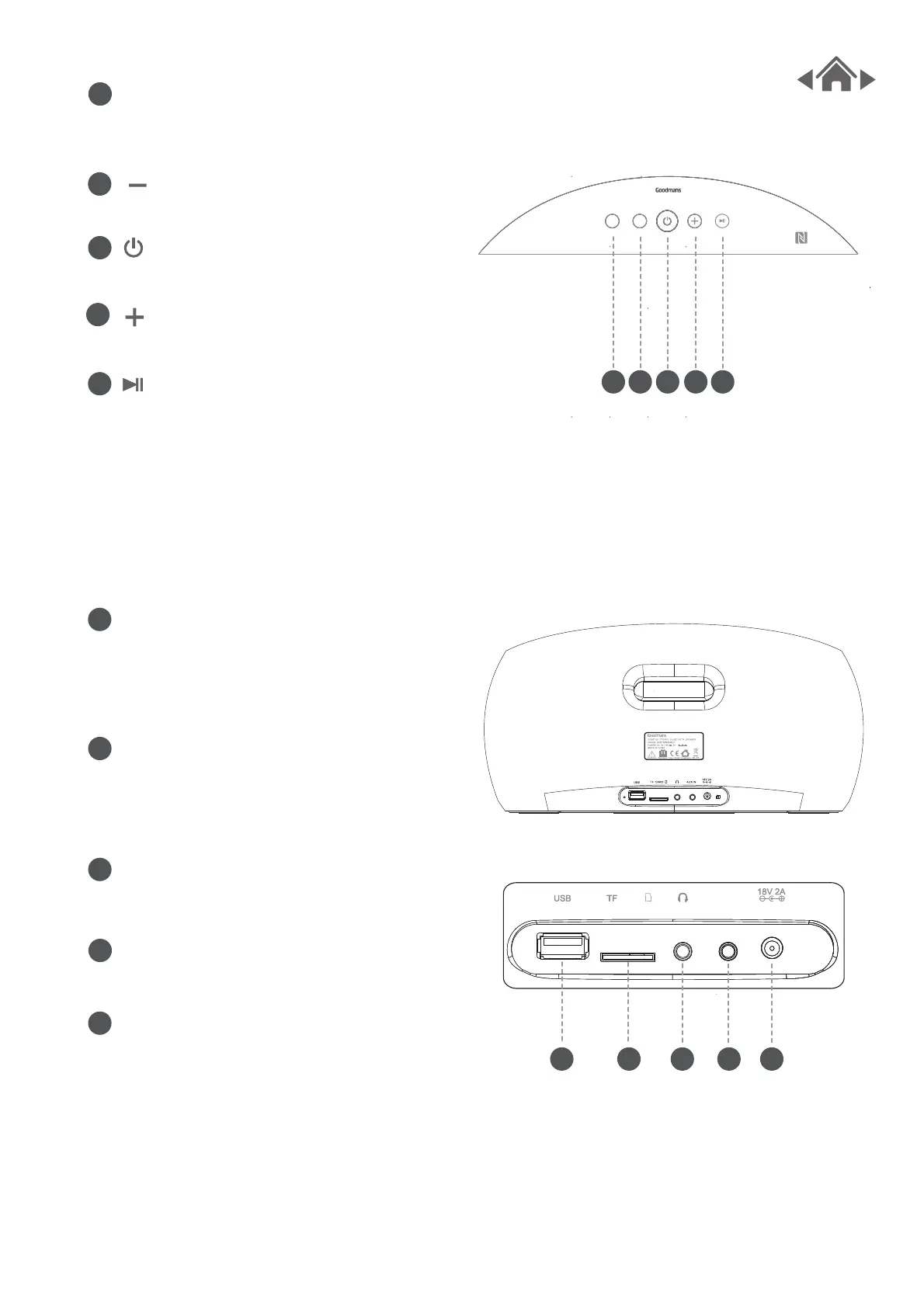
USB socket
Insert USB Flash drive to GDBTSPK30,
Press “M” to enter USB mode, it will
enter music player mode automatically
play.
TF card Slot
Insert Micro SD/TF card to GDBTSPK30,
Press “M” to enter USB mode, it will
enter music player mode automatIcally
play.
Headphone socket
Plug in headphones, Can also be used
as a 3.5mm output.
Aux-In socket
Connect external audio sources
with a 3.5mm audio cable.
DC-In socket
Used to connect GDBTSPK30 to mains
power supply.
Press M on the top of GDBTSPK30 or
MODE on the remote control to change
the source type.
Press to decrease the volume.
Press to turn GDBTSPK30 on/off.
Press to increase the volume.
Press to play/pause music.
M button
button
button
button
button
2.2 Top View
2.3 Rear View
AUX INAUX IN
CARDCARDCARDCARD



 To Next Page