Standard The red LED flashes 1 time
Rock The red LED flashes 3 times
Jazz The red LED flashes 2 times
Class The red LED flashes 4 times
Voice The red LED flashes 5 times
C
L
-
M
-
M
LED indicator
Blue: Bluetooth
White: TF card
Yellow: USB
Green: AUX IN
3 Operation
The LED indicator on the top of
GDBTSPK30 helps you to identify
the status and source mode.
3.1 LED Indicator
L
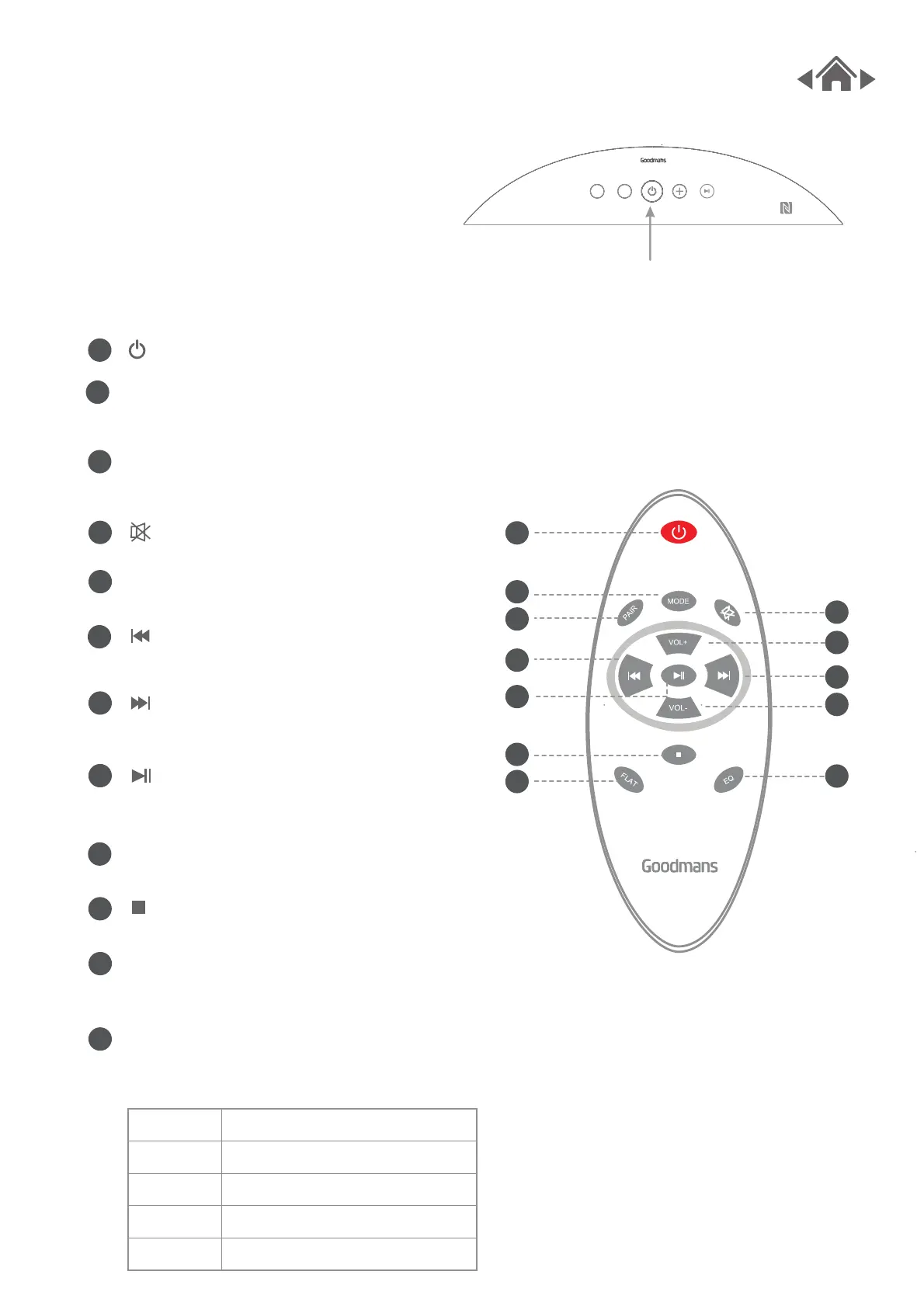
Press MODE on the remote control to
change the source type.
Press this button, begin the pairing
operation in Bluetooth mode.
Mute or unmute sound.
Increase the volume.
Decrease volume.
Press to stop music.
To restore any sound EQ preset to
the default flat mode.
Press repeatedly to cycle between
the sound modes.
Press to skip to the previous track
of paired Bluetooth device.
Press to skip to the next track of paired
Bluetooth device.
Press to play/pause a paired Bluetooth
device.
MODE
PAIR
VOL+
VOL-
FLAT
EQ
Turn on or turn off GDBTSPK30.
3.2 Remote Control
A
B
E
F
H
J
K
D
GG
I
I
K
J
H
GG
F
E
D
C
B
A


 To Next Page