8
03 BMS Connections User Manual V1.2-2022-10-30
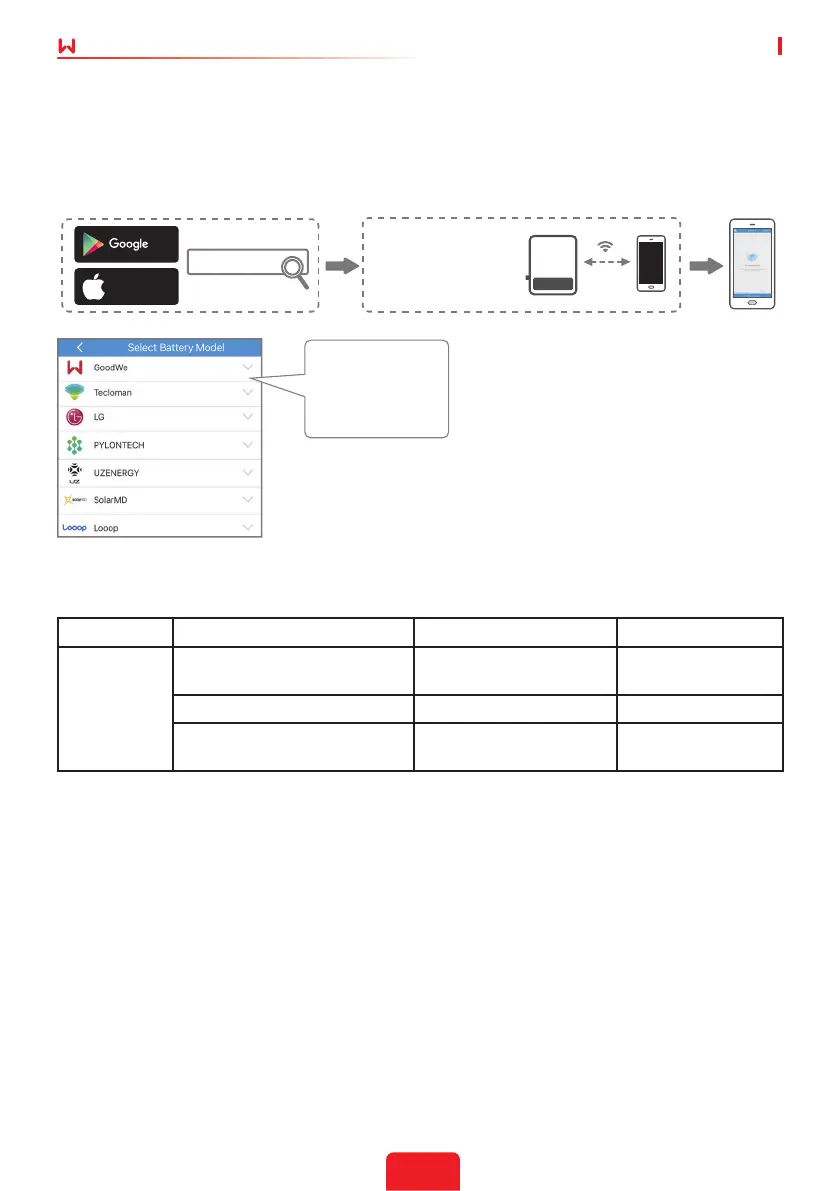
3.2 APP Setting (On SolarGo)
To make sure the battery communicates to inverter unit successfully, users have to use SolarGo
to choose the right battery option on SolarGo:
APP Installation And Connection:
3.3 BMS battery connection table
Description From To Cable label
GoodWe
SECU-A
(Figure 12)
BMS feed through port
Master battery COM 1
port to inverter port
To inverter
Fan Controller To Battery port Battery 2 +/-port Cabinet of battery
Link Port COM 2 of the master
battery
Link port COM 1 of the
slave battery
Link
Connect phone & Inverter
Wi-Fi SSID: Solar-WiFi***
Password: 12345678
play
App Store
Select SECU-A5.4L or SECU A5.4-20 on
battery page in SolarGo Application
Notes:
1. Select wrong battery will lead to BMS
communication failure.
2. For the complete commissioning
ofthe whole ESA system, please go to
ESA instruction.
SECU-A5.4L*1
SECU-A5.4L*2
SECU-A5.4L*3
SECU-A5.4L*4
SolarGo


 To Next Page