12
Note
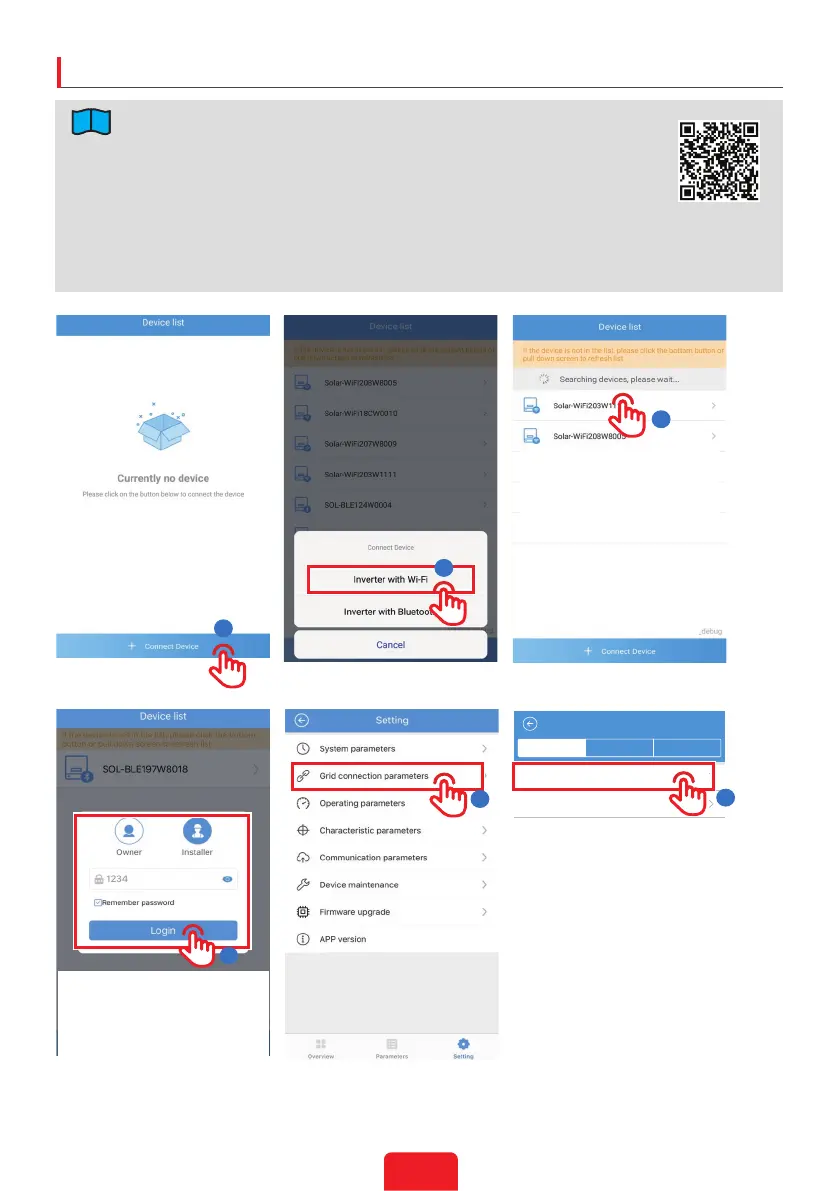
4
2
1
3
5
Basic setting Connection Jump off setting
4:21 PM 100%
VIRGIN
Grid connection parameters
Safety option
Grid connection
VDE4110
Triangle Grid (3W/PE)
6
1. Searchfor“SolarGoAPP”inGooglePlayorAppStore
2. OperationstepsarethesameforAndroidsystemandiOSsystem,although
thetwointerfacesareslightlydierent.Theintroductionhereisbasedon
Androidsystem.
3. Loginusingtheinitialpasswordforthersttimeandchangethepassword
assoonaspossible.Toensureaccountsecurity,youareadvisedtochange
thepasswordperiodicallyandkeepthenewpasswordinmind.
• InitialPasswordfor
WiFi&bluetooth:1234
• InitialPasswordforGPRS:
thelast4digitsofthe
inverterbarcode.
Bluetooth:SOL-BLE********
WiFi:SOL-WiFi********
InitialPasswordforWiFi:
12345678
ScantheQRcodeonthe
equipmentifyouneedtouse
GPRS.
*arethelast8digitsofthe
inverterSN.
SolarGo App
Commissioning via SolarGo APP



 To Next Page