10
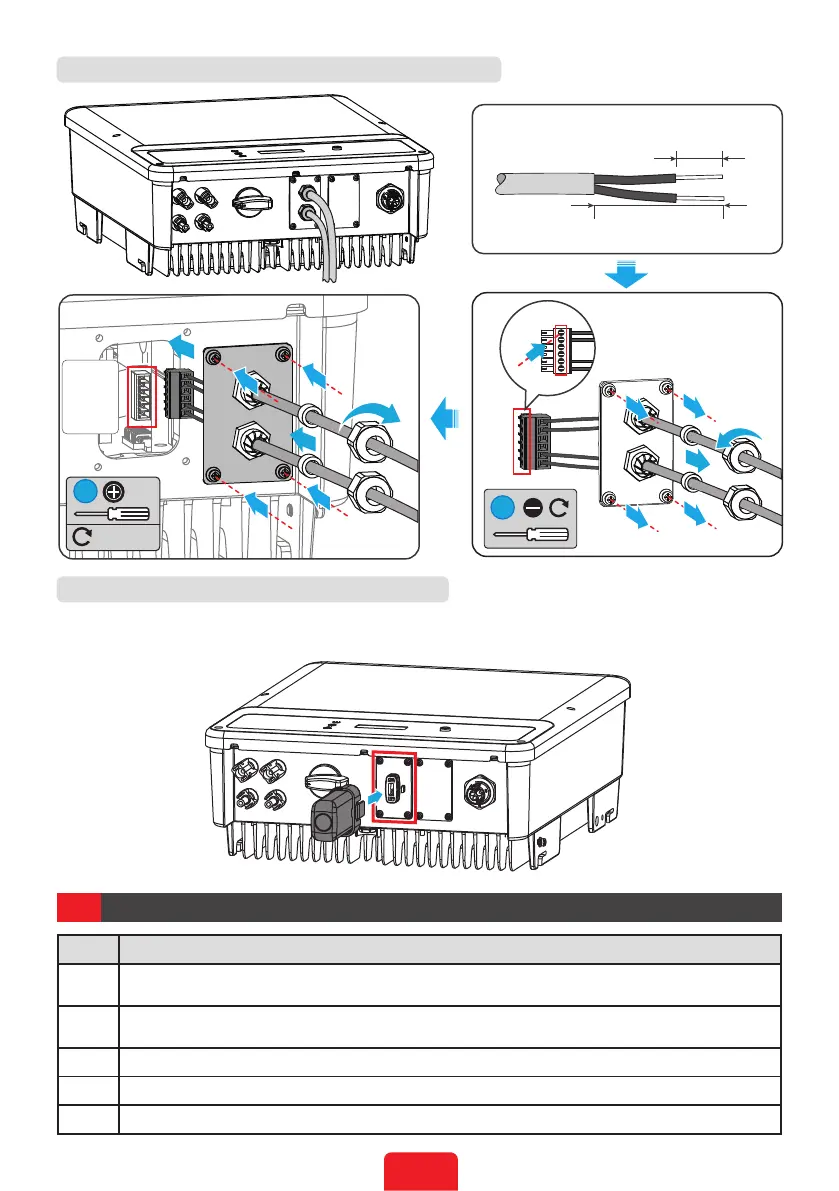
Theappearacneofcommunicationmoduelsisslightlydierent.Butthemodulesareinstalled
inthesameway.ThefollowinggureshowsyouhowtoinstallaWiFimodule.
05 Check before Power-on
No. Check Item
1
Theinverterisrmlyinstalledinacleanplacewhereiswell-ventilatedandeasyto
operate.
2
ThePEcable,DCinputcable,ACoutputcable,andcommunicationcableareconnected
correctlyandsecurely.
3 Cabletiesareroutedproperlyandevenly,andnoburrs.
4 Unusedportsandterminalsaresealed.
5 Thevoltageandfrequencyattheconnectionpointmeetthegrid-tiedrequirements.
RS485
RS485
6.5mm
25mm
2
1
DRED
CT
3
RS485
1
6: RS485+
5: RS485-
4: Reserved
3: Reserved
2: RS485+
1: RS485-
6
5
4
3
2
1
M3
0.8N·m
4
2
4
4
4
4
4
1
3
3
3
3
Connecting the RS485 Communication Cable(Optional)
Installing the Communication Module(Optional)



 To Next Page